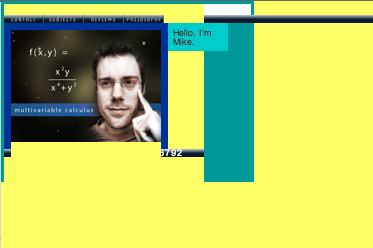
I was coding Mike’s Tutoring Website trying to control the container so my second column would float to the right of my first column… anyways, I made an extra wrapper for my slideshow (I put it in yellow for the time being, so I could see it) and most of my website went yellow and there were parts of my navigation bar and footer that were affected by the yellow block. I looked everywhere for the yellow hex code hoping to get rid of the problem once and for all. But, I couldn’t find the code after looking in my style sheet and my source code. I decided to upload my website to the internet and try to edit it in the browser when the pop-up that said “reset.css” has been changed. Want to upload changes? Or something to that effect. And I immediately knew that in my flurry of edits that I somehow wrote code in the reset.css and there it was! I deleted it and my site and my floating second column is in place. #smallcodingvictory
The Trick: This is a newb trick. There are better ways to do this, I’m sure. If you are looking for code and can’t find it and haven’t been making a lot of changes to different files. Upload your site and all of those “are you sure” pop-ups might help you find that your code has been going to the wrong place.
 Kismet Arts Tangent
Leave a comment