• Daily Astorian User Centered Considerations

    View more presentations from basementcat

    Above is my presentation regarding the users of The Daily Astorian’s Online Interface.

    There are many aspects to consider when designing an interface and Tim will continue to emphasize research. Ask the people. He says that these people will tell you something very surprising. We are researching for a small town’s online newspaper, and he said that his parents are from and live in a small town. When he visits them, their police scanner goes off; they turn off the telly and get their breaking news that way. Fascinating. There might be no current equivalent for the web right now.

    Everyone presented their research today which made for a fairly boring class time, but it was insightful to hear how many students went lengths, contacted people, got the scoop, or tried to. In every good designer, there’s a journalist getting the story and finding an angle. If you find information that no other designer is finding, you are ahead of your competitors, considering factors that they didn’t have insight.

    This class is teaching me that there’s always a way to go deeper and go farther and submerge into the thing you are trying to innovate. Tim always seems to have a question for you. Did you ask people? Did you find the numbers on mobile usage in small cities? What kinds of questions would get a more accurate response?

  • series of painted thumbnails of logo sketches for number 17 garlic habanero sauce

    Today Tom briefly outlined the history of package design starting from Egyptian amphorae and ending on Wonder bread. He mentioned how church interiors blow people’s minds, making a connection with the aesthetic of luxury—gold plated scepters and high vaulted ceilings—and authority. When making your designs, show that you are the authority on it. Make it ornate, commanding and detailed. Oh, are you friendly and accessible? Keep it graphically simple. (See Wonder Bread Logo)

    We made thumbnails in class to present for a Tom-critiquing. He emphasized if you haven’t thumbnailed, you’re doing it wrong. Yes, I am one of those students who started on the pen tooling of what I thought would be a good label design and since my thumbnailing session I can confidently slide that file into the trash icon on my desktop.

    During critique, Tom had a first declaration of paper pads for sketches that will be put up for critique. He loathes the feathered edge that comes with ripping something out of a spiral bound note book. And something that he detests even more is when students just bring up their notebook. It falls down, it falls down and scatters its inner loose papers, and it falls down and causes a minor distraction and lag during the critique.

    When Tom came to my project, I was nervous. I have gone confidently to critiques before only to have all my sketches to be denounced as useless and there’s no talking your way out of useless sketches (though God knows I try).

    It’s third quarter now and still the teachers make me a little nervous. Tom asked about “No.17” and if it was my idea (he totally dug it) and I was relieved to hear him say nice things about it that I said yes to his question without realizing I was taking credit for the brilliant and sentimental idea of a friend. Saying yes was a lot less syllables than saying that a friend and student in the culinary arts department makes sauces and I wanted to take the easy way out and make a label for an existing sauce instead of inventing a company and a sauce for this class project.

    This class project is to make a sauce label that contains all the things that a good label should include, from the right tone, the nutrition facts and the brand’s logo and what not.

    Tom said that I could go in any of these directions. The next step: What does my client think?

    No.17 Sauce

    Project: Make a sauce label fitting an existing bottle (we are not industrial designers and really don’t have the resources to come up with a bottle prototype as well)

    Step 1) Concept: A garlic habanero sauce for fun and energetic people

    Step 2) Thumbnail

    Step 3) Go to Illustrator

  • I took the above picture last Sunday. I keep having software dreams. Last week I had a dream about text wrap. Today we learned how to make multiples in InDesign using the arrows and  polygon tool (command if you want to give them more room—yay for gutters), and it made me think I’ll have a dream where I want more boats on the other side, so I do a reflection option click (in my dreams they never duplicate properly).


    It’s funny how much I like Hoppe’s class. I remember the first day, I thought each class would be like a dental appointment—I should go, but it hurts too much and they always scold me. But, Hoppe’s funny. I think some of the students think he’s too sarcastic and it’s true. Someone will ask if he should align right (or something innocent like that) and he says, sure… and then you can use periods instead of leading, stretch the type and then add a stroke and a drop shadow. (Whenever he adds the “drop shadow” part, you know he’s joking, until then, I’m always thinking, “yeah! That would look so cool!”) But, at the end of the day, he’s a type geek like the rest of us ought to be, laughing at the hideous awful created by people that think they know what they’re doing, but they’re using Microsoft Word, so they really don’t.

    Today the class brought in menus that were examples of good menus and bad ones. (Yes, just like show and tell. We did self-portraits last quarter. This teacher’s classes have been the most flash-backy experience of my life.) And we applauded and guffawed at the alignments, the way that someone thought that they should have one column span the whole width of the page! Man, that’s rich.

    Part of menu design is thinking about your audience. Are they at your restaurant because of the value? Maybe you should align all your prices then, make ‘em bold—customer’s love that, zero in on the cheapest one. If you’re a classy establishment, tuck in those prices, make them almost disappear. Yeah, getting rid of the dollar signs helps.

    He talked about how menus are part design, part psychology. You are selling something to hungry people; they act differently than normal design-loving people. Hungry people like fast information (pretty pictures with accurate captions). They scan a page haphazardly, hoping delicious catches their eye. And it’s up to us designers to make them feel good about what they order. A special? Slap a box around it. Ooh nice. A recommended item or some exotic flavors. It’s a collaboration with the restaurant, to say “hey, we need something really expensive,” so the rest of the menu seems rather affordable. Little tricks like that make a good menu great. Some menus that are over designed alienate the customer. What they want is something that conveys information elegantly, simply and quickly. Something that was designed in a way that even someone a little tipsy from looking at the wine list can pick from the main dishes.

    It’s a designing tenet that when you design for the most challenged (elderly, kids, people with poor vision or bad attention) then you have something very accessible, very commercial and very easy to use. Which is what creativity is all about: making something new and useful.

  • New Media’s First Assignment of the Quarter, due in 3 weeks

    Informational Video 1-3 min. 90 sec, ideal. Program featured: SCCC’s informational technology department, which includes web design, operating systems (cisco) and networking.

    The pitch:

    Project: Information Overload: Information Technology at SCCC

    Description: Journey of students and teachers, connections they make, the tools they use.

    Goals: to demonstrate all the technology at SCCC featuring students and faculty using tools to connect, educate and learn.

    How: Document commute, personal use of computers, classroom, teaching and other actions creating a quick cut montage featuring two or three story-lines in the life of information technology learning.


    Post critique:

    Tim and Doris thought this outline was too simple. My approach is always to have a general outline of what’s going to happen, and then things occur along the way to make it truly unique. It’s true that you cannot rely on chance to make a video good.

    Marc and Chris said that it was a little too much (multiple storylines) and too bland (cut to wires, it’s like a bad commercial for IT). Robbie recommended addressing the issue of technology in a silent way, black and white is effective. Tim and I asserted that the overlays we had planned would make it cool and interesting. I mentioned “visual analogies” and Chris’ face lit up. So, we definitely need to run with that. As a side note: Never call your teachers old as an attempt to say that your idea is too hip. You’re usually wrong and they kind of smugly sit there while you waste your breath on some idea half or over baked.


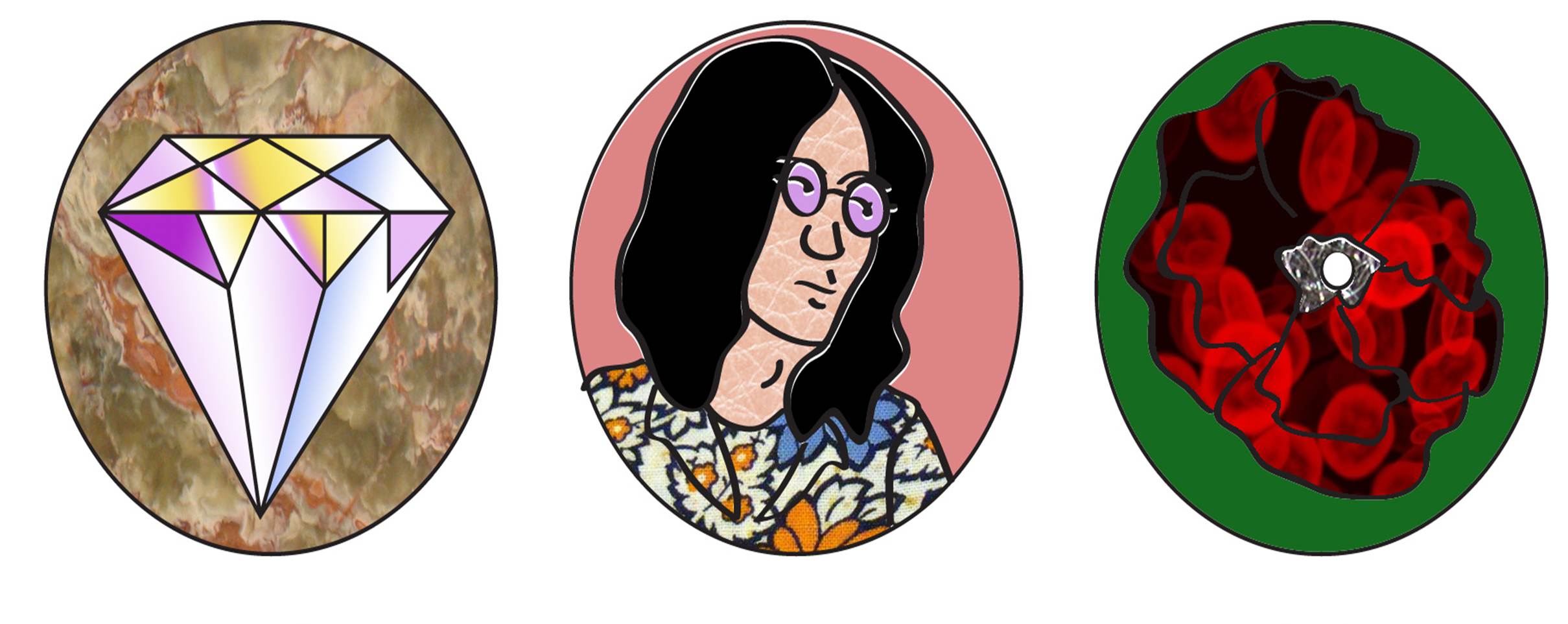
  • (Pictured above: three of the 20 sticker designs– work in progress. This post will be updated as  more of the sticker designs are complete.)
    The working title for these stickers has been called LSD stickers. Some friends and I were talking about the LSD scare with stickers. (Crazed man was giving stickers laced with LSD to children). And while she was telling this anecdote, I was thinking how were these stickers designed? Were they the kind of stickers that everyone would suspect? I thought it would be fun to create some friendly non-LSD stickers, inspired by the era of peace and love and maybe down the line, make them scratch and sniff.
    This would be marketed to kids that like freaking out their parents with what seems to be innocent things. (Once my parents found a hairclip as part of a pirate costume and thought it was a roach clip. I thought that was pretty funny.)

    I made these using Illustrator and Photoshop. I am sure that you can use one program to do both, but each program has a slightly different button/menu/tool that is sometimes easier.

  • User Centered Design (UCD) is where the designer thinks of the user, the main focus being functionality. Tim (the teacher) discussed Information Architecture and research. Every great design molds the user’s experience, streamlining processes and giving order and priority to important information.

    The main theme of today’s class was research. What do you know about the user? Ask people. Today’s in-class assignment was designing the Toshiba Remote Control (for TV/DVD). Our teacher pulled a Hoppe. (Last quarter Hoppe said that he deliberately left off information about the gallery address on the assignment brief as a test, seeing if any student would inquire about this information.) Tim had emphasized most of the class that research was incredibly important and that you should ask people about their experiences and how to improve it when going about designing stuff for them. Tim said that he had a lot of problems with this remote (and that we failed to ask him, supposedly the only person in the class that suffered from this particular remote’s design flaws). I don’t think I’ll ever get used to the smug “you should have asked” mode that some teachers phase into when they point out to their students obvious things that they could have done, but didn’t.

    Redesigning this remote was fun. It reminded me how well I knew my remote as a kid, watching cartoons, the master of flipping the channel during commercials. Now that I watch the computer instead, this remote seemed remote indeed. I imagined an old man watching his DVDs and what he would want from a remote, which buttons needed to be easy to locate when an insomniac grandson walked by to get a glass of milk, or a concerned wife. I got into the mindset of a secretive TV watcher. The kind of remote that would allow such ease to control the play, the pause, the slow-forward, as if you’re trying to absorb the actions on the screen like a magic trick that you want to repeat for your friends, understanding each little gesture –played at regular time, you’d hardly notice.

    During class I was in some kind of daydreaming stupor when the teacher asked about my remote design. Before claiming it, one of my classmates characterized as designed by someone who listens to a lot of music. I think he was referring to its ipod-esque design. That didn’t occur to me at all, when arranging the buttons, but now it all seems clear. I try not to be a hack, but design, good design makes you feel like it’s just a standard, as if there was only one way to go through the maze and Apple found it first.

    I enjoyed moving around these buttons and finding categories in which I could group each, like Little Foot finding more long necks (movie reference), a joy that I am learning comes with the territory. Graphic design is making a puzzle (you take pieces from history and your client’s parameters) and solving it (putting it in border with a logo slapped on to it).

  • The most important thing when approaching a program you aren’t familiar with is to show it who is boss. Today Hoppe ran through the basics of InDesign showing firstly that you must set your preferences in the program to give yourself more control over what you are doing: change the defaults. Set your workspace to [advanced] — welcome to the club.

    The cursor key: .003″

    Kerning/Tracking: 10/1000em

    Rulers: inches

    Keyboard increments: 1pt

    *added 10-4-12 Indesign->Preferences->File Handling->Snippet Import set at original location

    I learned that a slug (when referring to this program) is an extra part in the unprinted area of an art board for information such as your contact or ad specs.

    It’s very informative having a seasoned program veteran to give you the scoop on a program. Manuals won’t tell you how useless some of the components are. Hoppe went down rows of tools describing their function and when he got to the rectangle frame tool and the rectangle tool, he said to use either. Very much like the identical definitions of flammable and inflammable. Hoppe said (in his thinly veiled New Yorker confidence) “Notes tool. Yeah, right. Uh-huh.” A few tools got that response. Stretching, skewing and type on a path styles (such as gravity and staircase) and using several initial caps are now classified as fruit not worth picking. Unless you really, I mean really know what you are doing with these cheesy effects, it’s best to assume they are mirages of buttons to give the illusion of a program with more doodads.

    The best advice I received today is to keep your containers tight with your text (by clicking on the corners of the container– pretty smooth). The second good tidbit is the option return option. This allows you to duplicate guides (this is when your cursor is in the proper axis box and your guide is selected). And another good thing is the magic of linking via text threads. You can play with your layout and your copy is preserved as long as you have one container for the copy to rest in.

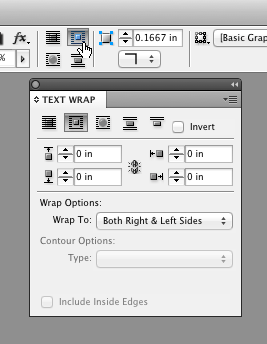
    I have to give it to Hoppe. He reminds me of a choreographer, the kind that are telling you to do moves never tried before, because he ends up describing the strangest things to get the point across. I am referring to how he uses weird visual objects to describe what the various icons we need to press. He calls those menu buttons (that indicate drop down menus) cheese graters. We were looking through the text wrap options and he described a square sun with the blinds closed, blinds open, s’more and s’more with no pants on. I think it’s going to be a very long quarter.