• (Left: A still from a class assignment, a promotional video for Seattle Central Community College’s information technology program.)


    Part three of a Summary of Erik Fadiman’s Opening Lecture to His Web Design Bootcamp 2012 

    In Web Design, the newest considerations we must make involve the versatility of the web. The Internet is in mobile devices ranging in size and power and each offers something unique that should be addressed by design. Responsive design is not a trend; it’s a shift.

    A shift in technology is not new by any means. History has taught us lessons about technology. There are early adapters, mainstream adapters and latecomers. There are people that don’t show up at all. My teacher-friend was telling me how when using computers became mandatory at her school, a small amount of teachers declared their retirement. Computers seemed too complicated.

    For the next generation computers became machines we understood, the Internet a wide cornucopia of information. The Internet is especially great because now if we have questions, we can just “Google” it. If we are okay with that we can walk ourselves through some of the most complicated processes using clearly written/demonstrated tutorials. We can teach ourselves more quickly about something than ever before. Better, too, everything is in a way, peer reviewed.

    As designers, we are pushing our aesthetic on other people. This aesthetic is not only visual; it’s a logical aesthetic, too. We create systems in the way we think they should work. A new aesthetic is called progressive enhancement. It is forward thinking. A site that gives the basics to everyone, but extra features to members of the early adapters’ club.

    The counterpart to progressive enhancement is called graceful degradation, catering to the lowest denominator. I don’t want to get too political, but the first example I could think of was the No Child Left Behind Act. Remember that piece of legislation? It mandated standardized testing for everyone but left the actual standard of education determined by each state. Graceful degradation is often meaning that everything you have should run an Internet Explorer browser. When that falls away, it will be something else that is less powerful that what is available. Why dig with a stick when you have a shovel?

    This is the final part of the three parts of Erik Fadiman’s opening lecture. Some takeaways for Web Design:

    1. Simple is good (easy= good user experience)
    2. Be progressive (use up to date technology)
    3. Be accessible (SEO, and responsive design)
    4. Communicate your ideas well (semantic mark-up and presenting to your team, your boss, your client, etc.)
    5. Keep your file sizes down when possible (just because you can dream it, it doesn’t necessarily mean you can do it… just yet.)
    (Earlier Post Relating to This Project)

  • Part two of a Summary of Erik Fadiman’s Opening Lecture to His Web Design Bootcamp 2012 

    Simple is good. We are not just visual designers, we also build systems. It’s important to design within the realm of what you can build. There’s so many new things coming onto the scene that if you are a designer who doesn’t code his own stuff, you’ll realize quickly what you ask of your developer is sometimes more than just a click of a button. A good principle of design: streamline everything.

    One of the ways the industry accomplishes this is by keeping down file size. If you have a “small” site, it uploads fast and renders easily. This happens by changing your original images into .jpegs, .pngs, and .gifs. These are your files streamlined, colors simplified and sometimes detail lost. It’s directly related: more information, higher resolution, bigger file. It’s about finding the balance between small file and high fidelity.

    There are many things that you don’t see in Web. Html, Hyper Text Markup Language, is not a programming language. It’s the bones of your site. Underneath (I envision it as underneath, but it could be projected invisibly above) the site, there is a series of tags that help describe the content in words. Semantic mark-up language has been the latest shift in this language. It helps the blind (and computers) find your site better. Using the right words in your html creates what is called “Search Engine Optimization” or SEO. Html is like the “Hello, My name is” name tag on your site. The nicer it is, the more Google wants people to find you (if they are looking for you).

    Web Design is an evolving field. You would think that means that things get more complex. What you find is that things must be pared down to their basic elements. The Internet is a constantly changing place. Formatting to fit new mediums, such as the up and coming mobile devices gives designers an age old challenge of offering accessibility to everyone while creating progressive enhancements. We might be in this world of apps and tags, pokes and .pngs, but not everyone is, but they’re catching up. Or rather, the Aol users, and Internet Explorer-ers are slowing dying off. Some of them are dropping out while others are upgrading.

    (Earlier Post Relating to This Project)

  •  

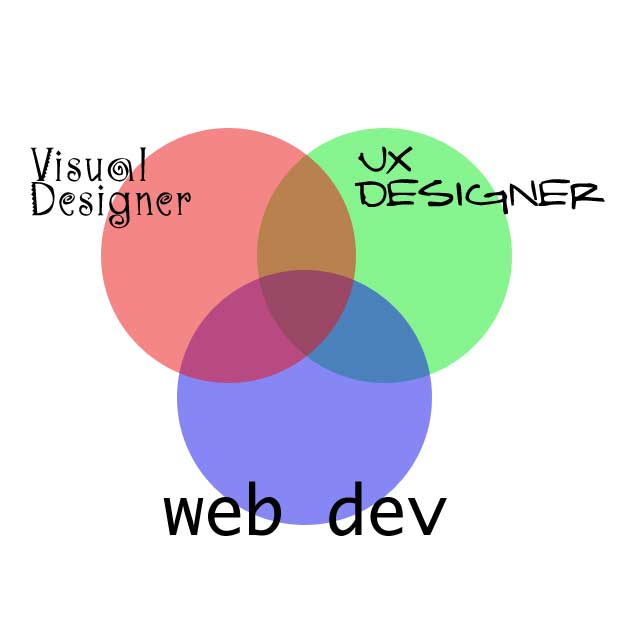
    (Left: A recreation of Erik’s Venn Diagram of Skills– visual design, user experience and web development)


    Part one of a Summary of Erik Fadiman’s Opening Lecture to His Web Design Bootcamp 2012 


    Sometimes, you are the UX designer, the visual designer and the developer all at the same time. This happens in smaller firms quite often. In companies like Microsoft, they have departments dedicated to each discipline and it’s more likely you will be one thing or another. In cases like that, it is paramount to be able to communicate to your team your ideas and be able to get along with people.


    The people of web design and the flow of creation: information architect (content and organization)à UX Designer (flow and interactivity) à Visual Designer (Pretty Pictures) à Front End Developer (coding) à Web Developer (um… more coding)


    Somewhere along all this, your friends (aka. Your account exec, art director, project manager, copywriter, content strategist and SEO optimizer) are communicating extra stuff that needs to be a part of this design. Web Design is a team.


  • Erik Fadiman pointed out where all of the students at Seattle Central Community College have accounts for websites. I thought this was weird for all of us to be guaranteed this small 20MB plot of land, but here I am. <– Check it as it blossoms into a “finished web page working on three different device resolutions with a simple audio player and jQuery slideshow.” That’s the assignment anyways. This simple html will be transformed with CSS, JavaScript and probably some voodoo to create an interactive and responsive design. My website is going to be (as per the assignment) a music “magazine” site.

    The made-up magazine is up to me. So, This is L’Opera Shmopera, Opera for the Post Modern World. I haven’t come up with a better tagline than that. I’ve been trying to find a word that describes “remix-a-philes.” People that love remixes. Because opera is okay, but add some downbeats, and whoa!

    The first step in any website design is to have content. Otherwise the jig is up! For practice sakes, I’ve borrowed these amputated articles for the bulk of the text.

  • (Above: a screen shot of my new and already gone primitive website. Kat says: I have a secret website under this one. does anyone care? Our teacher talked about how each website has html that no one sees that describes the page to blind people. He asked why do we care about blind people? It’s because Google is the Blind Man that will bring us our audience and employers. )

    Day 1: Brain Restructuring Required. Please remove Excess information from this brain.

    Erik Fadiman, my web design instructor unloaded some information about information architecture to web development and the bits in between. Between partying hard on the weekend and the cyber-awakening today, I don’t think I have the wherewithal to reconfigure to what he said today for my audiences at home. Whenever a student asks “How do I do this?” (or that, doesn’t matter) Erik replies, it’s all on the blog. I like that.

    Today in Web Design BootCamp, I made a website by using DreamWeaver for the first time. We did some simple coding. It reminded me of days of yore, the nineties when there was a thing called Zoog Disney, marketing the internet and emoticon usage to the Millenials oh! and NeoPets. Erik explained some of the “save for web and devices” ways of the land. For a world of freedom, the internet still the “Wild West” that it is, there are plenty of rules and guidelines. The differences between .png, .gif., and .jpeg are very subtle and Erik, our leader, says that each image is a little different. Every img is like a snwflk.

    In terms of the coding, it slowly caught on. The idea of bracketing things rings a small bell for me in my days of online roleplaying. Text-based worlds that are forums of imagination. I think for a time I was a little addicted back in middle school and occasionally I’d want a description or a thought in italics, the old <i>italics</i> trick I thought was so fancy and it gave me a little pleasure to do just now.

    When I look into DreamWeaver, I manage to see a part of my past, a tiny little part. I feel more comfortable typing in the code mode versus the design mode of the application. I feel the connections in my brain forming and these character clusters like “&nbsp;” not being so scary after all.


    (Below: that’s my face in save for web modes. I think I have a face for gifs.)

  • This square was an exploration of the stock patterns Photoshop has. This one is the ripply one, rippled again using an artistic filter, then setting that layer on Screen at 72%. Without that layer, it doesn’t look like a fun tacky shirt pattern. See box detail for something so crisp and under-designed. —>