Skip to content

Kismet Arts Tangent

Art Collective

    • Kismet Arts Tangent
    • About
    • Blog
    • Contact
    • Donate

recent posts

  • Photo shoot with Kayleigh Shawn
  • Testimonials
  • Fractures Poem
  • Poetry
  • Pixel art products

  • Instagram
  • Grid Classes Vs. Class Definition

    September 14, 2015
    my-code-vs-his-code
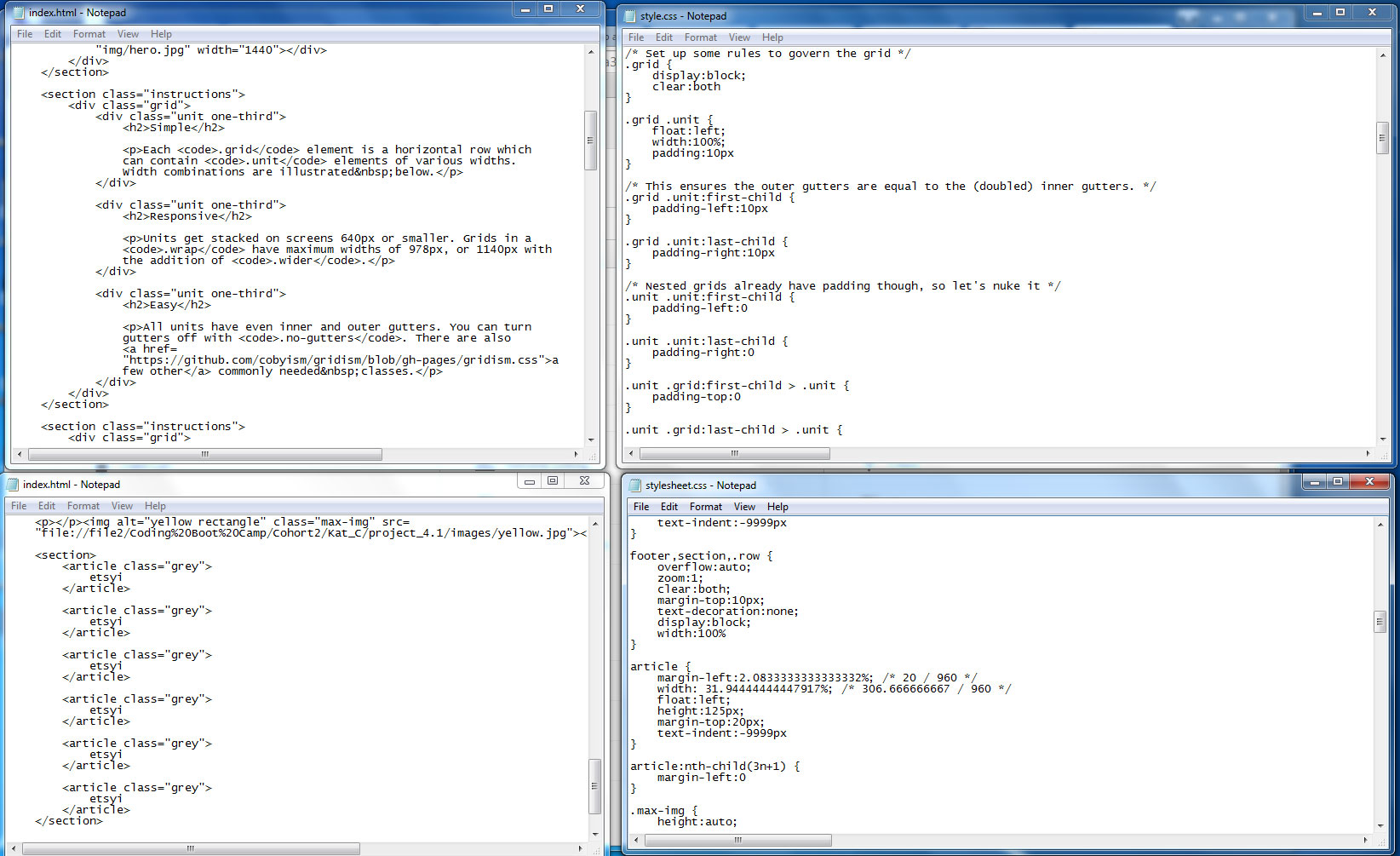
    The top row is code I am examining that is being taught in a web development class this year (2015). The bottom row is the initial workings of how I think it would be optimal to define HTML.

    When working on Project 4 of the coding program I’m currently in, I was initially stumped by the wireframe that goes from a 3 column layout (for desktop) to a 2 column layout (for tablet) and then a single column layout (for smart phones). Lately, I’ve been pondering creating a simple framework that makes the developer work a little smarter.

    I think defining a div with a class that is named for its desktop orientation is biased towards desktop being the primary viewport. I also think it’s limiting if you want to have a different distribution for the tablet mode.

    Creating a CSS/HTML5 system that uses pseudoclasses to select the last item in each row without defining rows  seems like the way to go. Using exact math via Flexible Math, you can use only the classes you need and be able to control the divs without extra classes.

    I would also propose to work this into a HML/SASS formula that will generate the same code only faster.

    This is a working theory and as I continue with Bootstrap (in an aside–the version bootstrap I downloaded is not HTML5 compliant, so ideally, I’d like to create a new framework that utilizes these features, too…)

    Like Loading…
  • Group Project- Assignment 5

    September 11, 2015

    wireframe-to-finish

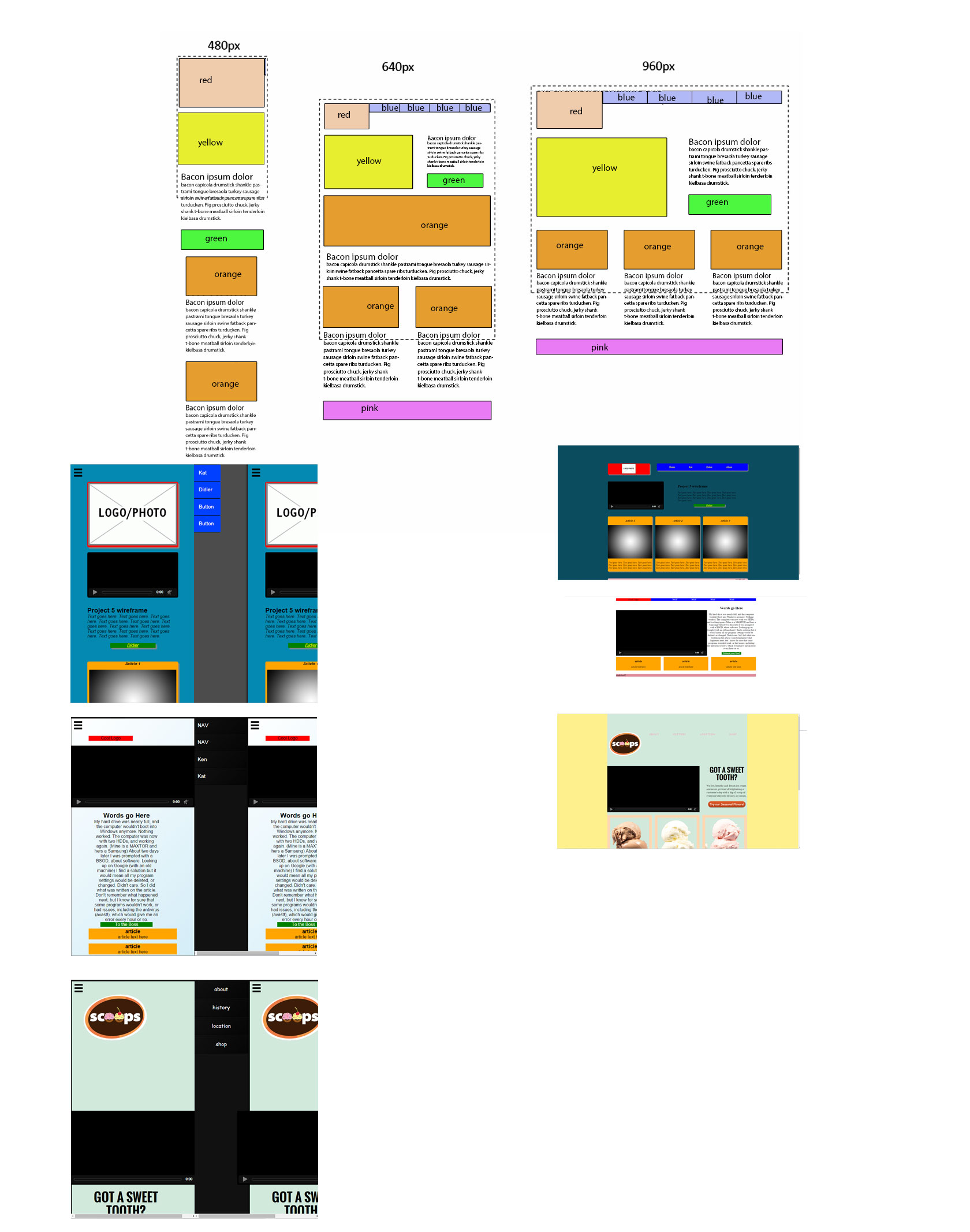
    Didier Ken and I worked on a team project this week where there was a “senior designer” and two “junior designers.” The notable component of the end product was the off canvas menu using CSS and HTML5 only. I was mostly supervising and at the end used Didier’s code to add some content (see: Scoops).

    Links

    Media Queries a website featuring the differing responsive layouts for inspiration
    Dirty Markup my team really appreciated this tool
    Off Canvas Menu in Code Pen we forked code from this website

    sharing options:

    • Share
    • Share on Tumblr (Opens in new window) Tumblr
    • Print (Opens in new window) Print
    • Share on LinkedIn (Opens in new window) LinkedIn
    • Share on X (Opens in new window) X
    • Share on Reddit (Opens in new window) Reddit
    • Share on Pinterest (Opens in new window) Pinterest
    • Share on Facebook (Opens in new window) Facebook
    • Email a link to a friend (Opens in new window) Email
    Like Loading…
  • Assignment #4: Responsive Page

    September 3, 2015

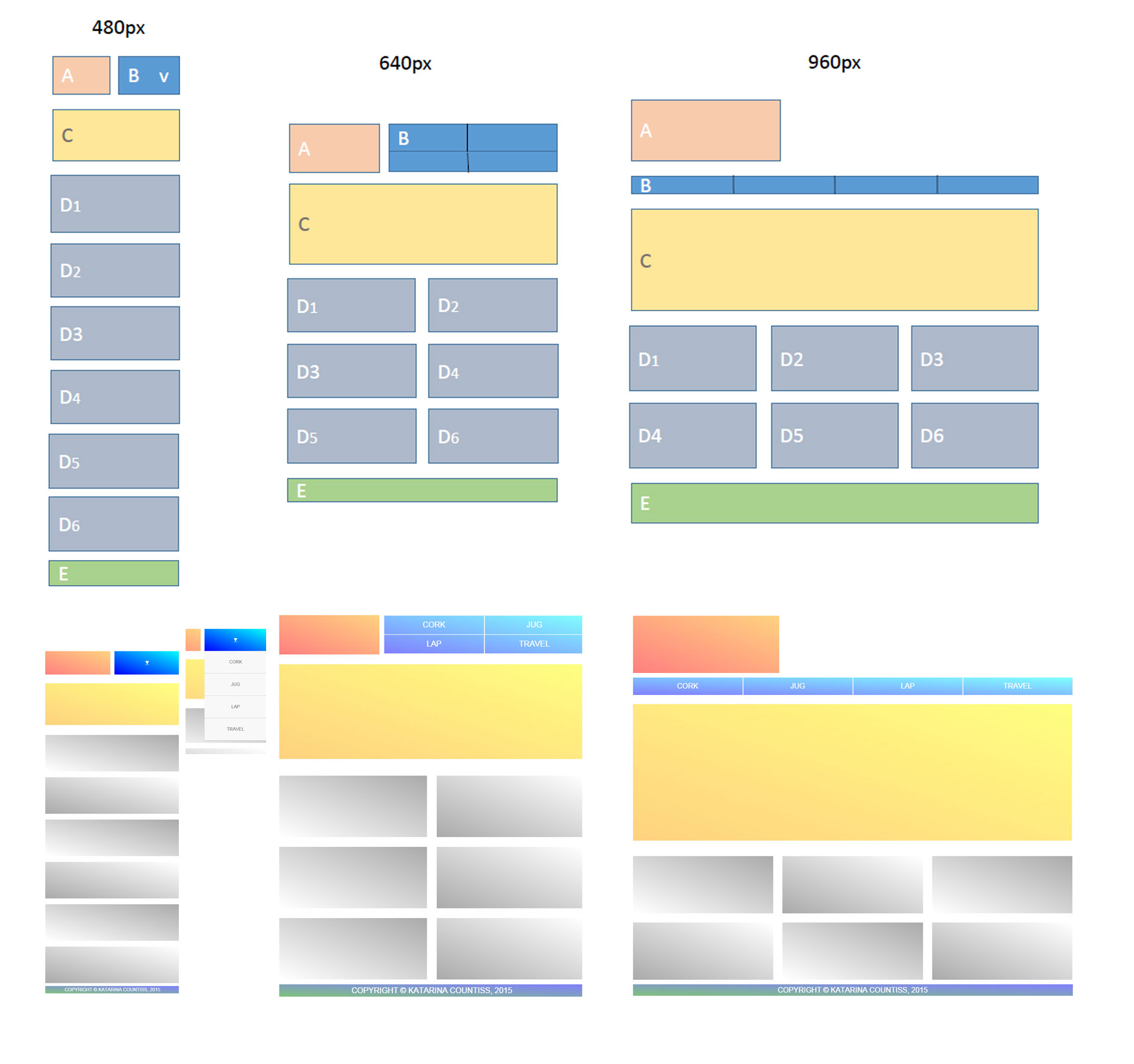
    In JobTrain’s Web Developer Coding Bootcamp, we received our forth assignment. Take these wireframes and turn them into CSS/HTML sites.

    wireframes-to-code
    From Wireframes to html and CSS

    — I added the gradient because I think they add a little pizazz for little effort.

    I was initially intimidated when I received the wireframes because I was used to using row-divs to separate rows and going from the three column layout to the two column layout would have meant violating one of those rows. (I was also a little irritated because the assignment violated the “content is king” paradigm that was so instilled in me.)

    Using the nth-child pseudo selector, I was able to control the right margin on the boxes to give them the spacing the divs needed when and where they needed them.

    I coded a few websites two years ago for graphic design school, so a lot of this is review, but there are also some new features/best practices that I was excited to utilize, like HTML5 semantic selectors (ex. article, header, footer, etc.).

    I used this code for the nav bar.

    border-right:1px solid #ccc;
    width:24.8%;
    /* fallback for non-calc() browsers */
    width:calc(100% / 4);
    box-sizing:border-box

    For the two column layout:

    article:nth-child(odd) {
    margin-left:0
    }

    article:nth-child(even) {
    margin-left:3.125%; /* 20 / 640 */
    }

    For a pure CSS3/HTML drop down menu, this code worked really well.

    Links:

    Dirty Markup clean that code!
    Google Calculator for calculating column widths ((formula: total width minus (margin-width times margin occurence) answer divided by number of columns)) ex. 960px wide layout with 20px margins and three columns (two margins). (960-40)/3= column width.
    CSS helper for converting pixel widths into percentages

    sharing options:

    • Share
    • Share on Tumblr (Opens in new window) Tumblr
    • Print (Opens in new window) Print
    • Share on LinkedIn (Opens in new window) LinkedIn
    • Share on X (Opens in new window) X
    • Share on Reddit (Opens in new window) Reddit
    • Share on Pinterest (Opens in new window) Pinterest
    • Share on Facebook (Opens in new window) Facebook
    • Email a link to a friend (Opens in new window) Email
    Like Loading…
  • Some Web Developer Resources

    August 24, 2015

    Mozilla plenty of tools, reference sheets, and demos

    Code Pen play in this page instead of mucking up your code

    Learn How with Shay Howe supplementary CSS and HTML knowledge

    • HTML5 Doctor
    • HTML5 Boilerplate
    • CodePen
    • Mozilla Developer Network
    • Can I Use?
    • HTML5 And The Document Outlining Algorithm
    • The New Bulletproof @Font-Face Syntax
    • HTML5 Outliner
    • HTML5 Outliner Chrome Extension
    • Datalist Experiment
    • Box-Shadow Demonstration
    • transition-timing-function – MDN
    • Autoprefixer
    • Dash
    • JavaScript Regular Expressions – MDN
    • Art Gallery Blog Source

    http://www.cnet.com/how-to/add-a-mute-button-to-chrome-tabs/

    http://necolas.github.io/normalize.css/

    • Responsive Web
    • Adaptive Web Design
    • Responsive.is
    • The Personal Disquiet of Mark Boulton
    • Future Friendly Resources
    • LukeW Ideation + Design
    • Media Queries
    • Viewport Meta Tag
    • Front-end Formations (Replaced 3 for 5 Course)
    • CSS Cross-Country
    • Example website: The Lost World

    A Whole Bunch of Amazing Stuff Pseudo Elements Can Do

    • Smashing Magazine Design
    • Net Magazine
    • Hack Design
    • Thinking with Type
    • The Elements of Typographic Style
    • Typography Calculator
    • Color Theory for Designers
    • Adobe Kuler Color Wheel
    • Working with Color
    • Understanding Z layout and Understanding F-layout
    • Responsive Grid Generator
    • Photoshop Grids
    • Sass website
    • CodeKit
    • LiveReload
    • Middleman
    • Scout
    • The Sass Way
    • Chris Eppstein’s Blog
    • Kicking Ass + Taking Names with Sass & Compass by Nathan Henderson
    • CSS Tricks — Sass vs. Less
    • Compass website
    • CSS Tricks: Timing Functions
    • Playing with Timing Functions on CodePen
    • Cubicbezier.com
    • Smashing Magazine: Understanding Timing Functions
    • A Guide to CSS Animations
    • Paste to Prefix
    • Can I Use
    • Soup to Bits: Adventures in Web Animations
    • Litmus – 14-Day Free Trial
    • Bulletproof Buttons for Email
    • CSS Support Guide for Email
    • Slides Email
    • Challenges Email
    • Litmus Builder
    • Litmus Community
    • Litmus Scope
    • Responsive Email Resources
    • Responsive Email Patterns
    • Email Client Market Share
    • Front-End Foundations
    • Journey Into Mobile

    list of HTML5 elements

    • Useful Methods for Strings
    • Special Characters and Escape Sequences
    • File Organization with HTML, CSS, and JavaScript Files
    • Eloquent Javascript
    • Mozilla Development Network Javascript
    • JSFiddle
    • DailyJS
    • Closures at the MDN
    • Prototypes at “Javascript, Javascript…”
    • OOP at “Eloquent Javascript”

    screen reader only class is really good idea for accessibility

    • Binary Floating Point Values
    • JavaScript: The Right Way
    • Code Conventions for JavaScript
    • 45 Useful JavaScript Tips and Tricks
    • Thinkful: Best Practices 1 and 2
    Like Loading…
  • Day 152: The First Demo Day

    August 21, 2015

    This was my first week of Web Developer Coding Bootcamp. After spending the summer recovering, I enrolled into a government sponsored vocational training program.

    It’s been really nice having a place to go to focus on my projects. Today, we had demo day. I showed the class my project that I’ve been working on this week: a three-page website.

    three-page-website-animals

    I’ve had previous experience with HTML5 and CSS3. This week, I’ve been learning Javascript using Codecademy.

    As far as my brain goes, it’s very sad to me that I feel like I’m not that smart. I’ve felt a loss of creativity and I relate to a lot of people that are on forums discussing how they are not sure if it’s the depression or the drugs that is giving them this feeling of “blah-ness.” I don’t know how long it will last.

    Everything that comes out seems like the opposite of inspired. I feel like a little kid trapped in a big person’s body. I find myself using simple vocabulary and when I try to look for more complex concepts, they are not there. I’m on the verge of crying just thinking about it.

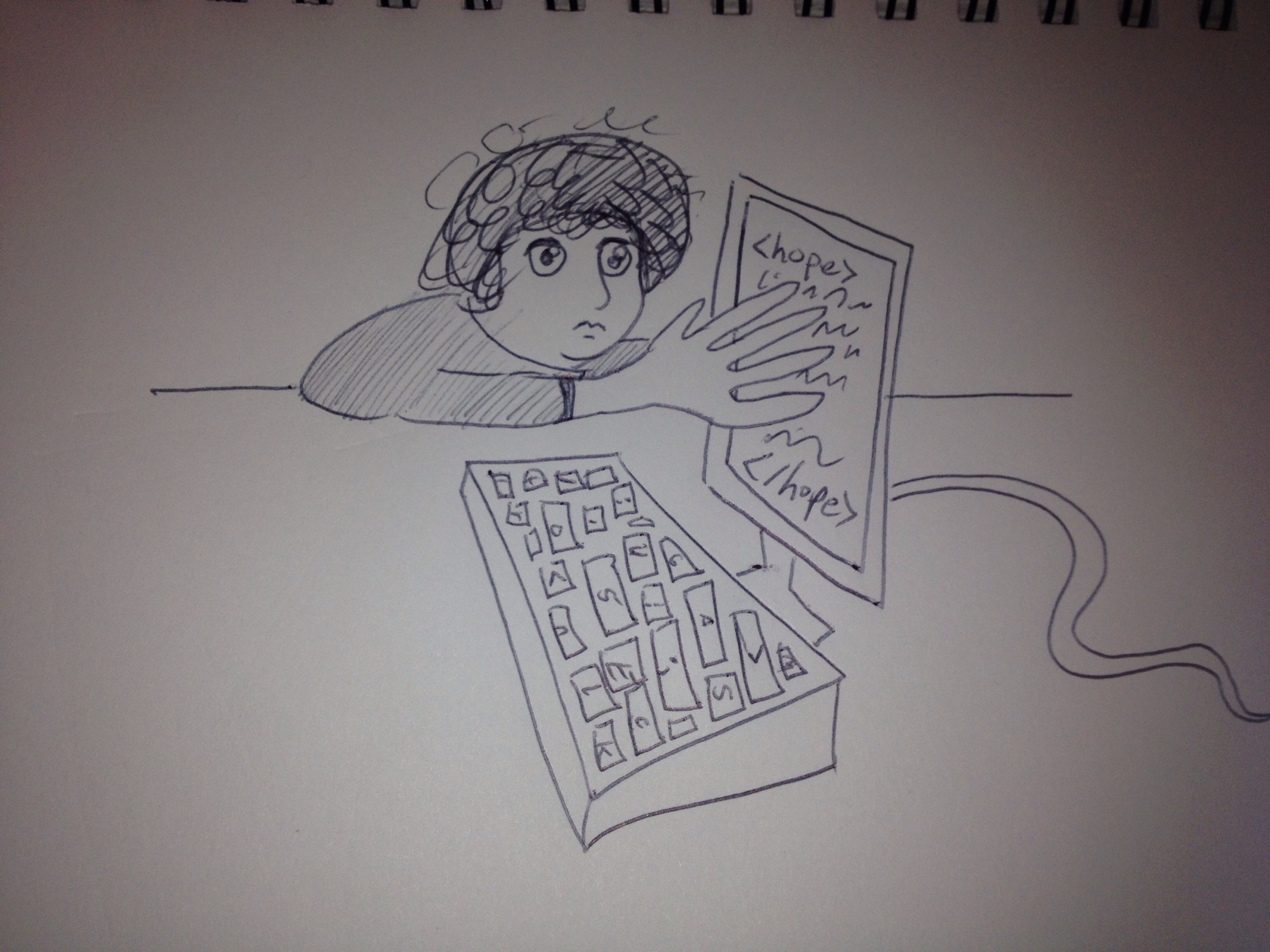
    I’m going to ask my therapist and psychiatrist about exploring psychiatric solutions to help me find that feeling that is myself. Some days, I feel like it’s important to push myself to draw. It’s a connection to what I consider to be quick magic. A touch of human in my computer-driven world.

    IMG_0059

    Yes. My hair really does look like a curly mushroom cap.

    Some notes for the day:

    Beautiful Typography Examples Need some nice examples of forkable type?
    Google Fonts Don’t forget to add your google fonts!

    Dirty markup? I’m going to always use this site to clean up my code. It will close open divs, so watch out for extra divs!

    “Describe the specs or goals for the projects, how you came up with the solution, the tools or methods you used, the obstacles you overcame, the lessons you learned, the skills you gained, the benefits of the end result, etc.” –Skillcrush.com

    “@hobbs, the Unicode standard says that ’ is the preferred character to use for the apostrophe, rather than '. –  Bennett McElwee Jul 4 ’13 at 1:55” –stackoverflow

    sharing options:

    • Share
    • Share on Tumblr (Opens in new window) Tumblr
    • Print (Opens in new window) Print
    • Share on LinkedIn (Opens in new window) LinkedIn
    • Share on X (Opens in new window) X
    • Share on Reddit (Opens in new window) Reddit
    • Share on Pinterest (Opens in new window) Pinterest
    • Share on Facebook (Opens in new window) Facebook
    • Email a link to a friend (Opens in new window) Email
    Like Loading…
  • Bipolar support groups near me

    July 29, 2015

    DBSA SF (Depression and Bipolar Support Alliance of San Francisco)

    Regular Support Group Meetings:

    Every Monday at 6:45pm to 8:15pm

    Every Saturday at 1:30pm to 3:00pm

    Meets at lower level conference room B or C at St Francis Memorial Hospital. For more information contact Gail at dbsasf@gmail.com.

    Young Adults Support Group (for ages 18 to 30 years old):

    On the 1st and 3rd Monday of each month at 6:45pm to 8:15pm.

    Meets at lower level conference room B or C at St Francis Memorial Hospital. Contact dbsasf@gmail.com for more information.

    Support Group for persons with Depression or Bipolar Illness. Weekly support group meets Tuesdays from 7-9 pm at College Heights Church, 1150 W. Hillsdale Blvd, San Mateo, CA. Family members and friends are welcome.

    Target Group:
    Adults and Older Adults

    Depression Bipolar Support Alliance Palo Alto Meetup

    Wed Jul 29

    6:30 PM

    1 going

    0 comments

    Palo Alto Veteran’s Hospital

    3801 Miranda Avenue, Palo Alto, CA (map)

    DBSA Palo Alto has served our community for over 12 years. We meet every Wednesday 6:30 – 8:30.

    via Depression Bipolar Support Alliance Palo Alto (Palo Alto, CA) – Meetup.

    sharing options:

    • Share
    • Share on Tumblr (Opens in new window) Tumblr
    • Print (Opens in new window) Print
    • Share on LinkedIn (Opens in new window) LinkedIn
    • Share on X (Opens in new window) X
    • Share on Reddit (Opens in new window) Reddit
    • Share on Pinterest (Opens in new window) Pinterest
    • Share on Facebook (Opens in new window) Facebook
    • Email a link to a friend (Opens in new window) Email
    Like Loading…
  • Improv Opportunities in the Bay Area

    July 29, 2015

    Drop in

    Drop-In Improv Class | Leela.

    Tuition: $15 online (links above) or $20 cash at the door.
    Prerequisite: None
    Instructors: Rotating Faculty
    Day/Date: Mondays & Thursdays, on-going every week
    Time: from 7:00 PM – 9:00 PM
    Location: Intersection for the Arts, 925 Mission Street, SF

    EndGames Drop-In Classes – Saturday Tickets, San Francisco – Eventbrite.
    Drop in to EndGames Saturdays at noon to infuse a little extra playtime into your weekend. Instructors rotate every week, and topics vary as well. Tickets are $10, payable only through Eventbrite. Cash will not be accepted at the door! Stay tuned here, or on our Facebook page for more information!

    Voice One / Classes / Studio Theatre.

    If you’re looking for entertainment for the cost of a movie, then jump on the Voice One stage Sunday nights and improvise away! After you play some warm up games, you’ll create scenes, build recurring characters and have a whole heck of a lot of fun. We welcome all – newcomers, seasoned professionals, and those in between. Just show up and be ready to play. No preregistration required.

    ONE SUNDAY EACH MONTH IS SPECIAL THEME DAY: Super Heroes, Commercials, Radio Drama, Improv for Networking, Auditioning, etc.

    Alternate Sundays 5:30pm-7:30pm

    [No class on Major Holiday Weekends. To be added to weekly email updates, send a message to sundayimprov@gmail.com. Check http://www.facebook.com/sundayimprov for updates.

    $15 cash at the break.

    Classes

    Foundation 1 | BATS Improv.
    Schedule: 6 sessions (once a week for 6 weeks)
    Class dates: August 18, 25, September 1, 8, 15, and 22
    Class length: 3 hours (18 hours total instruction)
    Tuition: $329
    Notes: Class size: 16 students maximum

    Improv Acting Classes for All Levels: Fun, Performance, Real Life, Etc.

    Schedule: 4 sessions (once a week for 4 weeks)
    Class dates: four Sundays: August 9, 16, 23, 30
    Class length: 2 hours (8 hours total)
    Tuition: $99
    Notes: Improv 101

    Buy Tickets | Made Up Theatre.

    Schedule: 7 sessions (once a week for 6 weeks)
    Class dates: Fall Session: September 9th – October 21st
    Tuition: $150.00

    ComedySportz San Jose |  Buy Tickets.

    Schedule: once a week for 8 weeks
    Class dates: Level 1 Mondays – 7:30-9:30pm 9/14/2015 – 11/2/2015
    Tuition: $200.00 A $50.00 deposit is required to hold your spot for the workshop.
    Improv I: Let’s Play! | Leela.

    Schedule: once a week for 6 weeks
    Class dates: 8/4, 8/11, 8/18, 8/25, 9/1, 9/8 Day/Time: Tuesdays, from 7:00pm – 10:00pm
    Tuition: $265

    San Jose Improv | Classes | American Improv Theatre | Classes.

    Schedule: once a week for 8 weeks
    Class dates: Sundays, Sept. 20 – Nov. 8 5 – 7 PM
    Tuition: $150

    About the Class: This eight-week class is designed for people who have gone through improv training and are looking for a fun place to practice their skills, put on a show or two, and laugh the evening away. Participants will be working on long form improv skills as well as honing their overall stage presence, quick wit, and yes, and-ing abilities. The last two shows of the series will be performances for family and friends. Prerequisites: Improv experience. Contact AIT about your eligibility.
    sharing options:

    • Share
    • Share on Tumblr (Opens in new window) Tumblr
    • Print (Opens in new window) Print
    • Share on LinkedIn (Opens in new window) LinkedIn
    • Share on X (Opens in new window) X
    • Share on Reddit (Opens in new window) Reddit
    • Share on Pinterest (Opens in new window) Pinterest
    • Share on Facebook (Opens in new window) Facebook
    • Email a link to a friend (Opens in new window) Email
    Like Loading…
  • Day 75: Cleaning and Logging, A Return

    June 7, 2015

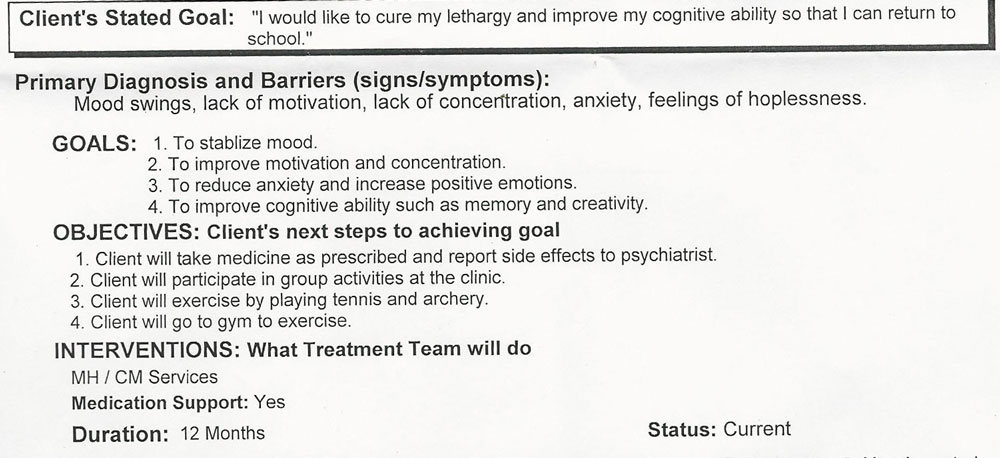
    Today, I started a drug/mood/health log (on twitter because I like the mobile app– short updates with the time stamps) to help me keep track of what helps and what hurts. I had my first evaluation meeting with my new government sponsored psychiatrist where I was a bit more prepared with a list of symptoms I wanted to treat and we set goals and reduced some of the meds and increased some of the meds.

    I went through some index cards. I called them “focus cards” when I was in my most producing days of what some call “mania.”

    goalsI’m feeling really optimistic about the future. I had a nice couple of days. I started reading again. It’s slow. I’m currently reading 101 Things I Learned in Law School. I’m considering going back to school because I would like to be a learned individual with a higher salary. Wake up call: being an “artist” means always wondering about the future and money and wondering if you’re going to “make it.” I was pretty delusional (alusional? Where one has no illusions true or false) about my future and so I’m giving it some heavy consideration before I make my next move.

    I keep thinking about time. About how this last year has really changed me. About how I’m growing and learning about myself, psychology, pharmaceuticals, friendship, compassion and the brutal pace that society keeps.

    Yeah, I am perplexed that I “took a year off” and when I came back everyone was passing me by and it’s hard to find one’s footing after going to the brink of insanity and back.

    Like Loading…
Previous Page Next Page

Blog at WordPress.com.


Loading Comments...
 

    • Subscribe Subscribed
      • Kismet Arts Tangent
      • Join 104 other subscribers
      • Already have a WordPress.com account? Log in now.
      • Kismet Arts Tangent
      • Subscribe Subscribed
      • Sign up
      • Log in
      • Report this content
      • View site in Reader
      • Manage subscriptions
      • Collapse this bar
    %d