Skip to content

Kismet Arts Tangent

Art Collective

    • Kismet Arts Tangent
    • About
    • Blog
    • Contact

recent posts

  • Make up looks
  • Images from re Patient’s Schedule
  • Self Intake
  • Inspiration Pool for zine
  • Photo shoot with Kayleigh Shawn

  • Instagram
  • Live Model Painting

    December 7, 2015

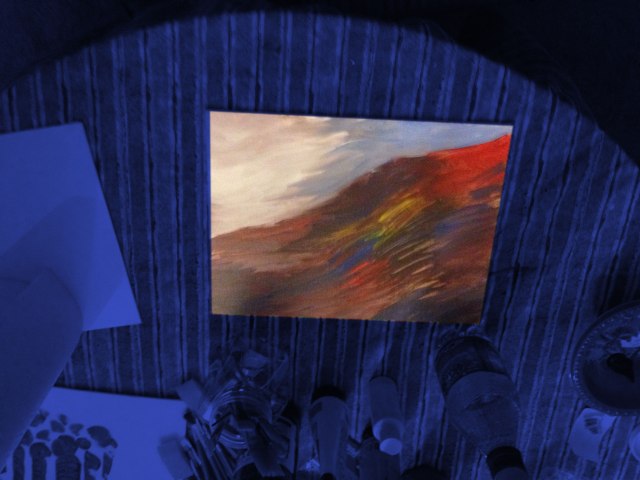
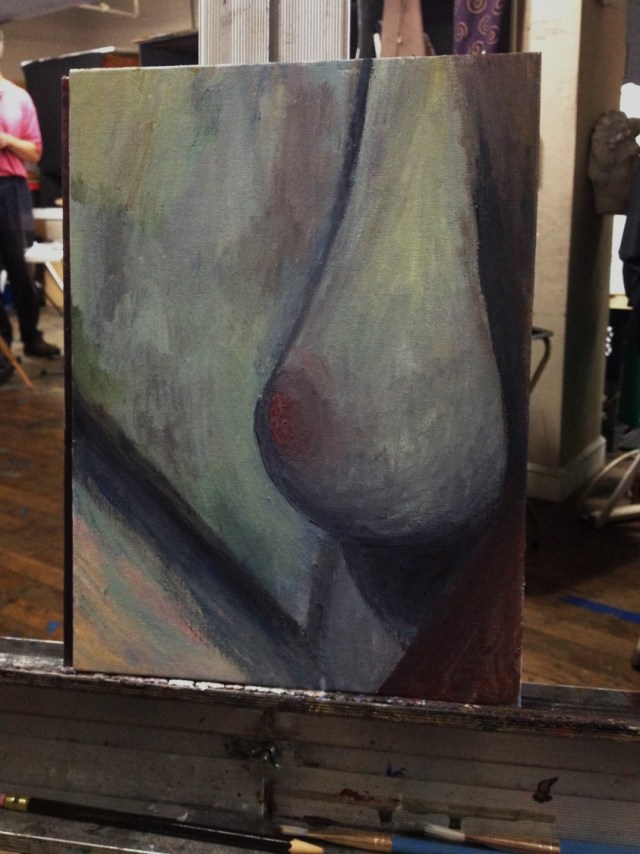
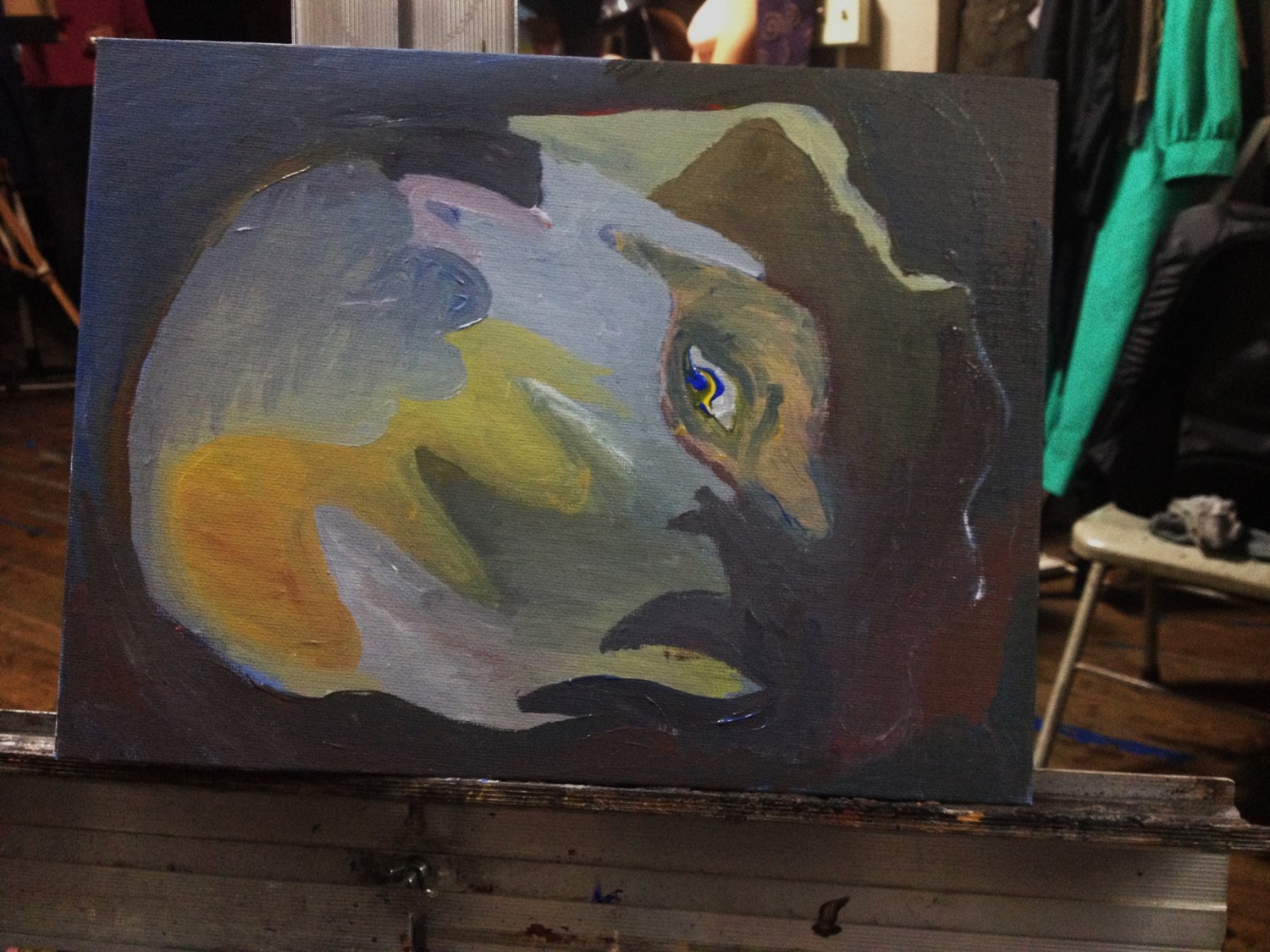
    I’ve never painted from a live model until yesterday. I found out about a long pose meetup and went to The Atelier School of Classical Realism with two of my friends. We had a great time, though I might not go back. Painting from one pose for so long was a little boring, though I felt grateful to have enough time to get the shading right. After that, though, I sprung into the abstract and then the surreal, no longer looking at the model.

    Materials:  Canvas panels 9 x 12 inch, Liquitex Basics Acrylic Paint

    painting1
    After the first 40 minutes
    painting2
    After 90 minutes
    painting3
    Abstract shapes and stuff
    painting4
    Frightened Cosmic Armadillo


    sharing options:

    • Share
    • Share on Tumblr (Opens in new window) Tumblr
    • Print (Opens in new window) Print
    • Share on LinkedIn (Opens in new window) LinkedIn
    • Share on X (Opens in new window) X
    • Share on Reddit (Opens in new window) Reddit
    • Share on Pinterest (Opens in new window) Pinterest
    • Share on Facebook (Opens in new window) Facebook
    • Email a link to a friend (Opens in new window) Email
    Like Loading…
  • 12 Beautiful Animations I haven’t seen yet

    November 24, 2015


    via Cinefix

    sharing options:

    • Share
    • Share on Tumblr (Opens in new window) Tumblr
    • Print (Opens in new window) Print
    • Share on LinkedIn (Opens in new window) LinkedIn
    • Share on X (Opens in new window) X
    • Share on Reddit (Opens in new window) Reddit
    • Share on Pinterest (Opens in new window) Pinterest
    • Share on Facebook (Opens in new window) Facebook
    • Email a link to a friend (Opens in new window) Email
    Like Loading…
  • Preparation for Freelancing/Job Searching

    November 11, 2015


    This week in the Jobtrain Web Developer Coding Boot Camp, a visit from a representative of Samaschool. In this online training program, I’ve taken snippets–if source not stated, it’s copied from the program– out to develop into this year blog post to share for people in my situation and of course for reference for myself in the future.

    Start with a Dream

    Take a moment to think about your dream job. Write it down if it helps. What tasks would you have to complete daily? What would your responsibilities be? Would you have people reporting to you? What are your hours? What is the office like? Are you close with your co-workers?

    Develop Your Positioning

    • What type of job are you applying for?
    • What is your value proposition? (1-2 sentences)
    • What do you want your personal brand to be? (aspirational – maximum 1 paragraph)
    • Present a case for why I should hire you. (1 paragraph)

    Be Proactive with Your Efforts

    • What online work platforms would work best for you? Name at least 3.
    • Who can you follow on social media to become more involved in your space? Are there any brands? What type of social media are people in your industry members of?
    • What online forums or discussion boards can you join? Name at least 4. What topics do you want to be an expert in?
    • If you could work for anybody, who would you work for? If you could contact anyone in the world for a job, who would that be? What types of businesses need your services?
    • What local businesses are in your area? Name at least 10. Of those ten, how many of them have someone who provides the same service that you do?

    Be Organized During Your Search

    “So, when you save a new version of your resume, name it using this naming convention [first name last name job title.doc]. Then, you make it as easy as possible for the person who receives your emailed resume to save it to their computer without having to rename it. This name, which includes the job title, also makes it easier for you to keep track of the different versions of your resume on your computer.”

    Source: How to Organize and Track Your Job Search – Job-Hunt.org

    worksheet for the interview— Your own cliff notes! More stuff like this at this link. Thanks, Jenny Blake!

    JOB SEARCH SPREADSHEET Blank – Google Docs Templates

    10 Job Search Templates (Including a Cover Letter Template!) – The Muse — This makes asking a little less intimidating!

    Job Hunter’s Toolbox: JibberJobber – BusinessWeek This app might be helpful. It’s $10 a month, but it sends reminder emails. I don’t think I’m going to end up using it, but I’d love to hear if anyone I trust has used and approved it.

    Write Your Proposal (for “E-lancing”)

    1. Start with a greeting (e.g. “Hello” or “Dear Client”)
    2. Get straight to the point. Use the first sentence to state the position/project you are applying for and why you think you are a good fit for the job.
    3. Demonstrate that you have a good understanding of what the company wants. Show your enthusiasm for the company’s goals or for the job.
    4. Relate your past work experience to the current job opening or project.
    5. Use keywords mentioned in the job posting. For example, if the job requires someone to do “processing,” then you want to mention that you can “process” what he or she needs.
    6. Keep your proposal short when possible. There will be times when you will need to write a detailed or extensive cover letter. Such instances usually occur when the job or project requires a high-level of detail or technical skills. In all other instances, try to keep your proposal below 250 words.
    7. If you are attaching a file or link to the proposal, be sure to mention it at the end of the proposal. You can say something like, “I have enclosed a link to my portfolio where you can browse my previous work that matches your needs.”
    8. After thanking your reader (Client or employer), sign off with a professional closing. Acceptable closings include: sincerely or best regards.

    Decipher the Job Description

    1. Based on the job, description, what do you know about the company looking to hire?
    2. What do you know about the pay and time commitment for this job?
    3. Is there a stated budget or timeline for the project? If so, please explain.
    4. What are the job fucntions or tasks required for this job?
    5. What skills do you have that are a good fit for this job?
    6. Has the client communicated a method of delivery or instructions for the job? If so, please explain.

    Links

    graphic design job-boards

    Caveats: The $5 logo on Fiverr | The Logo Factory, Freelancer Alert: Elance Review –, and this:

    “99designs model is brilliant. Next time I am going out to eat I am going to ask each chef at the restaurant to provide me with their specialty dish, sample everything and only pay for the one I like! Pure genius! Why would anyone ever expect to be paid for the work they do? People should only be paid if they are best of the hundreds competing for my business!”

    Source: 99designs Reviews – Consumer Reviews of 99designs.com | SiteJabber

    Jobs | 99designs

    Graphics & Design creative professional services, $5 + | Fiverr

    Freelance Graphic Design Jobs Online – Upwork

    online graphic design knowledge

    50 Totally Free Lessons in Graphic Design Theory – Tuts+ Design & Illustration Article

    14 Best Online Graphic Design Courses for Beginners | SkilledUp

    Teach yo’self: A guide to online graphic design education

    online web development knowledge

    Learn Web Development 101 for Free

    Learn to code | Codecademy

    Learn Web Design: 50+ of the Best Online Educational Resources to Learn T0 Build Websites | SkilledUp

    Don’t Fear the Internet (web design)

    WTF is a marketing stack?

    This seems potentially useful, but the interface is so useless.

    What is this? The same thing?

    Miscellaneous

    yearly marketing plan

    google trends– kind of fun to check on.

    see what grade you write at– Samaschool recommended that cover letters be written at a high school level. I’m really curious about the algorithms involved in this one.

    q. what are some good penalties for contract noncompliance?— make a contract that holds the client accountable for deliverables on their end.

     

    sharing options:

    • Share
    • Share on Tumblr (Opens in new window) Tumblr
    • Print (Opens in new window) Print
    • Share on LinkedIn (Opens in new window) LinkedIn
    • Share on X (Opens in new window) X
    • Share on Reddit (Opens in new window) Reddit
    • Share on Pinterest (Opens in new window) Pinterest
    • Share on Facebook (Opens in new window) Facebook
    • Email a link to a friend (Opens in new window) Email
    Like Loading…
  • JsFiddle Library

    October 28, 2015

    I kept getting distracted and couldn’t find the code that I used before underneath all of the website. So, here’s a library of jsfiddle code that I’ve been working on/with so if you need it to do that thing, here’s a starting block.

    MadLibs Engine – JSFiddle I used this to help create my vision statement. Sometimes thinking in complete sentences about lofty things is hard. Breaking it up into form and input sometimes seems more natural to me when coming up with copy that needs to convey ideas more than be original. (Could also be called the “Plagiarism Engine,” I dunno about intellectual property all that much.)

    To-Do-List App- JSFiddle I’m trying to get a to do list app to spit out an End of Day Report with categorized tasks:  to do, in progress, needs review, needs help and done. Still in the middle stage of developing this fiddle.

    Calculator that Doesn’t Calculate, Only Has Disappearing Keys – JSFiddle This is just some fun I had with an assignment. I really want to elaborate on this to make some kind of color chasing game/past-time.

    Pop Up Carousel I’m still trying to refactor this so it uses classes and “this” instead of ids.

    Like Loading…
  • Micro-Gallery Website

    October 28, 2015

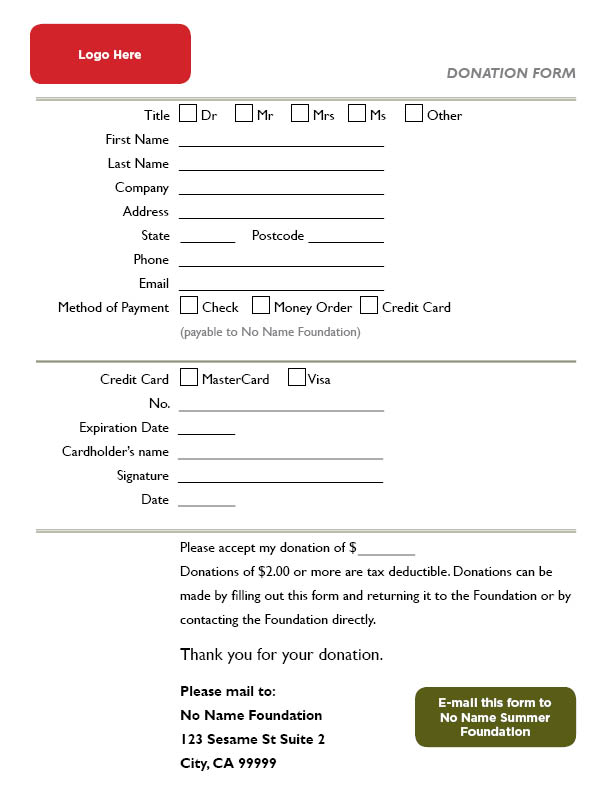
    ideaforawebsite

    Let this inspire a website or two.

    Is it a title/caption generating app? Does it find random photos and feature one a day with this caption? Does it secretly hack into your computer and take a picture of you?(Don’t do that last one.) When you’re ready, make a website.

    Like Loading…
  • Jennifer Dewalt Sites I like

    October 21, 2015

    Things I might want to fork and install

    GFBOOM! | Jennifer Dewalt  – google font browser

    Color Jam | Jennifer Dewalt -instrument app

    Paths | Jennifer Dewalt -make drawings with words

    Chatty Room | Jennifer Dewalt -meet someone at a site, chat them up.

    Pollsie | Jennifer Dewalt -easy to make one question anonymous polls

    Moment Of Peace | Jennifer Dewalt – modify this for asmr

    You Are Here | Jennifer Dewalt – this seems amusing… just spits out pictures taken nearby.

    Image Palette | Jennifer Dewalt Palette from Image. Clean interface. This is how I get most of my palettes, nice to have a web app.

    Song Machine | Jennifer Dewalt relaxing

    sharing options:

    • Share
    • Share on Tumblr (Opens in new window) Tumblr
    • Print (Opens in new window) Print
    • Share on LinkedIn (Opens in new window) LinkedIn
    • Share on X (Opens in new window) X
    • Share on Reddit (Opens in new window) Reddit
    • Share on Pinterest (Opens in new window) Pinterest
    • Share on Facebook (Opens in new window) Facebook
    • Email a link to a friend (Opens in new window) Email
    Like Loading…
  • Circle of Friends App

    October 19, 2015

    The Initial Idea

    It would be connected to a gmail account– (could modify it to a facebook account?). App will have access to friend’s list and calendar. The user selects friends they want to always keep on their social calendar and then give them frequency (regular intervals of time the user wants to see them.). Friends can also be grouped if you always see a certain set of friends, but they can be peeled off too.
    Interface: A series of concentric circles each with a friend icon sliding on each line (like a track). The grand circle is similar to a clock face but instead of the hands moving, it’s the face, the hand always pointing up. The clock scales with the plans that you have, but can zoom in if you wish. A person with less far out plans won’t see an empty calendar but a differently scaled (large icons) circle.
    Active (brightly colored) icons for “friend-instances” or an event planned with a friend. Inactive (dimmed) icons for friend “potential friend-instances” for the recommended slot to see this particular person based off the preference indicated by the interval of time you enjoy seeing this person. And then some other state of icon, “Routine” for standing appointments. So most active icons will have a follower of a tickmark indicating an automatic emailer* followed by a dimmed icon at a variety of intervals indicating the next potential date.
    Circle of friends connects users. If a person needs to cancel, they click the friend-instance icon and click the cancel date option which triggers a new email to inform the other user that plans are canceled. The active icon goes away. The trailing inactive icon doesn’t.
    *automatic emailer– it emails your friend with a generic message, hey, let’s grab some coffee on this {{date}}? (or some other generic activity you like doing together, indicated in the friend settings)– can be disabled when going on trips, can be influenced by calendar.
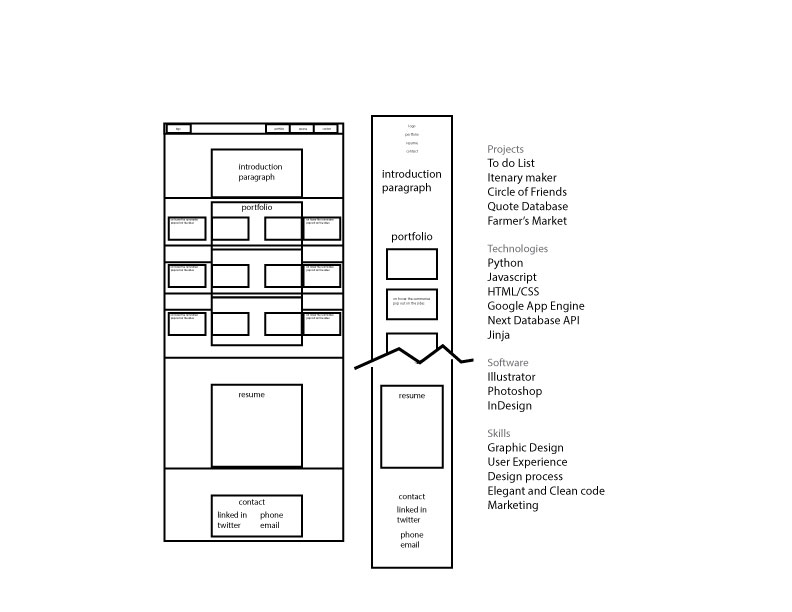
    IMG_0202

    Comments by my technical advisor, Myco:

    I can see the use of this for someone like yourself, who likes to keep social events flowing so that you can keep in contact with people. For others, this would be a bit of a change for them, to schedule regular meet ups. However I think the strongest selling point for the app is that most people *want* to be more social and stay in touch with people. promising them to help them with that is your value proposition.
    If you boil down the concept to its most basic, it would be this:
    Get a list of people.
    Set the interval for each person.
    Remind the user to set up a meeting at the specified interval.
    So that would be what you would want to build first. From there, you would expand into the different psychologically useful features:
    The circle UI, which is psychologically satisfying for the user.
    The automatic emails, which force the user into a meeting instead of procrastinating.
    The streamlining of the start process, which helps guide the user through the potentially tedious task of picking out friends from a large list.

    sharing options:

    • Share
    • Share on Tumblr (Opens in new window) Tumblr
    • Print (Opens in new window) Print
    • Share on LinkedIn (Opens in new window) LinkedIn
    • Share on X (Opens in new window) X
    • Share on Reddit (Opens in new window) Reddit
    • Share on Pinterest (Opens in new window) Pinterest
    • Share on Facebook (Opens in new window) Facebook
    • Email a link to a friend (Opens in new window) Email
    Like Loading…
  • From Scratch to Hello World App: Google’s App Engine

    October 15, 2015

    First: Download the Google App Engine SDK – App Engine — Google Cloud Platform

    Then open Google App Engine Launcher.

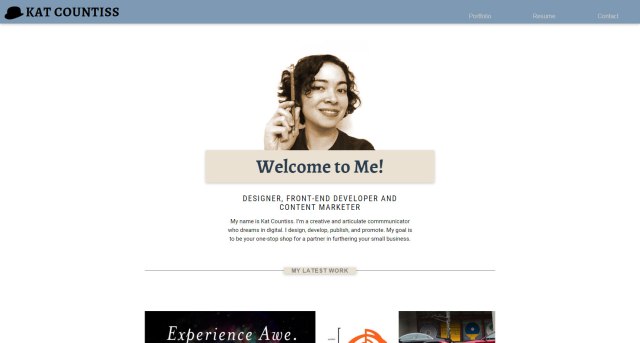
    how-to

    This is the simplest app and it’s all created by naming it “helloworld.” However, making an app that actually does stuff is something else. Continue to follow this blog for more details.

    sharing options:

    • Share
    • Share on Tumblr (Opens in new window) Tumblr
    • Print (Opens in new window) Print
    • Share on LinkedIn (Opens in new window) LinkedIn
    • Share on X (Opens in new window) X
    • Share on Reddit (Opens in new window) Reddit
    • Share on Pinterest (Opens in new window) Pinterest
    • Share on Facebook (Opens in new window) Facebook
    • Email a link to a friend (Opens in new window) Email
    Like Loading…
Previous Page Next Page

Blog at WordPress.com.

Loading Comments...
  • Subscribe Subscribed
    • Kismet Arts Tangent
    • Join 102 other subscribers
    • Already have a WordPress.com account? Log in now.
    • Kismet Arts Tangent
    • Subscribe Subscribed
    • Sign up
    • Log in
    • Report this content
    • View site in Reader
    • Manage subscriptions
    • Collapse this bar
%d