Skip to content

Kismet Arts Tangent

Art Collective

    • Kismet Arts Tangent
    • About
    • Blog
    • Contact
    • Donate

recent posts

  • Photo shoot with Kayleigh Shawn
  • Testimonials
  • Fractures Poem
  • Poetry
  • Pixel art products

  • Instagram
  • Whiteboarding Interview for UX Designers

    June 2, 2013
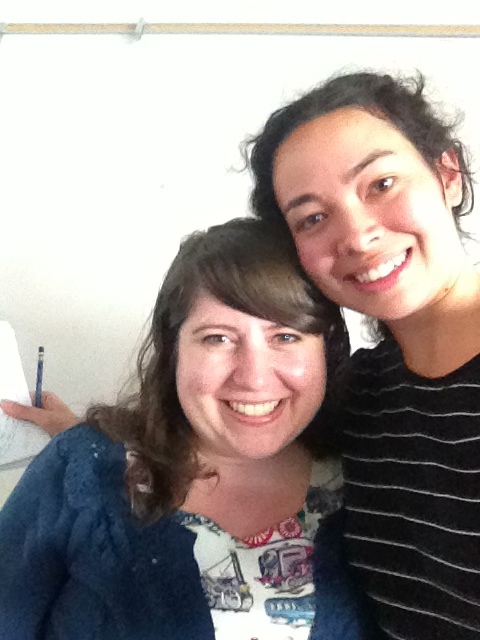
    2013-06-01 11.00.38
    Rebecca Shapiro and I at our whiteboarding session

    Yesterday, my Interactive Design teacher, Erik Fadiman, organized a whiteboarding learning session for a little extra practice before graduation and more importantly job interview time. Whiteboarding is when people gather around a whiteboard and do some group problem-solving. The whiteboarding interview is common for software engineers to show their interviewer how they would solve a problem. This exercise is also done by user experience interviewers.

    Rebecca Shaprio, UX designer at Amazon and Seattle Central Creative Academy Alum, ran me through a Whiteboarding exercise to help me familiarize myself with the open-ended process of this specific type of interview. Each job and interviewer has special goals in mind, so each whiteboarding interview will be different. Rebecca told me that the primary goal is to witness how the interviewee thinks. This was my first whiteboarding session. She told me that for this task, just to write and talk out my thinking process.

    She stated the prompt: Design Technology for the Goal, Buy Clothes Online that Will Fit. I had no time to prepare. Interviewers like to see how you think on the fly. I asked about restraints, budget, time, current technology and she said there are none. A free for all.

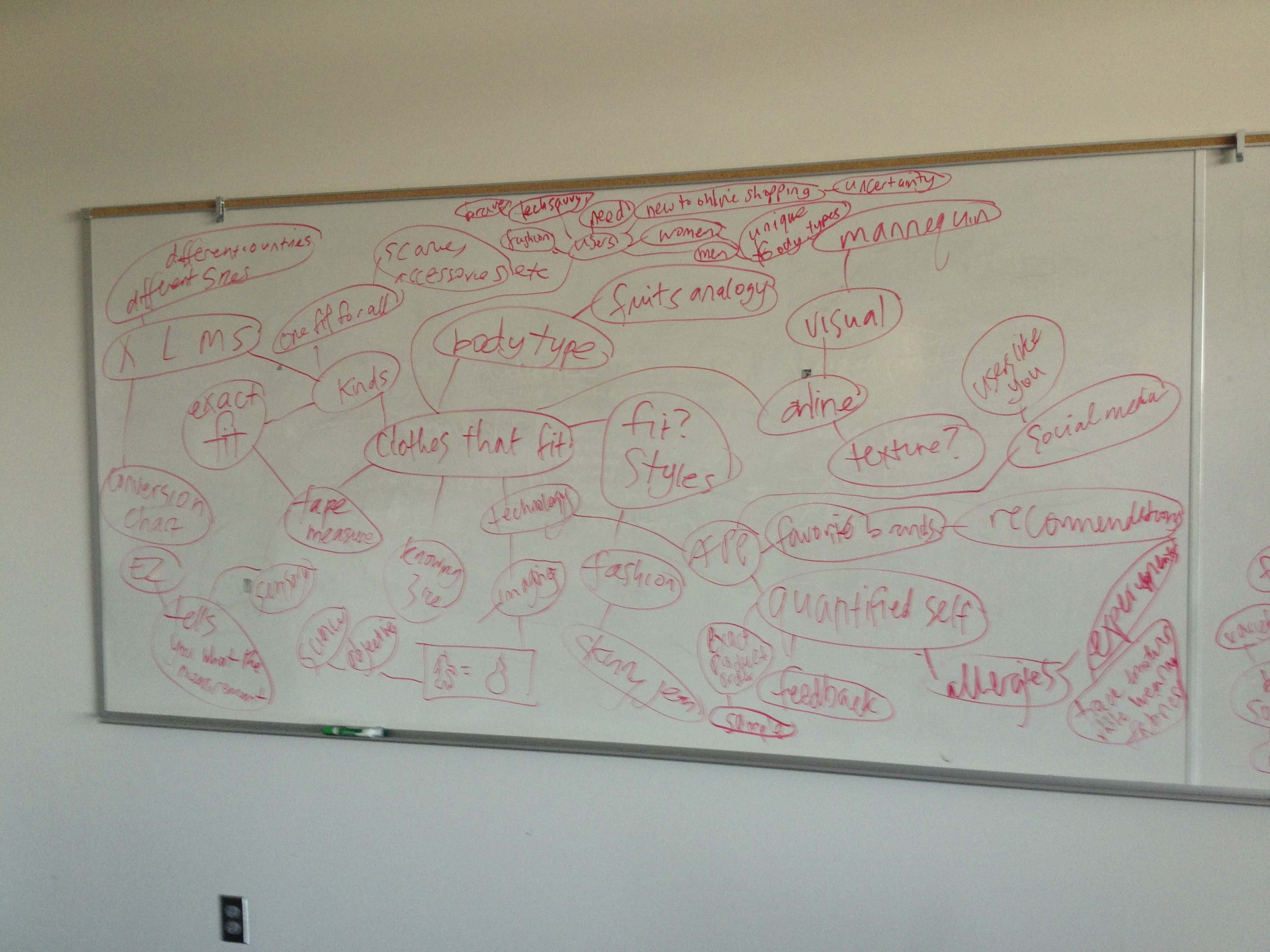
    I started to brainstorm using the mind map method. I like this method because you can see hierarchy and context. It’s easy to add connecting ideas. The seed idea is “clothes that fit.” Rebecca prompted me to think of the users and to think of how to use technology.
    2013-06-01 10.27.42
    Initial Brainstorm

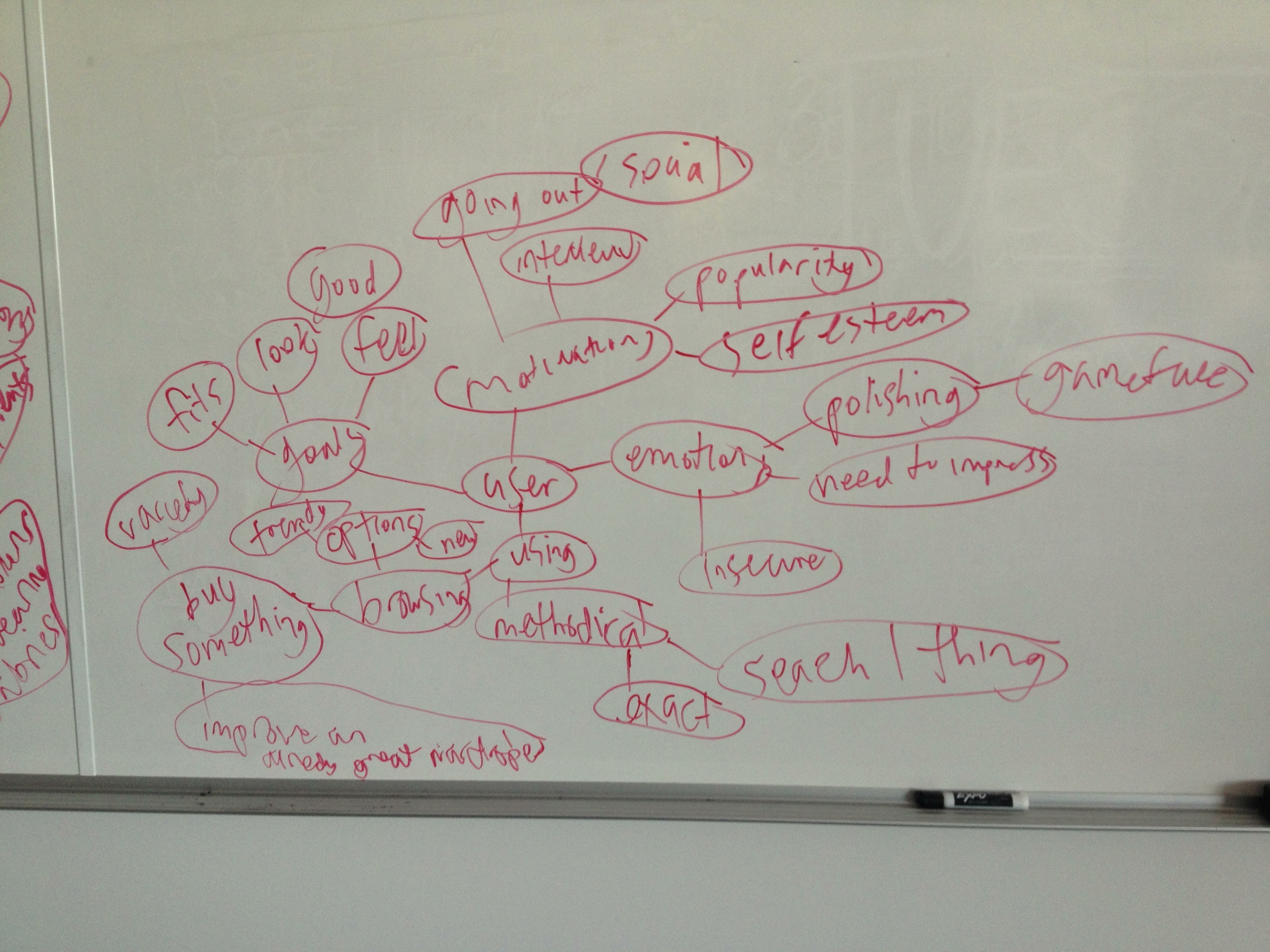
    Next, Rebecca asked “Who is the user?” and how are they feeling when using this technology. I thought about the different types of shoppers as well as the uncertainty.
    2013-06-01 10.27.50
    mind map of the user

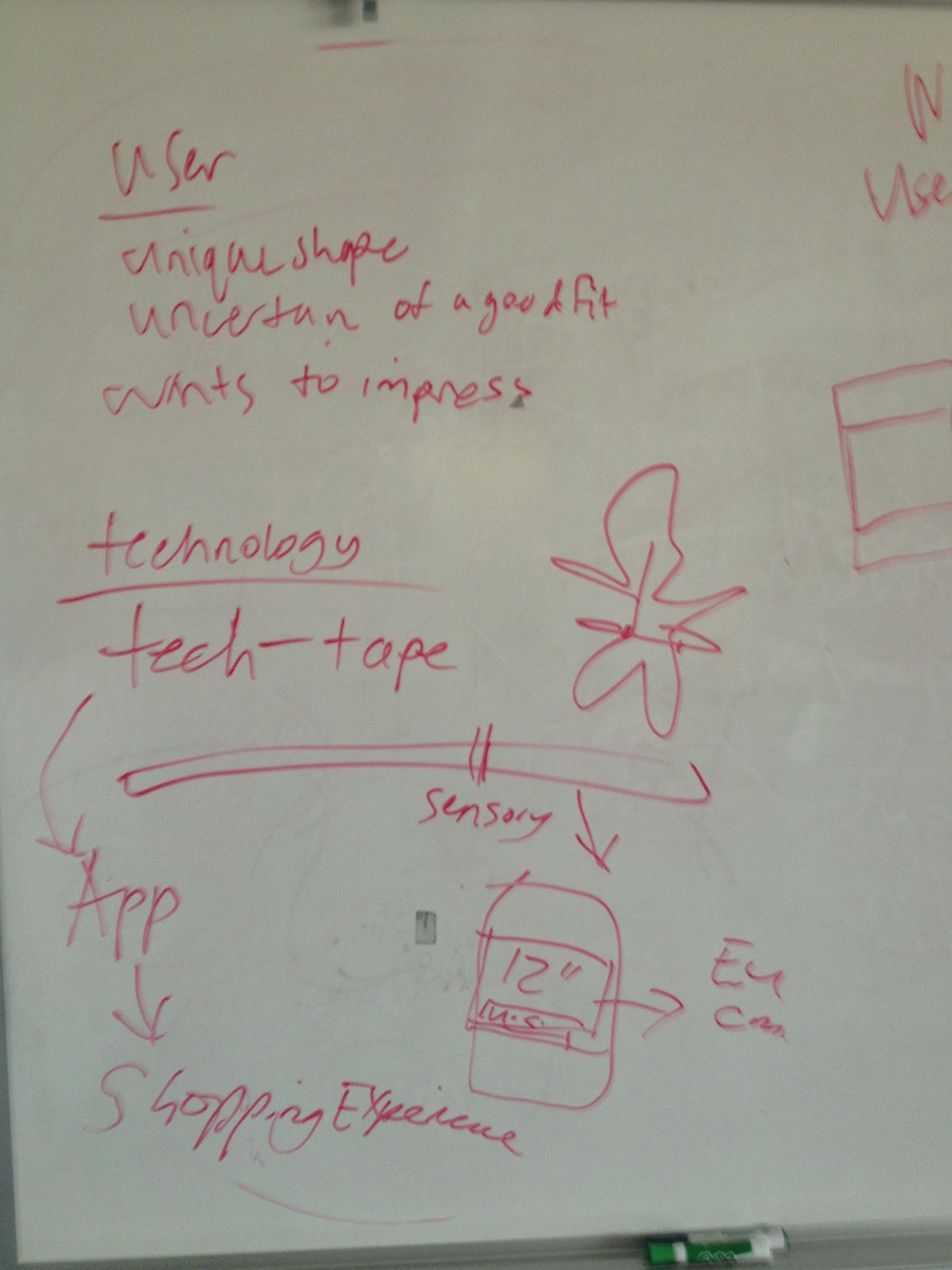
    Rebecca asked me to write out a walk-through of the technology. First, I summed up what I established about my user, she’s a unique shape, uncertain of a good fit, but wants to impress. The technology: Tech-tape, a measuring tape that has no measurements on it. You pinch the places where the tape meets around you and that input is sent via bluetooth to the phone where the app keeps that information in your profile. I supported this by saying how I worked in a dry cleaning store and it’s kind of amazing that not many people can work a regular tape measure with ease and confidence. The device has a companion app that is a easy to use shopping experience.
     

    2013-06-01 10.50.49
    the user and the technology

    The Walkthrough

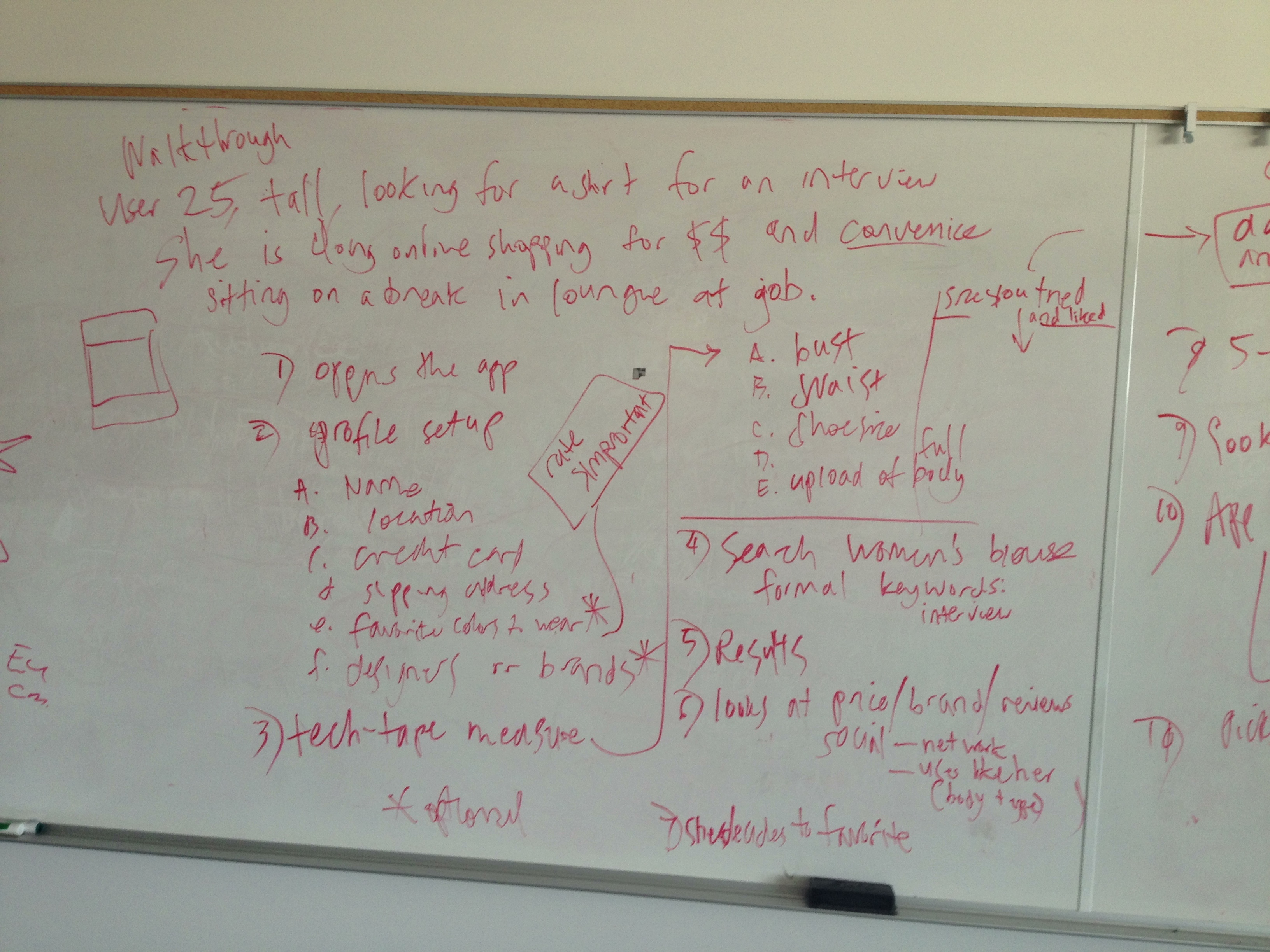
    The user (based on myself mostly so I didn’t have to invent anyone, but also because this is a problem I occasionally think about) is 25, tall, looking for a shirt for a job interview. She is doing her shopping online to save money and convenience. She’s sitting, at a break, at a different job.

    1. Opens App
    2. Profile Setup (this step is key because the info entered determines a good deal of the top results in the search algorithms)
    a. Name
    b. location
    c. credit card
    d. shipping address
    e. favorite colors to wear*
    f. favorite brands/ designers to wear*
    *optional
    3. Tech-tape measure
    a. bust, waist, etc.
    b. upload a full body photo
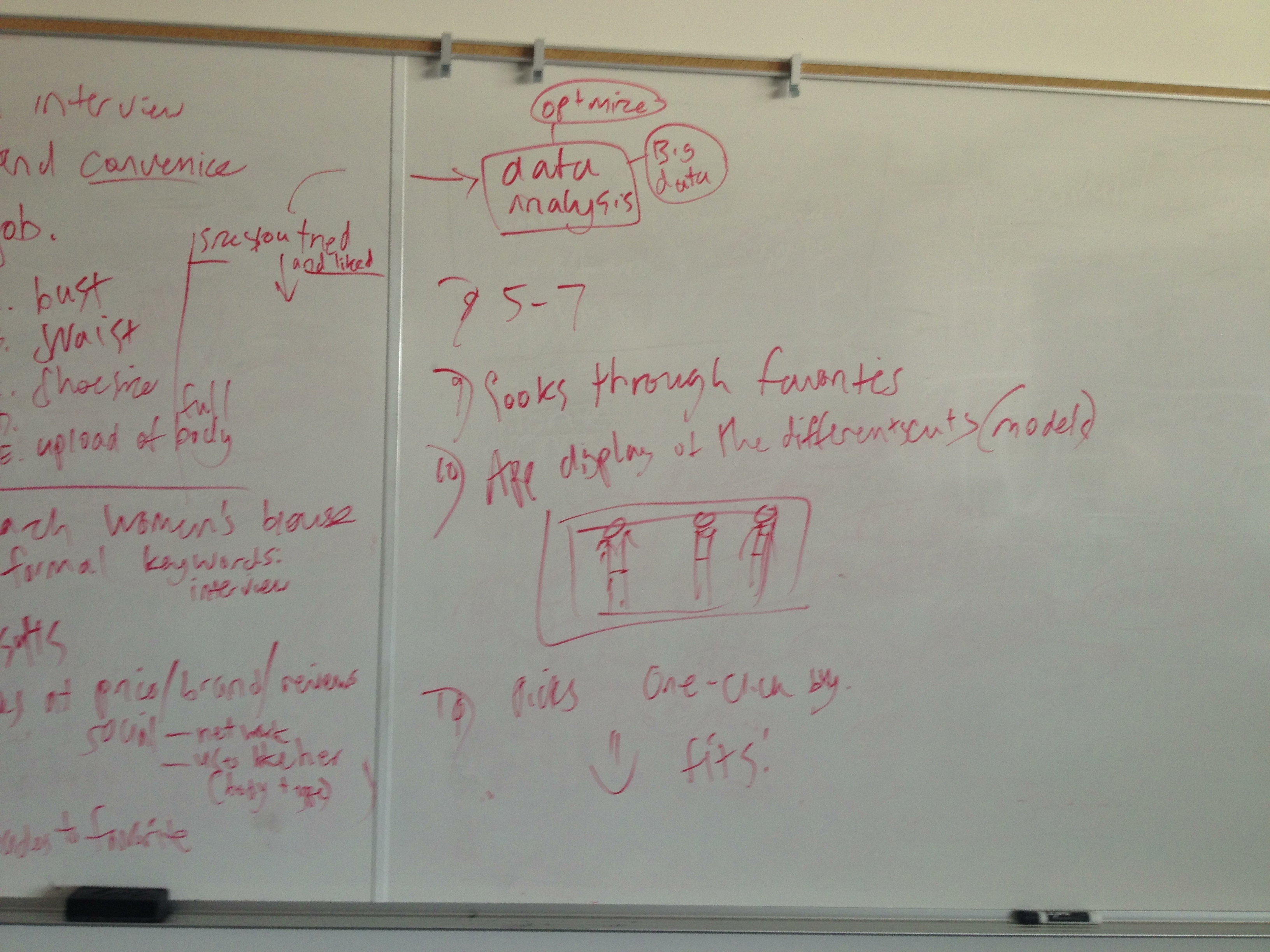
    c.sizes you’ve tried and liked. This information goes into data analysis where studies are conducted to see how people use different sizes than recommended by the manufacturer and draw conclusions about why that is and how to improve the sizing process. #bigdata
    4. Search: type in women’s blouse, formal, keywords: interview
    5. Results
    6. looks at price, brand, reviews, social– networks like facebook and also the “users like you” feature which finds users with similar body types.
    7. Add item to favorite.
    8. Repeat steps 5-7 until you have top 3 for comparison.
    9. Look through favorites.
    10. App displays the shirts on your uploaded full body photo. (This is where Rebecca stopped me saying that we ran out of  time and I insisted I was almost done and added this last step.)
    11. User decides on one and clicks it and the one-click purchase button (which I love about Amazon.com’s shopping experience) and the user receives it five days later and it fits. And she’s happy.
    2013-06-01 10.50.55
    app walkthrough part 1
    2013-06-01 10.50.59
    app walkthrough part 2

    After finishing the last step of my walkthrough, we sat down and talked more about the experience envisioned. She asked “How does this technology work in different contexts?” I told her that because it’s a smart phone app, it can go anywhere. I think that for clothes shopping, context is less of an issue than other shopping experiences like buying some expensive piece of equipment like a desktop computer. She asked about accessibility, which I addressed by saying that it will be easy to use because of the tech-tape’s simple interface. She asked more about disability where I explained how the tech-tape is all touch activated, so this is really a great app for blind people, no measurements to read. Also, the favorite color to wear option on the profile can be rated according to importance so the blind user can browse with confidence that she will never accidentally purchase an orange sweater when she only likes wearing blue ones.

    Feedback After the exercise was completed, Rebecca said that I did pretty good. She liked that I created a device that helps users breeze through a task that might stop them because measuring can be mentally tasking. She liked the color matching feature. She emphasized the importance of thinking big and exploring new ways to meet users’ needs. Stretch your ideas because in User Experience, you’re designing for the future.

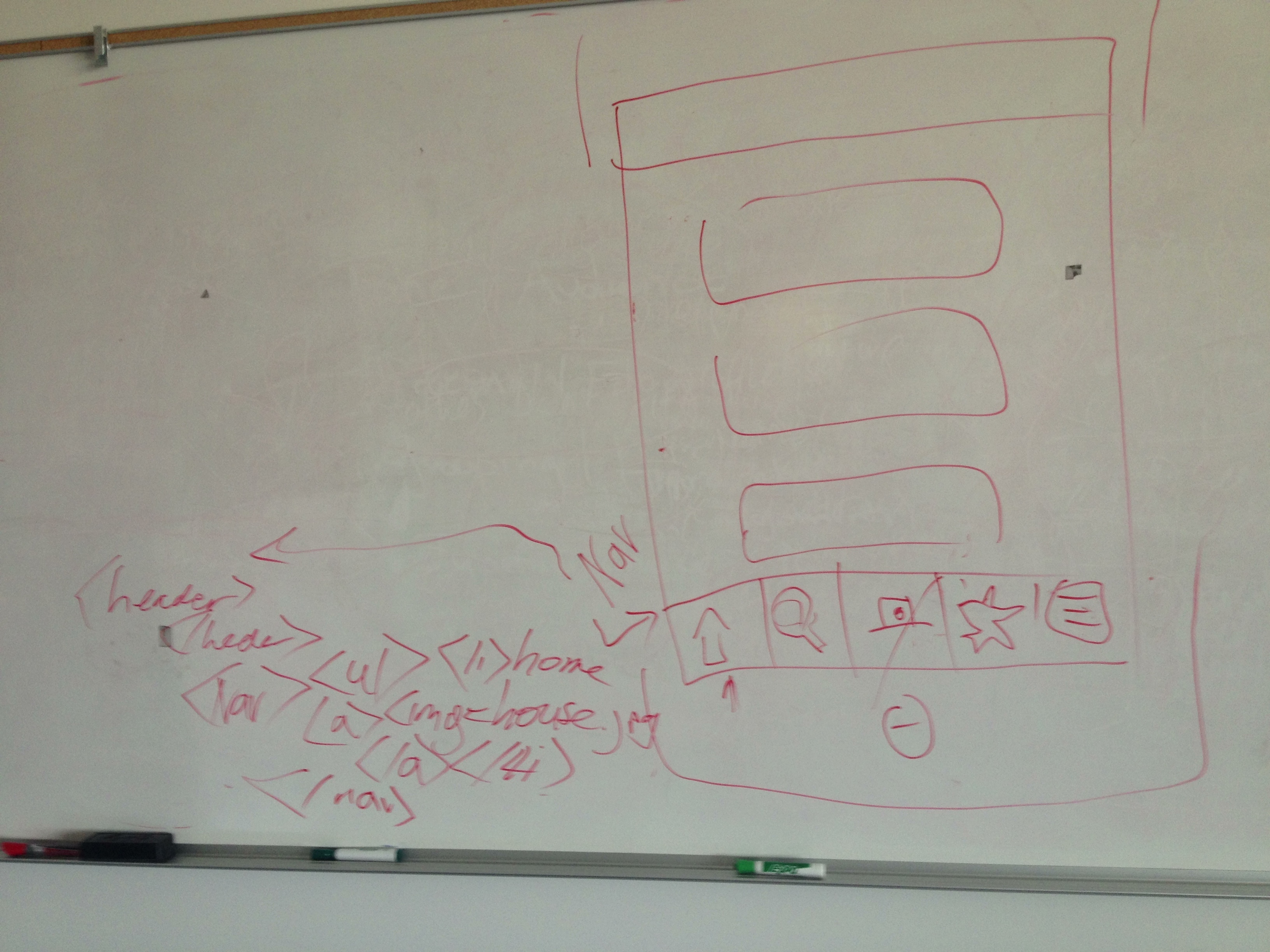
    I told her that I expected the exercise to include some coding. And she said that in her interview at Amazon, there was a separate interviewer to test her on some basic html. I asked Rebecca to run me through a quick one where she told me to program the navigation for the app. So I drew a spare wireframe and next to the nav, I wrote out some tags, ul, li, img, and a. Good practice. It was weird to write that stuff out by hand on a whiteboard. It felt so unconnected and informal. I’d never have to run that code into a validator.
    2013-06-01 10.56.08
    writing out some code

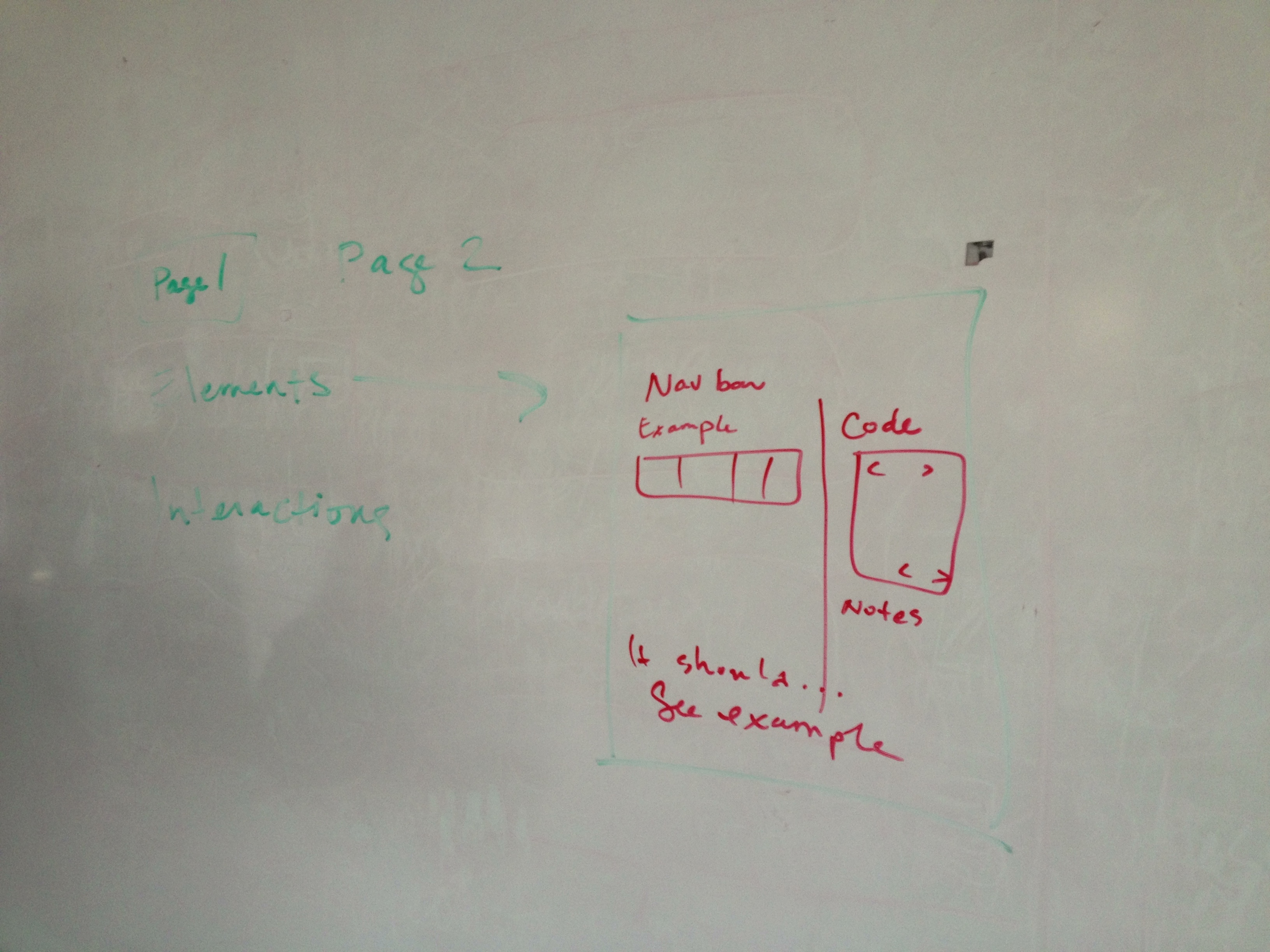
    I asked Rebecca more about her job and what she does when she mentioned documentation. I am in love with the idea of documentation (obviously I like taking notes on things I do) and I wanted to hear about her process. She says it’s different for everyone and some projects require different methods. She was telling me about how she is working with some people in China so her favorite documentation method is to make simple html websites with her notes and screenshots of her Photoshop comp and actual code or links to examples of code that show the interaction. She told me that  good documentation is about showing devs how easy it is to make an interaction you want to see happen. Sometimes developers code something a certain way because it’s easy for them or they think something is cool and it’s your job as a user experience designer to make it easy for developers to understand and use your ideas.
    2013-06-01 10.59.26
    Rebecca few this diagram of her documentation setup. Notice the excellent penmanship.

    In conclusion, this whole whiteboarding adventure took about an hour. It was educational and exciting, like witnessing the sprouting of a seed. It felt like a thing I should do as part of my professional career. I really enjoyed the process. Thank you to Rebecca Shapiro for taking time out of her Saturday morning and Erik Fadiman for arranging it all.
    sharing options:

    • Share
    • Share on Tumblr (Opens in new window) Tumblr
    • Print (Opens in new window) Print
    • Share on LinkedIn (Opens in new window) LinkedIn
    • Share on X (Opens in new window) X
    • Share on Reddit (Opens in new window) Reddit
    • Share on Pinterest (Opens in new window) Pinterest
    • Share on Facebook (Opens in new window) Facebook
    • Email a link to a friend (Opens in new window) Email
    Like Loading…
  • Portfolio Video Ad Production

    May 31, 2013

    After going through the audio of the interviews I’ve conducted with my teachers and the interview I had a friend conduct of me for some valuable and authentic sound bites to guide the direction of the video, I have a first draft. This is a blank canvas for which to add animations with AfterEffects. I’m going to get a critique of this foundation from my instructor before animating over it.

    sharing options:

    • Share
    • Share on Tumblr (Opens in new window) Tumblr
    • Print (Opens in new window) Print
    • Share on LinkedIn (Opens in new window) LinkedIn
    • Share on X (Opens in new window) X
    • Share on Reddit (Opens in new window) Reddit
    • Share on Pinterest (Opens in new window) Pinterest
    • Share on Facebook (Opens in new window) Facebook
    • Email a link to a friend (Opens in new window) Email
    Like Loading…
  • Today’s AfterEffects Work

    May 29, 2013

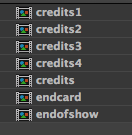
    Screen Shot 2013-05-29 at 3.26.34 PM

    This is a screenshot of my file structure in AfterEffects. I put all of the credits into one mp4 for safe keeping. I named the title sequence the credits, but other than that it’s good. The numbered credits are for the different parts (part one, etc) and the end card goes on to each of them. Credits and end of show is for the four minute video.

    5 29 – YouTube.

    full – YouTube.

    sharing options:

    • Share
    • Share on Tumblr (Opens in new window) Tumblr
    • Print (Opens in new window) Print
    • Share on LinkedIn (Opens in new window) LinkedIn
    • Share on X (Opens in new window) X
    • Share on Reddit (Opens in new window) Reddit
    • Share on Pinterest (Opens in new window) Pinterest
    • Share on Facebook (Opens in new window) Facebook
    • Email a link to a friend (Opens in new window) Email
    Like Loading…
  • Haptic App Presentation

    May 29, 2013
    Hapticapppres5 292 from Katarina Countiss


    Haptic, the App. (Website)

    Update 5-31-13: The Instructor’s Response.

    EF: Your presentation today was excellent. Both your spoken assessment and your visuals. You did a great job of taking complex subject matter and making it tangible.

    sharing options:

    • Share
    • Share on Tumblr (Opens in new window) Tumblr
    • Print (Opens in new window) Print
    • Share on LinkedIn (Opens in new window) LinkedIn
    • Share on X (Opens in new window) X
    • Share on Reddit (Opens in new window) Reddit
    • Share on Pinterest (Opens in new window) Pinterest
    • Share on Facebook (Opens in new window) Facebook
    • Email a link to a friend (Opens in new window) Email
    Like Loading…
  • Haptic App Video Prep

    May 29, 2013


    Gesture Markup Language and Gesture Fonts | Gestureworks Core Gestures. A great place to get some free gesture icons.

    Outline for Video:
    1. Intro
    a. Logo screen: Perceptics. The Future is designed.
    2. State Problem
    a. Personalizing Workspace to meet the challenge of context in the world of changing technology.
    3. Related Technology
    a. Leapfrog
    b. Googleglass
    c. Kinect
    4. Required Technology
    a. Introducing Perceptics Tech
    b. Goggles
    i. Camera
    ii. Gesture detecting software
    c. Bracelets
    d. Envision interaction
    5. Describe the downfalls of the competition
    a. Limited vision and functionality with Google Glass
    b. Limited portability with Kinect
    6. Introduce the design of Haptic, A New Way to Draw
    a. Principles behind Haptic
    i. Describe ideal users
    ii. accessibility
    b. Features
    i. Designed primarily to interface with an iPhone 4.
    c. Interface
    d. Versatility
    7. Walkthrough
    8. Business Strategy
    a. Sponsorship from Art Supply Chains
    b. Freemium—valuable features that are designed for power users
    c. Sales in physical merchandise: different kinds of bracelets and goggles for the power users.
    d. Increasing Market Place. Open Source some of the software. This will create new features and ways to engage with the product.
    9. Marketing Strategy
    a. Slow Launch
    b. Initial Niche Market
    c. Internet Video Campaign

    After giving it some thought, I realized for pacing and for potential questions, the presentation should be PowerPoint and a video walkthrough.

    sharing options:

    • Share
    • Share on Tumblr (Opens in new window) Tumblr
    • Print (Opens in new window) Print
    • Share on LinkedIn (Opens in new window) LinkedIn
    • Share on X (Opens in new window) X
    • Share on Reddit (Opens in new window) Reddit
    • Share on Pinterest (Opens in new window) Pinterest
    • Share on Facebook (Opens in new window) Facebook
    • Email a link to a friend (Opens in new window) Email
    Like Loading…
  • Today

    May 28, 2013

    527 – YouTube.

    sharing options:

    • Share
    • Share on Tumblr (Opens in new window) Tumblr
    • Print (Opens in new window) Print
    • Share on LinkedIn (Opens in new window) LinkedIn
    • Share on X (Opens in new window) X
    • Share on Reddit (Opens in new window) Reddit
    • Share on Pinterest (Opens in new window) Pinterest
    • Share on Facebook (Opens in new window) Facebook
    • Email a link to a friend (Opens in new window) Email
    Like Loading…
  • Today’s Animation

    May 24, 2013

    unfold523 – YouTube.

    sharing options:

    • Share
    • Share on Tumblr (Opens in new window) Tumblr
    • Print (Opens in new window) Print
    • Share on LinkedIn (Opens in new window) LinkedIn
    • Share on X (Opens in new window) X
    • Share on Reddit (Opens in new window) Reddit
    • Share on Pinterest (Opens in new window) Pinterest
    • Share on Facebook (Opens in new window) Facebook
    • Email a link to a friend (Opens in new window) Email
    Like Loading…
  • Today’s Animation

    May 20, 2013

    sharing options:

    • Share
    • Share on Tumblr (Opens in new window) Tumblr
    • Print (Opens in new window) Print
    • Share on LinkedIn (Opens in new window) LinkedIn
    • Share on X (Opens in new window) X
    • Share on Reddit (Opens in new window) Reddit
    • Share on Pinterest (Opens in new window) Pinterest
    • Share on Facebook (Opens in new window) Facebook
    • Email a link to a friend (Opens in new window) Email
    Like Loading…
Previous Page Next Page

Blog at WordPress.com.


Loading Comments...
 

    • Subscribe Subscribed
      • Kismet Arts Tangent
      • Join 104 other subscribers
      • Already have a WordPress.com account? Log in now.
      • Kismet Arts Tangent
      • Subscribe Subscribed
      • Sign up
      • Log in
      • Report this content
      • View site in Reader
      • Manage subscriptions
      • Collapse this bar
    %d