Skip to content

Kismet Arts Tangent

Art Collective

    • Fall Program
    • About
    • Blog
    • Contact

recent posts

  • Project Planning
  • Peppermint Products
  • Writing Prep List
  • Automatism
  • Latha’s Prattles

  • Instagram
  • NRD: Web Design Phase 1

    October 26, 2012

    Assignment:

    “The type of site is a hybrid news/blog/magazine site, sometimes called a ‘Blogazine’. Each project needs to have a lot of news and content, as well as some form of advertising. Additional requirements:  Responsive Images, Responsive jQuery slideshow and/or Video, Embedded fonts from Fontsquirell.com, needs to be under 300k, needs to work on IE8, all modern browsers, phones and tablets.  You should surf the web to find similar sites to see what is relevant. Choose one from below:

    Geekbot.com is a digital culture magazine for the gamer/techie/maker/cosplay crowd. It has a lot of user generated content, social media integration and the latest news and information for the digital lifestyle. Its tone is hip, urban, youthful and irreverent. The demographic is young, affluent, sophisticated. The typical user owns a smart phone, a tablet, a gaming console and a laptop and is fluent in social media. See http://www.gameinformer.com/”

    Phase 1 of Web Design

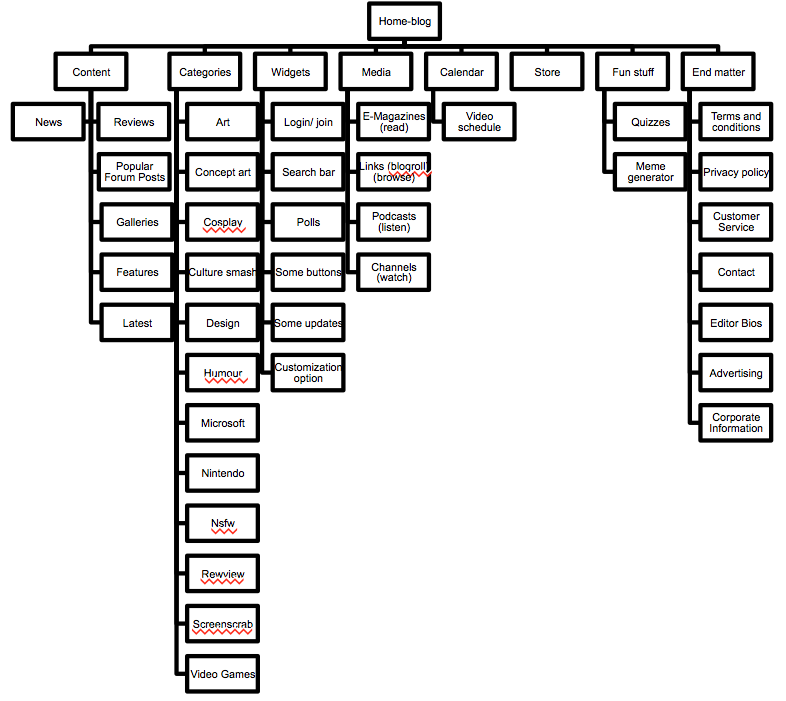
    1. structure information with user-centered considerations (Site Map) *Research the competitors (Links) and content (html)
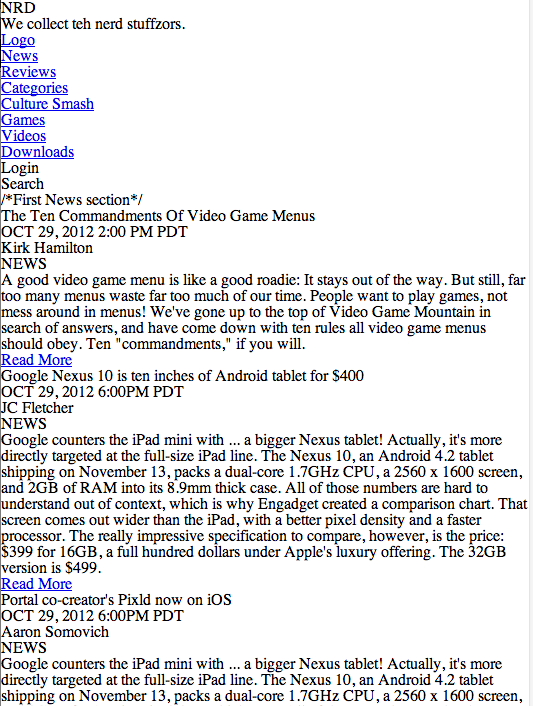

    unstyled html for NRD website

    NRD
    Version 1 of sitemap for NRD


    Joystiq.
    Kotaku, the Gamer’s Guide.
    The Escapist.
    Home – www.GameInformer.com.

    2. communicate style and function Branding: I’ve invented the new brand called “NRD” and designed their logo as pictured below.
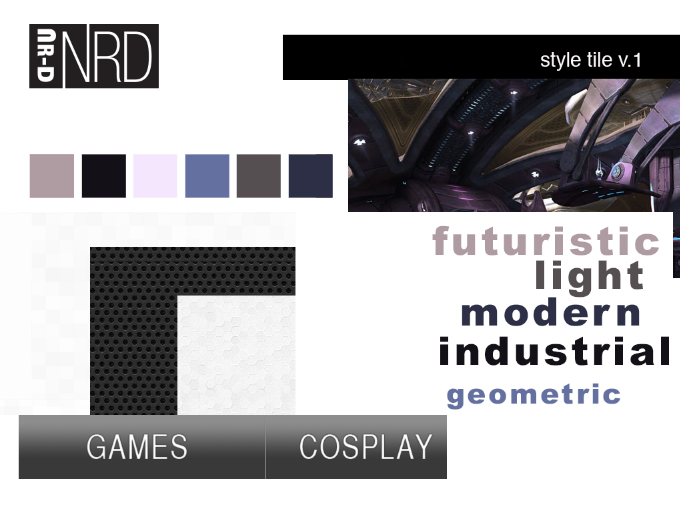
    NRD style tile

    3.wire-framing explore more efficient layouts (Don’t forget Advertisements!)
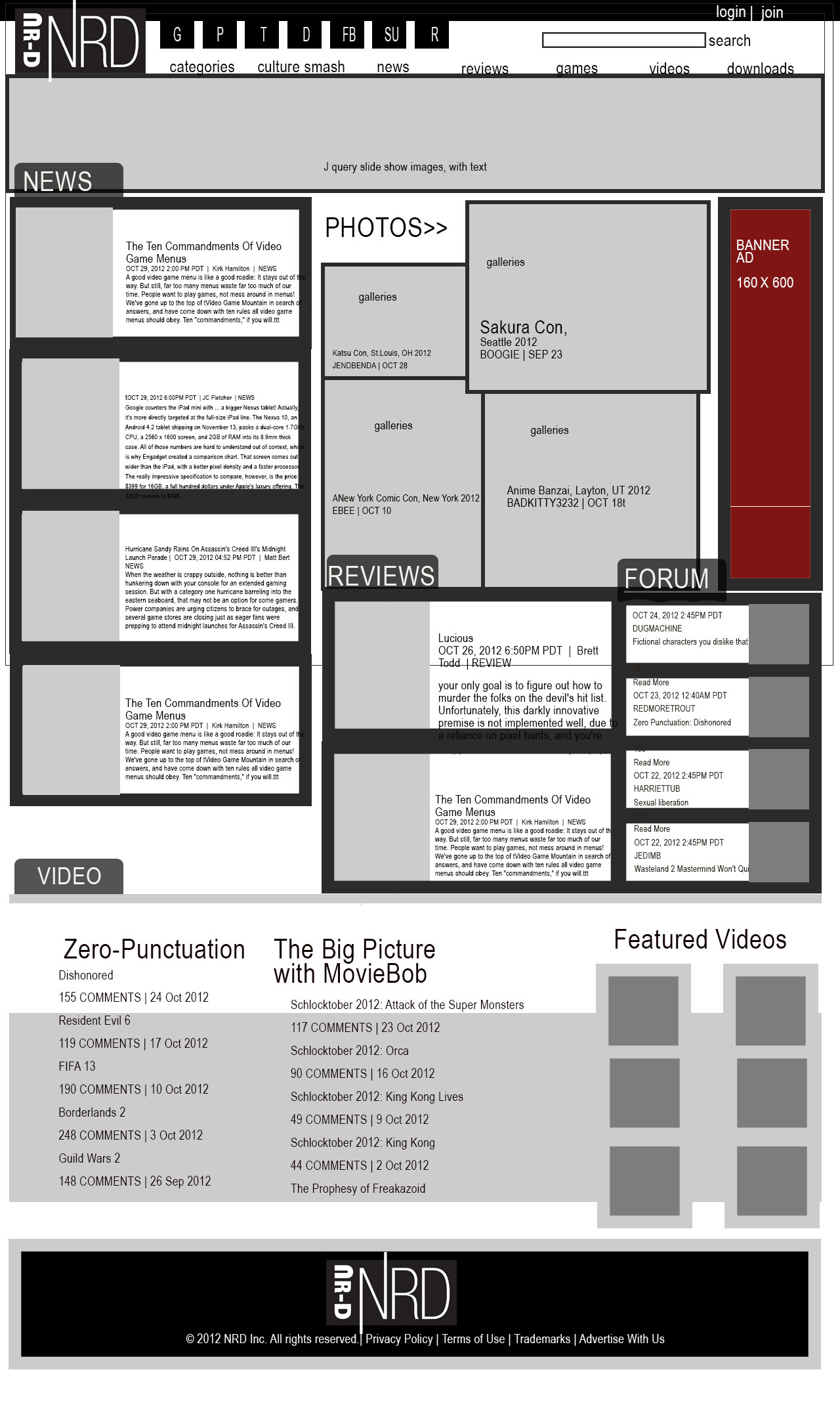
    4. understand mobile strategy and other media requirements Client wants 3 layouts– mobile, tablet (landscape), and desktop *my audience is a bunch of computer nerds so let’s make that, widerscreen. Responsive Images, Responsive jQuery slideshow and/or Video, Embedded fonts from Fontsquirell.com, needs to be under 300k, needs to work on IE8, all modern browsers, phones and tablets. 20-30 good pictures in the image library and at least the initial paragraph for 12-15 feature stories on the front page.
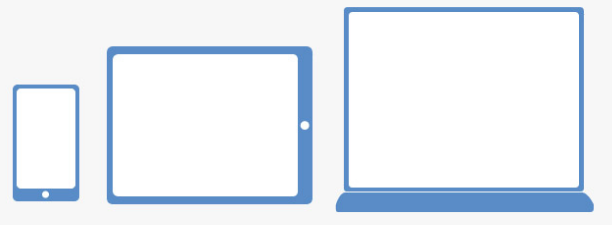
    3 layouts responsive

    sharing options:

    • Share
    • Share on Tumblr (Opens in new window) Tumblr
    • Print (Opens in new window) Print
    • Share on LinkedIn (Opens in new window) LinkedIn
    • Share on X (Opens in new window) X
    • Share on Reddit (Opens in new window) Reddit
    • Share on Pinterest (Opens in new window) Pinterest
    • Share on Facebook (Opens in new window) Facebook
    • Email a link to a friend (Opens in new window) Email
    Like Loading…
  • A Comp and Critique

    October 26, 2012

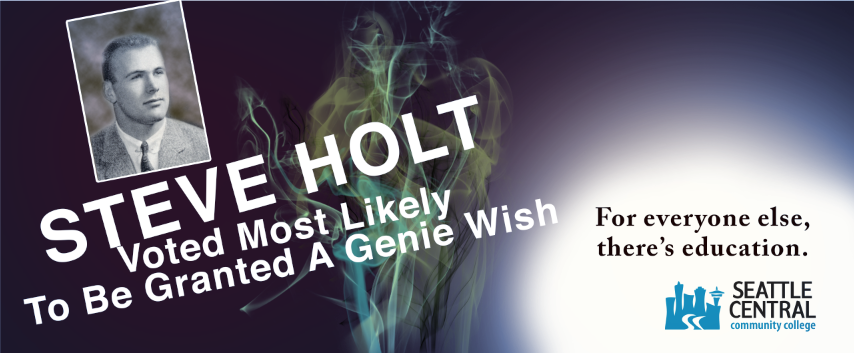
    I submitted this comp today for critique in Advertising Class. What is a comp? That was a question I was asking myself this week. It is something where you push it as far as you can go. It has to be proportional to your intended substrate (thing you are putting it on) and in this case, flush-mounted on foamcore– I’m sure each boss will have their own ideas of what a comp is when it comes to presentation, but something considered and fairly polished. Using your own amateur photography, or excellent photorealistic illustrative skills or as a last resort filching from the Google Images bin, which never turns out to be exactly what you want. A comp is not about submitting less than your intended vision.

    Looking at just the copy, Tom Lenon said that I should say “Seattle Central” and not “education” lest the audience gets confused about the message. I don’t want them to persue just any education, but specifically my client’s establishment.

    Tom Lenon said that “Helvetica” is on his list of “Never Use.” I realized and affirmed that I probably shouldn’t use the name “Steve Holt” (even though I know how much fun it is to see it and read it with that voice in your head saying it “STEVE HOLT!” like they do in my favorite television show, Arrested Development. Tom Lenon said that it needs to be more. This picture isn’t the picture of someone that would really buy into this “genie wish” stuff. What I need is a total doofus. I’ll work on making that visual so I can communicate better to my photographer that I am meeting on tuesday.

    (Earlier Post Relating to This Project)

    sharing options:

    • Share
    • Share on Tumblr (Opens in new window) Tumblr
    • Print (Opens in new window) Print
    • Share on LinkedIn (Opens in new window) LinkedIn
    • Share on X (Opens in new window) X
    • Share on Reddit (Opens in new window) Reddit
    • Share on Pinterest (Opens in new window) Pinterest
    • Share on Facebook (Opens in new window) Facebook
    • Email a link to a friend (Opens in new window) Email
    Like Loading…
  • Advertising Analysis: Kokanee

    October 26, 2012
    kokanee beer ad
    kokanee beer ad

    Advertising Analysis #4 Using Tom Lenon’s Advertising Concept Word List

    Summary: (medium, typeface, etc.) Describe the thing.

    Full page ad in the Stranger Alternative Weekly magazine, photographic approach, yeti holding beer bottle, slanted italic sanserif font cold palette color with a warm accent tertiary.

    visual method:

    colorful language
    Type Plus Image
    Space
    Scale

    Analysis: What approaches? Audience? 

    Audience: young people, alternative, students, 18-65. People with a sense of humour, Pacific NorthWesterners who love the Sasquatch myth, snowy weather, evergreens

    What’s the emotional/social/personal appeal?
    Warm & Fuzzy
    Nostalgia
    Adventure

    What’s the cultural resonance?
    Visual/ Verbal Cliche
    Post Modernism
    Eclecticism
    Subcultures (cultural self identifiers)

    sharing options:

    • Share
    • Share on Tumblr (Opens in new window) Tumblr
    • Print (Opens in new window) Print
    • Share on LinkedIn (Opens in new window) LinkedIn
    • Share on X (Opens in new window) X
    • Share on Reddit (Opens in new window) Reddit
    • Share on Pinterest (Opens in new window) Pinterest
    • Share on Facebook (Opens in new window) Facebook
    • Email a link to a friend (Opens in new window) Email
    Like Loading…
  • Today’s Quiz: Workflow in InDesign

    October 25, 2012
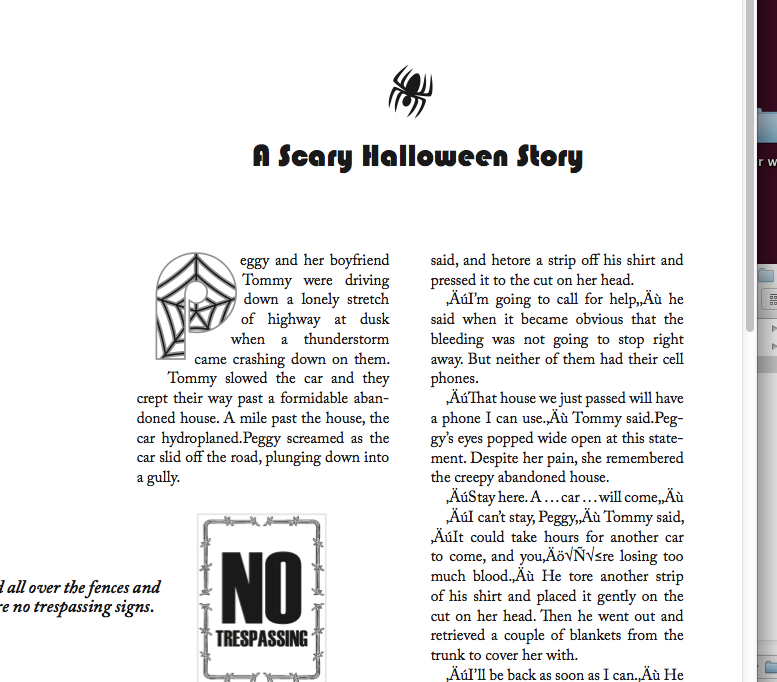
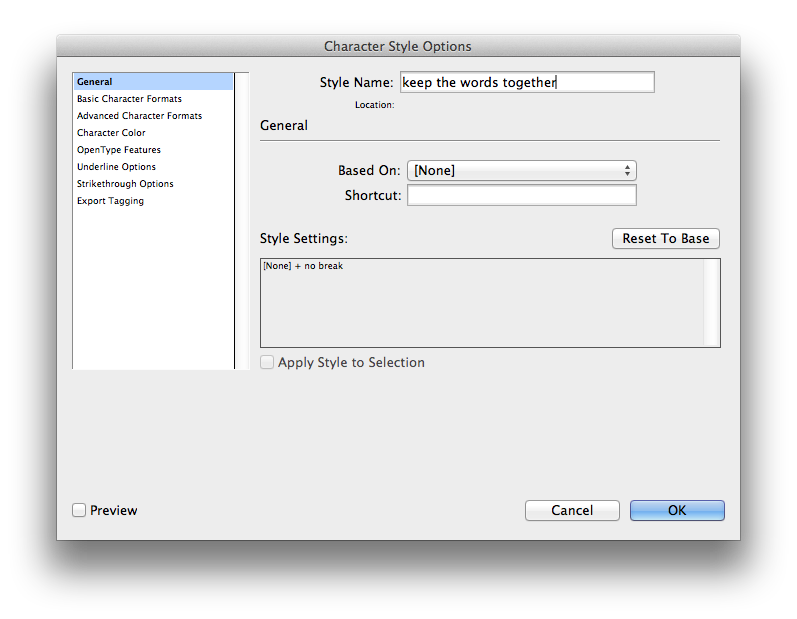
    indesign class halloween story
    Shift+1 in Webdings gives you a scary spider!

    Today’s quiz involved a Halloween Story. It reminds me of those days in Elementary School where when holidays came around suddenly the homework would take on those themes. Why couldn’t we have designed a Christmas card last year? Was it the lame-stream media’s influence on our liberal teachers?

    Chris handed out this really great workflow instruction sheet. I would love it if all of my classes had one of these. A good workflow instruction sheet has the tasks that need to be done in order. I want to use it as my checklist for all my InDesign assignments in the future (and edit it when I find better tactics):

    Instructions. A Simple Workflow (40 minutes) Part 1

    Create New Doc (Letter)
    Create Paragraph Styles

    including Next Style
    Create Character Styles
    Create Nested Styles
    Create Object Styles for:
    Image Frame
    Main Text Frame
    Folio
    (Include Paragraph Styles as part of Text Frame Anchored Objects)

    Create Object Styles for Anchored
    Objects (or after place and format): Incl. Drop Cap, NoTres Image Spider image and PullQuote
    Create Text frame
    Place Text ‘hallowtext’
    Find/Change & edits for returns (etc.)
    Apply Object Style for Main Text Frame
    Add, Create or Insert Anchored Objects – Format

    Type Folio Area and Apply Object Style
    Instructions. A Simple Workflow (5 minutes) Part 2
    Place Text file, ‘AddText’ before the paragraph that starts… “Tom- my slowed the car…” Test your anchored objects.
    Instructions. A Simple Workflow (15 minutes) Part 3
    Create new document
    Load Paragraph, Character and Object styles
    Create a new text frame
    Place Sasquatch text and format using all of the items you have available from what you created earlier.
    Save both files to my drop box
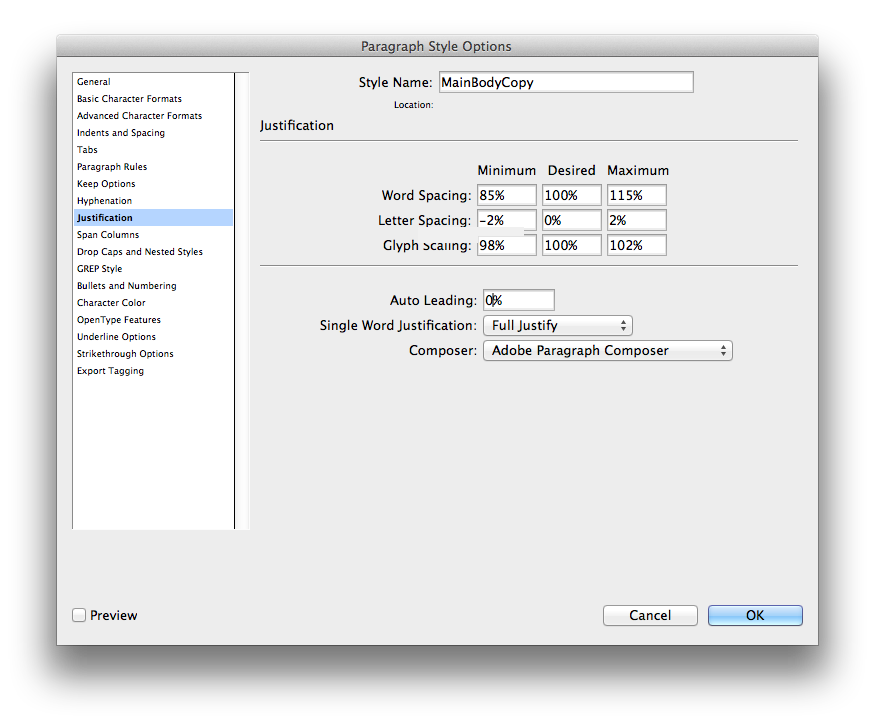
    Below are images of dialog boxes with some suggestions for formatting. I’ll try to add more as I go.
    screen grab indesign justification rules
    screen grab indesign

    sharing options:

    • Share
    • Share on Tumblr (Opens in new window) Tumblr
    • Print (Opens in new window) Print
    • Share on LinkedIn (Opens in new window) LinkedIn
    • Share on X (Opens in new window) X
    • Share on Reddit (Opens in new window) Reddit
    • Share on Pinterest (Opens in new window) Pinterest
    • Share on Facebook (Opens in new window) Facebook
    • Email a link to a friend (Opens in new window) Email
    Like Loading…
  • Drifters: Lessons of Self-Directed Learning

    October 24, 2012

    As part of my special project for this quarter, I will be curating a multi-faceted course companion for After Effects. However, I have gotten a bit off track. I thought my best learning would be done while working on something of my own that I liked and wanted to work with, but I am realizing that I won’t learn new techniques and I won’t understand the interface like that, so I am developing a checklist to structure my “self-project” sessions. Next post will be one where I follow the tutorials really closely and glean valuable techniques vs. floundering in a sea of interface.

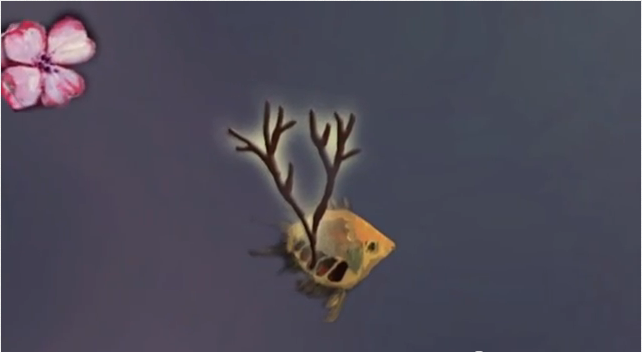
    Today, I wanted to animate this painting of mine to help me explore After Effects. (Am I too lazy to come up with new material?) I learned that negative amounts in scale doesn’t mean it recesses into an infinitely small abyss. I worked with a lot of layers, organizing and toggling visibility to focus on the layer that I was working on. There are a lot of dogwood flower layers in this project. I learned that like any project with duplicated layers, that if one has a value that shouldn’t be there (note the scale on the flowers that show up prematurely) that the mistake will be duplicated and annoying to correct.

    fish and dogwood

    Checklist for Classwork:

    Review My Timeline
    Discover Tutorials
    Develop Materials for Executing a Project outline in a tutorial
    Work Alongside tutorial until completion
    Reflect and Document on newly learned technique

    sharing options:

    • Share
    • Share on Tumblr (Opens in new window) Tumblr
    • Print (Opens in new window) Print
    • Share on LinkedIn (Opens in new window) LinkedIn
    • Share on X (Opens in new window) X
    • Share on Reddit (Opens in new window) Reddit
    • Share on Pinterest (Opens in new window) Pinterest
    • Share on Facebook (Opens in new window) Facebook
    • Email a link to a friend (Opens in new window) Email
    Like Loading…
  • Group Drawing

    October 24, 2012

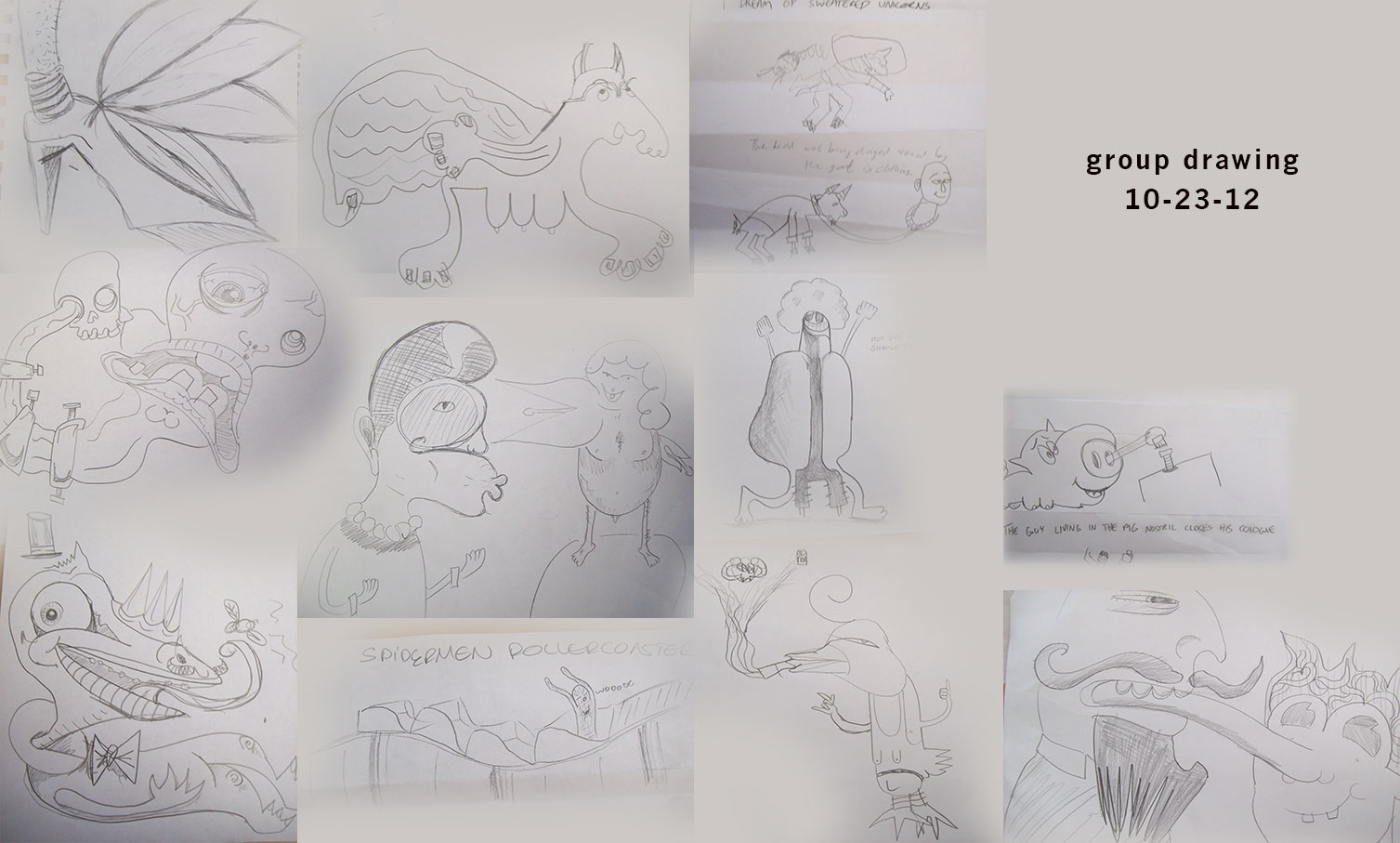
    At the Drawing Club meeting this week, we started by drawing a still life of gourds. After getting warmed up, Jill showed up briefly and mentioned Exaggeration which led nicely into the talk that ensued about group drawing. There are many ways to collaborate, generate ideas and draw together. At the meeting, we did a few techniques. Telephone Pictionary is always popular. “Grocery Cart Driving Spiders” evolved into “Spiderman Rollercoaster!” We also did a couple of round table drawing sessions. It’s where each person contributes a line, any kind of line, straight, wavy, or curved until something starts to develop. I encouraged everyone to riff when they felt like it, giving details to the abstract until it started to form something that none of us would come up with separately. After a couple rounds, each person had to finish the drawing that they were handed, adding shading and more details to flesh out the drawing. This is a good improvisonational drawing exercise. I think it’s valuable to take what would have been a mistake or unintended line and incorporate it.

    sharing options:

    • Share
    • Share on Tumblr (Opens in new window) Tumblr
    • Print (Opens in new window) Print
    • Share on LinkedIn (Opens in new window) LinkedIn
    • Share on X (Opens in new window) X
    • Share on Reddit (Opens in new window) Reddit
    • Share on Pinterest (Opens in new window) Pinterest
    • Share on Facebook (Opens in new window) Facebook
    • Email a link to a friend (Opens in new window) Email
    Like Loading…
  • Ravenna Gardens: Website Design Polishing

    October 22, 2012

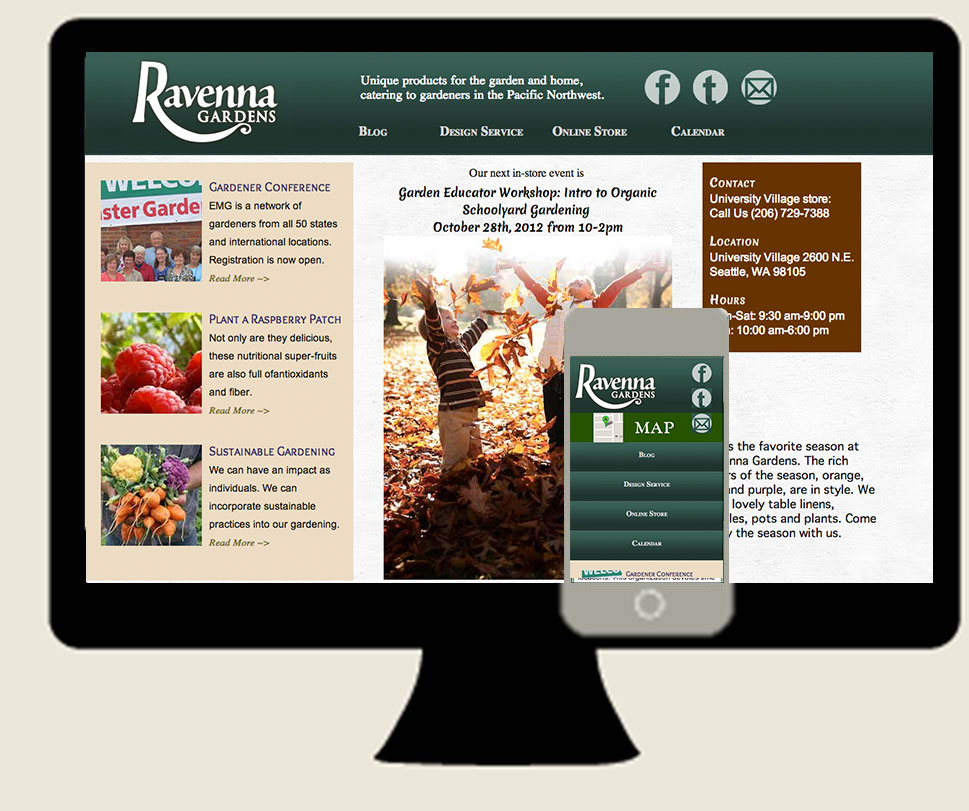
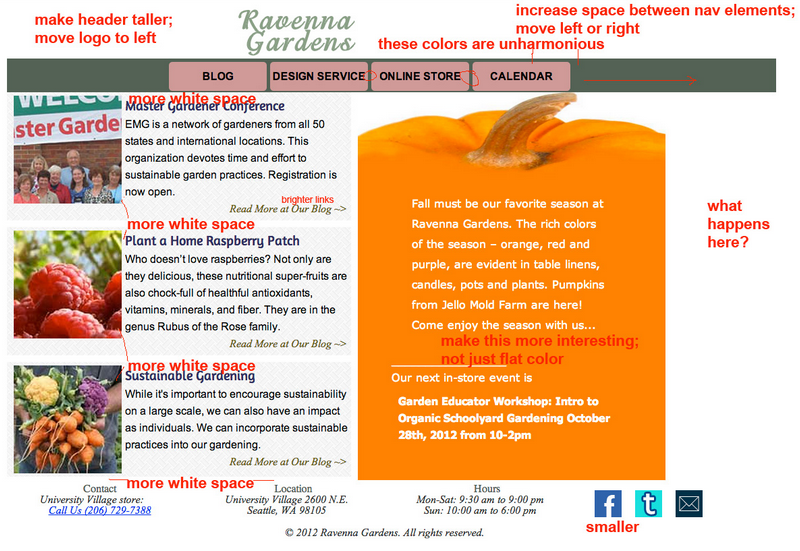
    Ravenna Gardens Desktop Mobile ScreenshotsKatsite Project 1  I am continuing to make deviations from my wireframes as I respond to critiques of this website. Above is the latest version. It is 192.0 K. I cut down the file size by using Google Fonts instead of the Adobe Edge Fonts which run their javascript that takes up over 100 K. I put the social media buttons in the “header” because I wanted them to be prominent. When I am looking to “follow” a website, I look for them in the top nav first.

    Fadiman Critique
    Fadiman’s Critique

    Why does it look so different from last week? Well, I had one of those moments where I realized I wasn’t fully grasping the brand’s identity. The logo seemed separate from the page and the navigation seemed to be slapped on there. Firstly, I redesigned the logo. Then, I consolidated the nav, social media buttons and logo into the header. And slipped the contant info into a third column on the side. Pretty much the principle of “important info flows to the top.” I reevaluated the content and separated the second column into more meaningful chunks.

    I decided that despite how much I like seeing slideshows functioning, that my site should be something comfortable and not flashy. Especially content-loaded websites, I think that with all of this text, a slideshow as big as I was proposing last week would be more distracting than helpful or ornamental.

    (Earlier Post Relating to This Project)

    sharing options:

    • Share
    • Share on Tumblr (Opens in new window) Tumblr
    • Print (Opens in new window) Print
    • Share on LinkedIn (Opens in new window) LinkedIn
    • Share on X (Opens in new window) X
    • Share on Reddit (Opens in new window) Reddit
    • Share on Pinterest (Opens in new window) Pinterest
    • Share on Facebook (Opens in new window) Facebook
    • Email a link to a friend (Opens in new window) Email
    Like Loading…
  • Storytelling and Mobile, A talk at InfoCamp Seattle, 2012

    October 19, 2012
    powers of ten ray charles eames
    A still from Charles and Ray Eame’s Video The Powers of Ten

    Session 7, NamHo Park @namho

    Sunday at InfoCamp, Namho Park shared a beautiful presentation about communication technology. It’s a matter of scale.

    Firstly My Story I journal, I have a history and by telling some of those details to others I share my personal stories. In the olden days, my story wouldn’t have been told. At most, an entry in a family book, born, maybe a marriage date and then the date of my death. If I was a pharoah, I’d have a scribe following me around, writing my story as I was living it.

    Nowadays, information storage is plentiful and devices to record my life are numerous. Human brains create narrative. We love making and consuming stories. (StoryCorps, QuantifiedSelf)

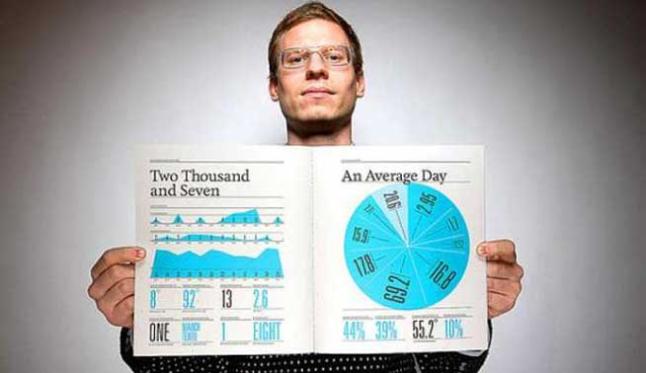
    Nicholas Felton and his personal infographic
    Nicholas Felton

    Nicholas Felton is an infographic designer who collected information about his life, about his father, to create annual reports. These collections weren’t just data. They were curated to form meaning. He was one of the founders of Daytum. You think to yourself, I’m not that crazy data collector that he is. Well, guess what. He helped design your new facebook that collects all of that personal data for you and rearranges it into Timeline.

    Others’ stories How can we ingest them easier? Answer: friendly interface. Facebook among others is so captivating because of all the stories, all of the pictures. Flipboard, Daum, Scavenger reinforce our pursuit of the intersection between media and reality.

    Collective Story We are the stories that we tell ourselves. Our identity is reinforced by these stories. What does a city tell themselves about themselves? History has been curated by historians, but now we record our information. What can the data we contribute do? Will our tweets and facebook statuses condense into the historical narrative? When you generalize, individuals’ stories are bent and blurred. Ushaidi, A tech company, collects users contributions, showing graphs of frequency of crisis reports telling a very specific story about what’s happening in a region. (Other story-telling websites: Cowbird, Momento, We Feel Fine

    Information Overload Curation has value by definition. If we let the #trending messages tell us what’s important, we might miss the things that truly matter. Tweets Per Second is a way to measure how important something is to culture some might say. Beyonce’s baby hit the top of the list whilst Steve Jobs death is number nine on the list. (article)

    What are valuable metrics that will help us sift through all of the stuff that is recorded? Jonathan Harris demonstrates a photo essay’s power when his camera is hooked up to his heartbeat and increases frequency of capture as his heart rate goes up in The Whale Hunt.

    As a civilization, we spend a great deal of time collecting information about ourselves, our past, our identity. The power of the machine to collect this information for us frees us up to do other things instead of scrapbooking, journaling and indexing. There will be a backlash. As individuals, we want to find ways to capture our memories in a way that will resonate best with how we think, whether that’s audio recordings, blogs or even drawing and writing. Mobile will be there. Mobile is our new scribe that follows us everywhere. Our phones are changing the way we think. It tells us stories and tells our stories and it fits in a pocket.

    sharing options:

    • Share
    • Share on Tumblr (Opens in new window) Tumblr
    • Print (Opens in new window) Print
    • Share on LinkedIn (Opens in new window) LinkedIn
    • Share on X (Opens in new window) X
    • Share on Reddit (Opens in new window) Reddit
    • Share on Pinterest (Opens in new window) Pinterest
    • Share on Facebook (Opens in new window) Facebook
    • Email a link to a friend (Opens in new window) Email
    Like Loading…
Previous Page Next Page

Blog at WordPress.com.

Loading Comments...
  • Subscribe Subscribed
    Kismet Arts Tangent
    Join 102 other subscribers

    Have a WordPress.com account? Log in now.

  • Kismet Arts Tangent
    View site in Reader
    Manage subscriptionsSign upLog in
    Report this content
    Collapse this bar
%d