Skip to content

Kismet Arts Tangent

Art Collective

    • Fall Program
    • About
    • Blog
    • Contact

recent posts

  • Project Planning
  • Peppermint Products
  • Writing Prep List
  • Automatism
  • Latha’s Prattles

  • Instagram
  • Advertising is not Easy

    October 12, 2012

    Today in Tom’s class. A brief summary: banana cannon, graffiti is an old hat, “You are writing what you think are ads,” prismism. You can’t be successful if you’re always safe, but you have to make sense.You can’t be successful if you don’t give your work the effort it deserves. Okay is failure. 18-year-olds are sophisticated message consumers.
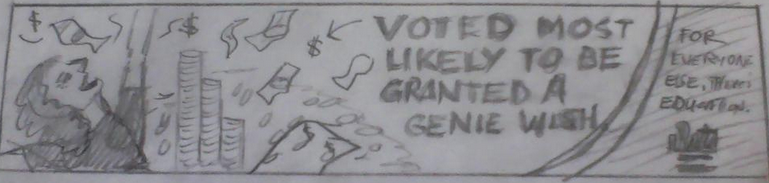
    granted a genie wish advertising thumbnail
    Text reads “VOTED MOST LIKELY TO BE GRANTED A GENIE WISH. For everyone else, there’s education. Seattle Central.”

    This was one (the best one, which says a lot) of the several thumbnails I submitted for critique. It was really heartbreaking having Tom read the headlines out loud as if they weren’t the funniest things ever. He went quickly through them, one after another slowly tearing down my expectations of being hailed the next Julian Koenig (copywriter for Think Small campaign). This is my first hurdle, the first of many times that I will think I am not sharp enough to be in advertising. He said, be straight-faced when I make the joke. Advertising audiences love piecing it together themselves, working for the reward of looking like a Magic Eye painting. I can’t give away the joke. He suggested that maybe from this brainstorm I take the idea of “magic isn’t the answer” with me and try some more at this thumbnailing business. That being said, I have a lot of thinking to do.
    sharing options:

    • Share
    • Share on Tumblr (Opens in new window) Tumblr
    • Print (Opens in new window) Print
    • Share on LinkedIn (Opens in new window) LinkedIn
    • Share on X (Opens in new window) X
    • Share on Reddit (Opens in new window) Reddit
    • Share on Pinterest (Opens in new window) Pinterest
    • Share on Facebook (Opens in new window) Facebook
    • Email a link to a friend (Opens in new window) Email
    Like Loading…
  • Features of InDesign

    October 11, 2012

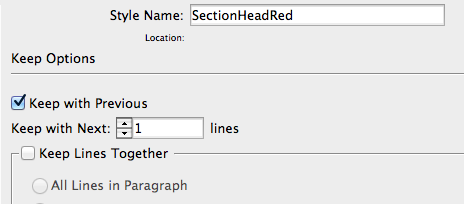
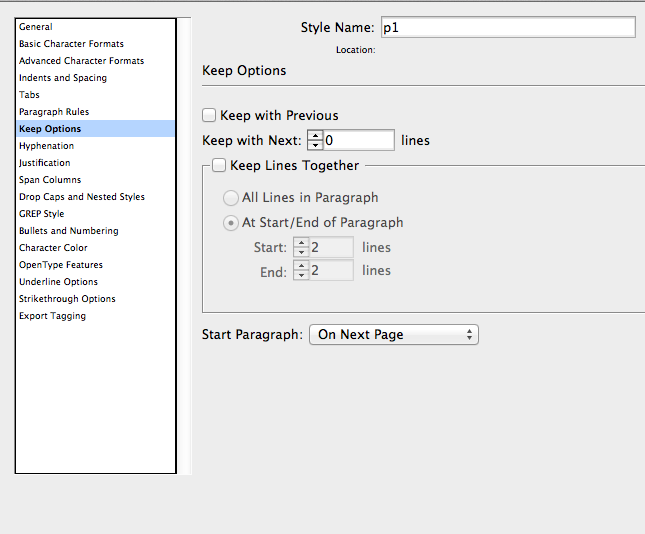
    Screen Shot keep options

    Keep Options. This blows my mind. What does it mean? Why is it here? It’s a way for your chapters or whatever to always start on the right page, or the left page, or what have you. What are some other features that you might have never bothered to look for and done everything one at a time? Loads. So much that I can’t even begin to blog about it. As a new rule, when you’re in InDesign and have some free time, just explore all the buttons. I think that because the software has to be so versatile, there’s a lot of features that can be creatively applied to achieve the task you want (like negative indentation). There are also a lot of features that can mess you up if you accidentally turn them on and forget about them (again, long list).

    The baseline grid options use leading numbers! The baseline grid also overrides what leading in your paragraph styles you have going on.

    1. set up your baseline grids (Command B)
    2. optical kerning
    3. tell paragraph styles to adhere to baseline grid
    4. flow text
    5. apply body copy to everything
    6. then use Command F to find and apply styles

    –I’ll add to this page as I go if I can. This InDesign is boggling my mind.–

    11-14-12

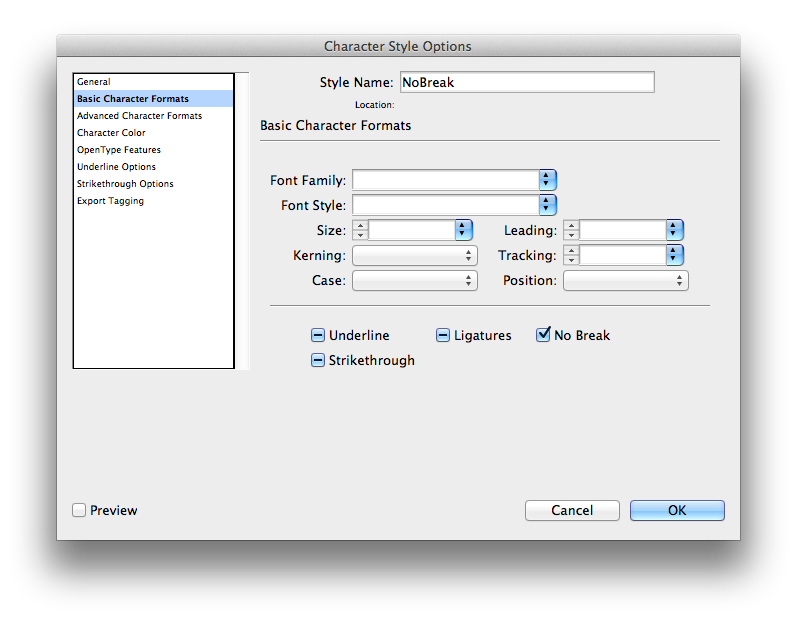
    no break character style
    Good for keeping things together like URLS and proper names

    Eyedropper: double click for style-grabbing fun

    how to keep paragraphs together a bit
    how to keep paragraphs together a bit
    how to keep sectionheads together
    how to keep sectionheads together
    balance columns and align to baseline grid
    gives InDesign permission to mess with your frame to balance columns.
    content collector
    content collector–it also imports container.

    sharing options:

    • Share
    • Share on Tumblr (Opens in new window) Tumblr
    • Print (Opens in new window) Print
    • Share on LinkedIn (Opens in new window) LinkedIn
    • Share on X (Opens in new window) X
    • Share on Reddit (Opens in new window) Reddit
    • Share on Pinterest (Opens in new window) Pinterest
    • Share on Facebook (Opens in new window) Facebook
    • Email a link to a friend (Opens in new window) Email
    Like Loading…
  • Small Website Additions: Favicon and Error Page

    October 11, 2012

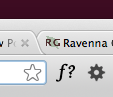
    favicon In Web Design class, I find that I feel a little better adding the features favicon and 404 page. They take less than fifteen minutes each for some nice touches to your website.

    What is a favicon? It’s that little icon in the tabs in the browser. After Googling how to Favicon, I found this Favicon wordpress article that lead me to Faviconer. Next time, I am going to Google what I want plus the suffix “er” and see what comes up. I looked up other code for this, but ended up using what Favioner fed me and it worked right away.

    What is a 404 page? It’s that page that comes up annoyingly when you find a broken link or type in an address kind of wrong. This one is an easy tutorial to follow. I recommend to follow best practices and make your error page funny but helpful. (Make sure your linking code is correct. Specifically: http://edison.seattlecentral.edu/~kcount01/ if you were me on the school’s servers.)


    sharing options:

    • Share
    • Share on Tumblr (Opens in new window) Tumblr
    • Print (Opens in new window) Print
    • Share on LinkedIn (Opens in new window) LinkedIn
    • Share on X (Opens in new window) X
    • Share on Reddit (Opens in new window) Reddit
    • Share on Pinterest (Opens in new window) Pinterest
    • Share on Facebook (Opens in new window) Facebook
    • Email a link to a friend (Opens in new window) Email
    Like Loading…
  • Preference Set-Up for InDesign CS6

    October 11, 2012

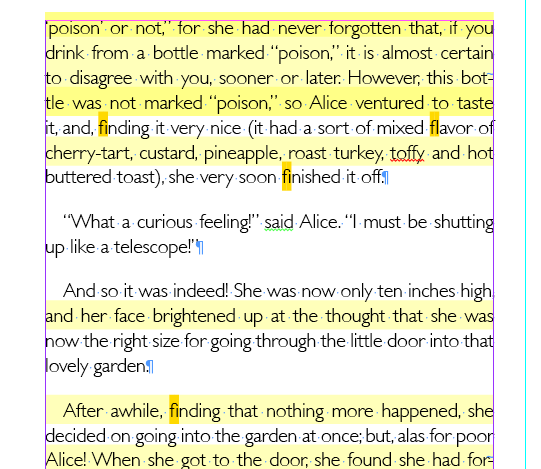
    Screen Shot highlight options InDesign

    Today, Chris Sullivan went over Preferences to have set up for working in InDesign. Without opening up a file, but after launching InDesign, you can change the defaults for the rest of the time you are working with the software. Here’s what I recommend changing from the standard default. You can change these when you are working on specific documents that may require other settings, but this is a great place to start.

    List of things to change:

     Set your workspace to [advanced] (located in the upper right corner)

    (InDesign->Preferences->Type)

    Check Enable in Layout View
    Check Delete Empty Pages

    (InDesign->Preferences->Composition)

    Check everything in the highlight section

    (InDesign->Preferences->Units & Increments)

    The cursor key: .003″

    Kerning/Tracking: 10/1000em

    Rulers: [inches]

    Keyboard increments: 1pt

    (InDesign->Preferences->Spelling)

    Check Enable Dynamic Setting (typos look very unprofessional)

    (InDesign->Preferences->File Handling)

    Snippet Import… Position at [Original Location]


    And there you have it.


    sharing options:

    • Share
    • Share on Tumblr (Opens in new window) Tumblr
    • Print (Opens in new window) Print
    • Share on LinkedIn (Opens in new window) LinkedIn
    • Share on X (Opens in new window) X
    • Share on Reddit (Opens in new window) Reddit
    • Share on Pinterest (Opens in new window) Pinterest
    • Share on Facebook (Opens in new window) Facebook
    • Email a link to a friend (Opens in new window) Email
    Like Loading…
  • Introduction to After Effects

    October 10, 2012

    As part of my special project for this quarter, I will be curating a multi-faceted course companion for After Effects.

    Introduction:

    After Effects is an Adobe Program (exports .aep), very similar in its design as its buddies Photoshop, Flash, and PremierPro. It’s also compatible with these other softwares in the same way that InDesign, Photoshop and Illustrator have some nesting capabilities. As in other Adobe Software, where “artwork” is the file you are creating, in After Effects, you are creating a “composition,” like music– there’s timing involved.

    Like InDesign, until you export as video, your .aep file merely links to existing videos stored on your hard drive and that keeps down file size. It’s more like PremierPro in the interface. A lot of shortcuts are similar between AE and other Adobe programs, ex. shift constrains and spacebar gives you the hand tool. I would recommend being familiar with how layers (especially layer effects) in Adobe programs work before diving into After Effects because it has layers on steroids.

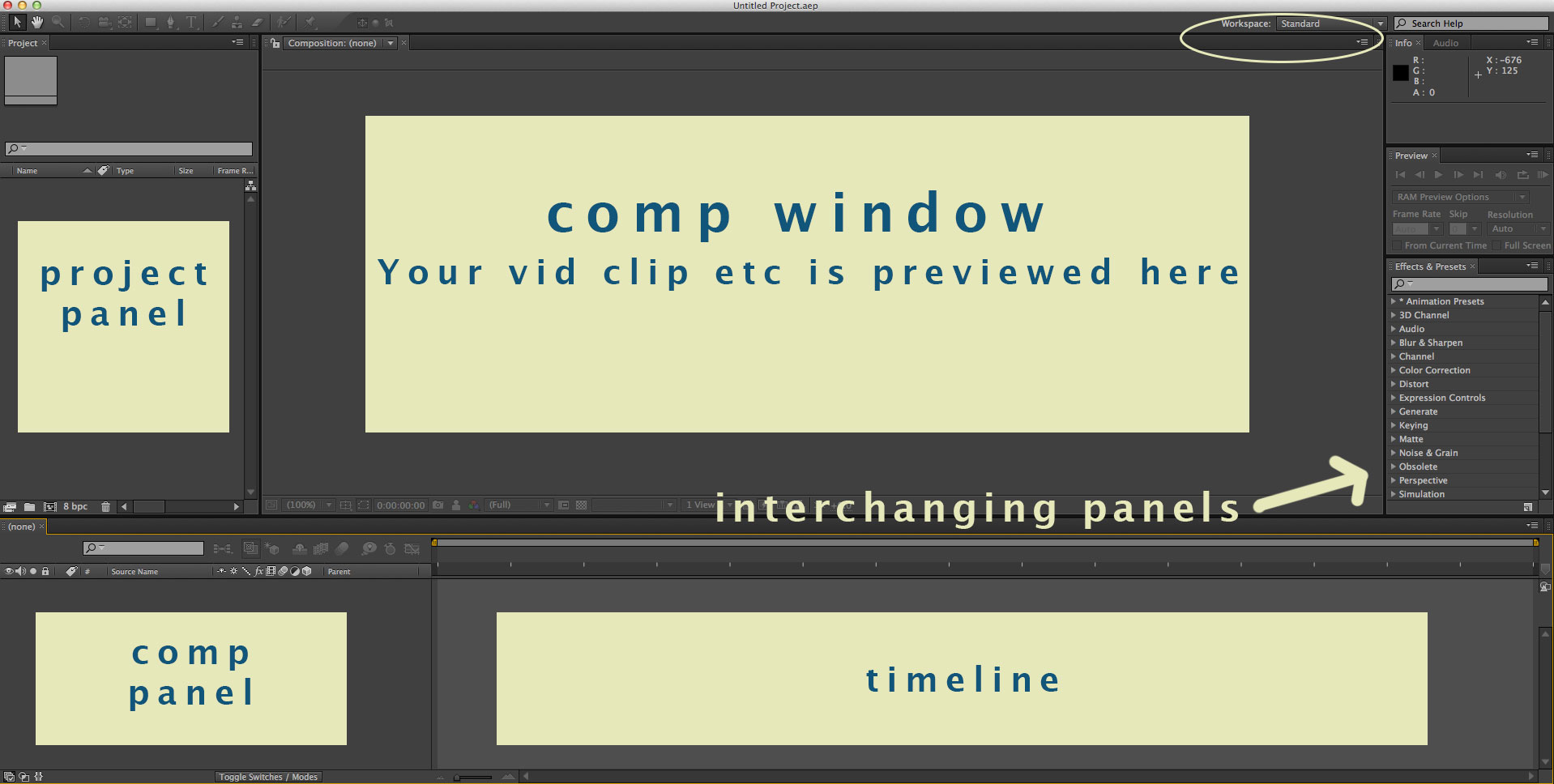
    anatomy of After Effects interface

    Anatomy of After Effects:

    Your workspace can be customized, but don’t try that just yet. Just make sure it’s set to standard. (As indicated in the above image by the yellow oval.)

    Introduction video tutorials:

    GreyScaleGorilla— workflow oriented, creating a basic geometric shape animation sequence. The basics of animating and pre-comping. He refers to the shortcuts a bit. Try to keep up with a glossary of shortcuts.  Level: Beginner

    Techtopia— workflow oriented, adding effects and type to an existing video clip. “The ABSOLUTE BASICS of keyframing, masking, video effects, and importing video.” Level: Super Beginner

    This tutorial reflects how we need to build files– with the clever use of shapes. You see a moving fluctuating frame, but it is a series of squares on top of each other.

    What is pre-comping? “PreComposing is the process of creating a separate composition out of one or more layers in your open composition” says Barry Williams. GreyScaleGorilla guy is taking an animation he made and duplicating it and altering it to be a motif for his composition.

    After Effects- Examples of finished product

    Vimeo Gallery— some examples of AfterEffects projects

    sharing options:

    • Share
    • Share on Tumblr (Opens in new window) Tumblr
    • Print (Opens in new window) Print
    • Share on LinkedIn (Opens in new window) LinkedIn
    • Share on X (Opens in new window) X
    • Share on Reddit (Opens in new window) Reddit
    • Share on Pinterest (Opens in new window) Pinterest
    • Share on Facebook (Opens in new window) Facebook
    • Email a link to a friend (Opens in new window) Email
    Like Loading…
  • Book Design Progress

    October 9, 2012

    Using my critiques as a checklist for next time:

    1. Consider content. What has it’s own formatting? (By that, I mean, are there documents in what you are designing that come a certain way, with the author signed at the bottom– that’s always flush right.)
    2. Consider non-content. Do not number pages with nothing on them.
    3. Decide information hierarchy. Small Caps or All Caps but not both. Simplify your system.
    4. In book design, right side is dominant.
    5. Look for widows. Don’t let those words be so lonely.
    6. Get the best resolution you can for your scanned in images.

    sharing options:

    • Share
    • Share on Tumblr (Opens in new window) Tumblr
    • Print (Opens in new window) Print
    • Share on LinkedIn (Opens in new window) LinkedIn
    • Share on X (Opens in new window) X
    • Share on Reddit (Opens in new window) Reddit
    • Share on Pinterest (Opens in new window) Pinterest
    • Share on Facebook (Opens in new window) Facebook
    • Email a link to a friend (Opens in new window) Email
    Like Loading…
  • Tshirt Design for SCCC Tobacco-Free Cause

    October 9, 2012

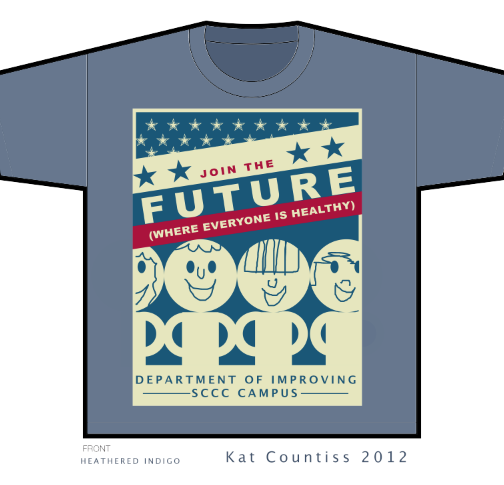
    join the future tee shirt design sccc

    Creative Brief For TeeShirt Design

    “Let’s see…

    1)      We would like to do about 100 to 200 T-Shirts. 


    2)      The shirt will be used for our first event (A Cigarette Butts Clean-Up, where students and employees volunteer to pick up the cigarette butts on campus and then we count each butt to see how much we as a college are littering and creating health and environmental hazards) but the shirt doesn’t need to say anything specific in terms of addressing  the “Cigarette Butts Clean-Up” event itself because if we have left over shirts, then I would like to use them for other Tobacco Free activities in the future. 


    3)      But what it should say is something very general, like “Let’s Go Tobacco Free, SCCC!” Or just something really general about SCCC trying to be a Tobacco Free College.   I’m definitely open to your students making up their own tag lines and logos as long as it is general towards our efforts in being a Tobacco Free College.  In fact, I would like the students to make it T-shirt design that they think is “cool” to wear, one in which they would like to wear themselves, with a slogan/design/logo that is fun, or catchy, YET definitely tasteful (nothing perverse or vulgar, etc).  For example, University of Oregon just went Tobacco Free and their T-shirts said, “WTF!”  (with print below:  “We’re Tobacco Free!”) and that was attention-grabbing, yet still tasteful…


    4)      I’m open to any colors as well.  We were thinking teal blue because of SCCC’s marketing colors as seen on our website, but I’m not committed to that.  For colors, we just wanted uniformity so that everyone who is out there volunteering on our Butts Clean-Up day would have the same colors on and that might strike conversation with other students who are watching and who might ask, “what is everyone in those T-shirts doing?” “

    Execution

    I wanted to create a design that didn’t speak negatively. “Don’t do this” doesn’t really resonate with people. My campaign slogan “Join the Future” is positive and subtle. The underlying approach is peer pressure. Join the future, join the people of tomorrow, the forward thinkers. I wanted this to be a versatile shirt. It can be used for a bunch of different events. I also did not target smokers whom with I greatly sympathize. As for my color palate choices, I think I may have been influenced by the ubiquitous political talk of the upcoming election.

    sharing options:

    • Share
    • Share on Tumblr (Opens in new window) Tumblr
    • Print (Opens in new window) Print
    • Share on LinkedIn (Opens in new window) LinkedIn
    • Share on X (Opens in new window) X
    • Share on Reddit (Opens in new window) Reddit
    • Share on Pinterest (Opens in new window) Pinterest
    • Share on Facebook (Opens in new window) Facebook
    • Email a link to a friend (Opens in new window) Email
    Like Loading…
  • CSS quiz

    October 9, 2012

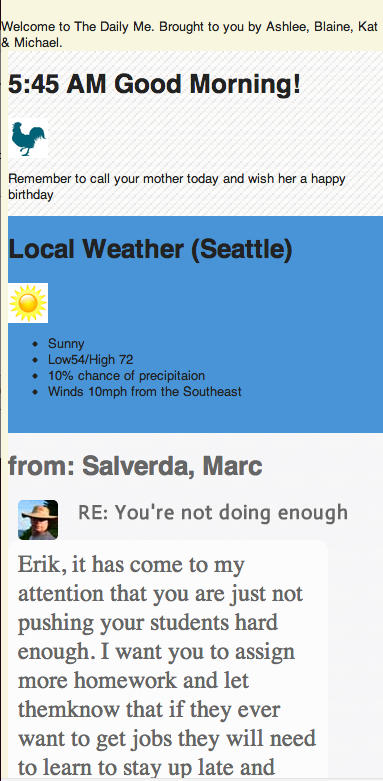
    Screen Shot of facebook phone quizToday, I had my first CSS quiz. (What’s CSS?) I love the field I have chosen. I got to make this with some school chums instead of answer A, B, C or D. I enjoyed the thrill of working with people against the clock.

    We did well, checking our design in the browser throughout the one hour we had to complete to the best of our abilities, the styling of what someone proposes the future will look like: facebook phone.

    This stuff is on its way. It has been for years. I love this idea about getting information I am interested in faster and more efficently. I kept thinking about Nicholas Negroponte while doing this quiz. How did he know in 1995? The future is getting closer. And I am going to use CSS on it.

    sharing options:

    • Share
    • Share on Tumblr (Opens in new window) Tumblr
    • Print (Opens in new window) Print
    • Share on LinkedIn (Opens in new window) LinkedIn
    • Share on X (Opens in new window) X
    • Share on Reddit (Opens in new window) Reddit
    • Share on Pinterest (Opens in new window) Pinterest
    • Share on Facebook (Opens in new window) Facebook
    • Email a link to a friend (Opens in new window) Email
    Like Loading…
Previous Page Next Page

Blog at WordPress.com.

Loading Comments...
  • Subscribe Subscribed
    Kismet Arts Tangent
    Join 102 other subscribers

    Have a WordPress.com account? Log in now.

  • Kismet Arts Tangent
    View site in Reader
    Manage subscriptionsSign upLog in
    Report this content
    Collapse this bar
%d