Skip to content

Kismet Arts Tangent

Art Collective

    • Kismet Arts Tangent
    • About
    • Blog
    • Contact
    • Donate

recent posts

  • Photo shoot with Kayleigh Shawn
  • Testimonials
  • Fractures Poem
  • Poetry
  • Pixel art products

  • Instagram
  • StumbleUpon: A Review

    July 17, 2012
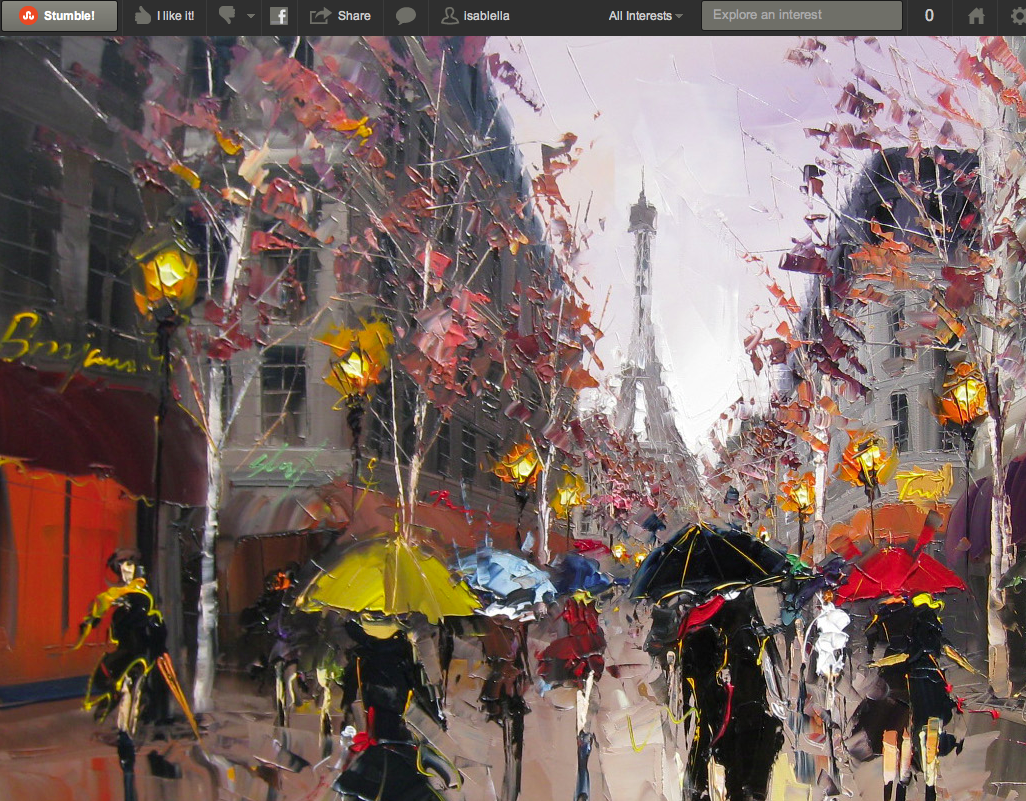
    StumbleUpon paris scene
    Painting by Kal Gajoum

    I’m such a Luddite. StumbleUpon has been around since 2001. I’ve only recently heard about someone in my social circle using it (my sister). So, then, a week later, I’m trying it. Today’s my first day and I have to say that StumbleUpon is fascinating.

    It’s called a discovery engine (a form of search engine). The Pandora of the Internet. (Pandora is a site for listening to music based on kinds of music you like. They use algorithms to categorize songs by their genres, subgenres etc.) Just think of Pandora but replace songs with websites and stations with your interests and that’s StumbleUpon. I have a new appreciation for the Internet. “Stumbling” is like traveling through the ghetto of an eccentric country. You meet some strange characters that you would have never run into otherwise.

    A downside to all of this Social Media is attribution. So much of what Internet companies do is free to the point where they have to constantly push their brand as part of their business strategy. (Here’s an article about how there are no more direct links from StumbleUpon) Who painted this picture I found and at least 11 others wanted to share with their friends? The neato thing is that I can surf the web Internationally with this StumbleUpon. The not-so-neat-o thing is that this Paris painting is by Kal Gajoum and I had to do some investigating to find that out. It’s hosted on a russian art site. It should be more obvious. The new rule with content generation is (should be) that the title of the work and who did it should be embedded on the image otherwise after getting passed around a few times, its origin is horribly obscured.

    I think people are afraid of registering for new social media sites because it feels like a commitment. That’s how I thought. Social Media is a big world. I feel like a husk of an Interneteer if I can’t at least scope this stuff out. My advice for timid Interneteers: Have a standard username and profile pic for your exploring of social media. Try it out. It’s not supposed to be your one-stop-shop for Social Media. It’s a tool to help you navigate the expansive terrain of the Internet. And don’t be afraid to register, try it out for a few minutes, an hour, a week, etc. and leave and never come back. It’s just a new flavor of ice cream. Try it and then you know what you like/don’t like about that particular discovery engine.
    sharing options:

    • Share
    • Share on Tumblr (Opens in new window) Tumblr
    • Print (Opens in new window) Print
    • Share on LinkedIn (Opens in new window) LinkedIn
    • Share on X (Opens in new window) X
    • Share on Reddit (Opens in new window) Reddit
    • Share on Pinterest (Opens in new window) Pinterest
    • Share on Facebook (Opens in new window) Facebook
    • Email a link to a friend (Opens in new window) Email
    Like Loading…
  • Web Design Process: Responsive and Responsible Design

    July 17, 2012
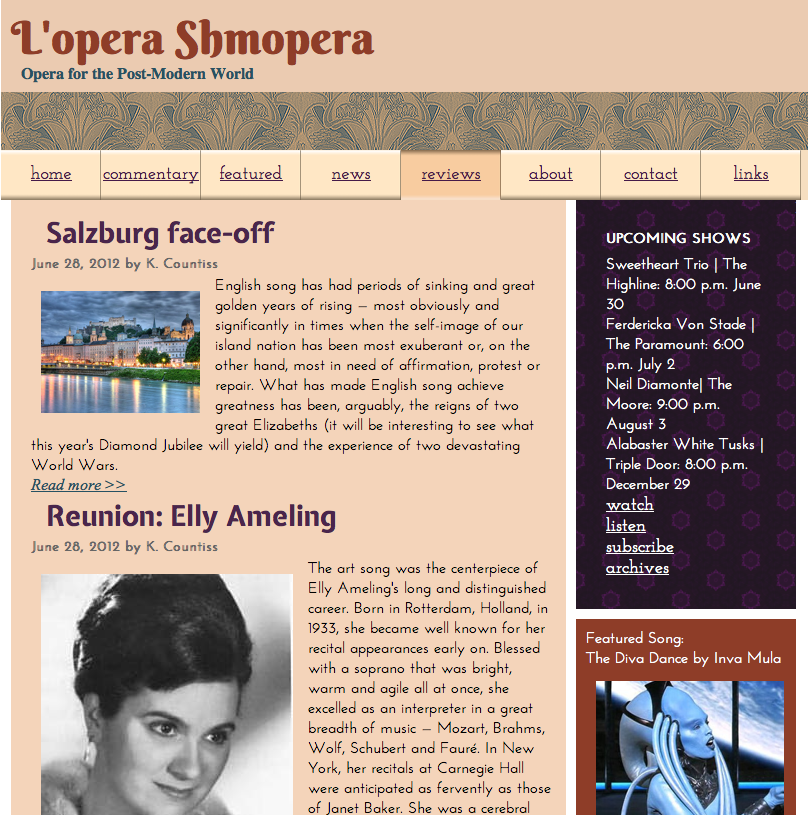
    lopera shmopera web responsive desktop to phone
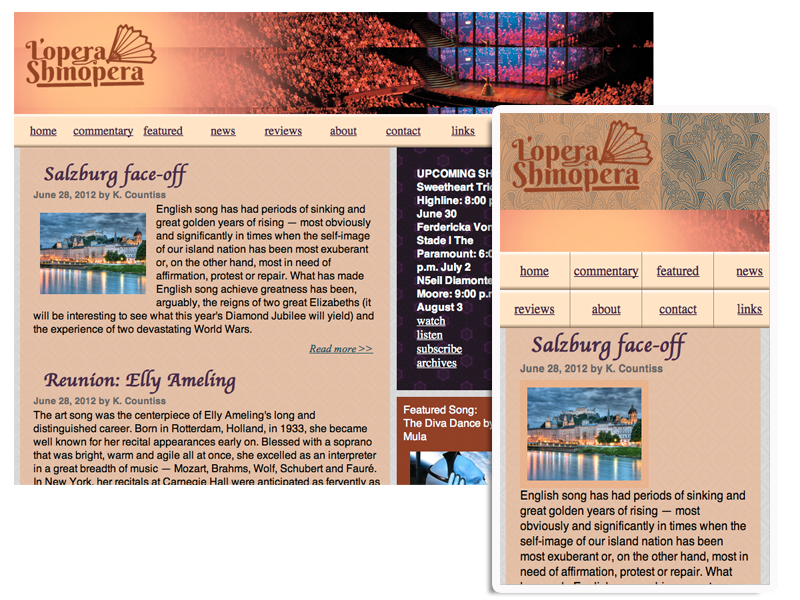
    L’opera Shmopera Website: Desktop and Phone View

    (L’Opera Shmopera–design changes from last week: added logo png and work-in-progress photographic header)

    Responsive Design is Responsible Design. Sounds catchy, right? This is the kind of thing that’s embroidered on the pillows of Web Design superstars. People no longer say that this is a trend. What is Responsive Design?

    It’s when your website says “whoa, you’re using a phone to look at this? … wait, let me get the phone layout for you… ahhh. Much better.” Or a tablet. (Try making the window smaller now and  you’ll notice this blog is responsive.) I’m still reeling a bit about what tablet devices really mean for web design. Retina displays are an entirely different matter. I won’t be getting into that for a while. More on that here.

    So, yes. I made my L’opera Shmopera Website responsive. Not to tablets, yet. I haven’t gotten that hooked up. But, it is “phone-ready” (as phone-ready as a fake website can be.) How do you know? Make the window smaller and it should lock into a phone-size at a certain point. Between full size and phone size however you can see my pictures floating for a bit. That’s where the tablet layout comes into place, but I haven’t written the script for that, yet.

    Pretty cool, though. I added lines of code and attached another CSS (Cascading style sheets) file to tell the boxes and stuff what to do when the window gets smaller and there you have it. I’m still new at this game. It is difficult to design websites when you don’t name your tags/classes etc. It will get complicated and fast. I’m glad Erik Fadiman instructed us on code commenting. That is very helpful. Web Design with DreamWeaver is like being a puppeteer, your code are the strings. In my case, the strings are tangled because I keep pulling the wrong ones until they are tangled. Using an ID or a class instead of a tag is a good way to tangle your code.

    Another trick is to use the browser to edit your website. Using the code inspector in the Web Dev tool bar, you can make changes and see them in real time in the browser. A good web design work station has two to three monitors, mac and windows and a lot of multitasking going on.

    Some brief instruction on CSS sprites. It’s intriguing mostly because of the name. Sounds fun. It sorta is. A CSS sprites’ origins comes from “a graphic object blended with a 2-D or 3-D scene through graphics hardware” (-Smashing Magazine). It’s a way to have multiple states of the same item saved in a master grid. Then depending on the circumstance, you can call up one of the images within the grid—aligning the images is crucial!

    Things I would stitch onto my pillows (in my mansion of web design love):

    Systematic naming makes a happy home.

    God Bless Web Dev Toolbar.

    You can’t spell cuss, without CSS.

    Code comments are the flowers that bloom in God’s Garden.

    (Earlier Post Relating to This Project)

    sharing options:

    • Share
    • Share on Tumblr (Opens in new window) Tumblr
    • Print (Opens in new window) Print
    • Share on LinkedIn (Opens in new window) LinkedIn
    • Share on X (Opens in new window) X
    • Share on Reddit (Opens in new window) Reddit
    • Share on Pinterest (Opens in new window) Pinterest
    • Share on Facebook (Opens in new window) Facebook
    • Email a link to a friend (Opens in new window) Email
    Like Loading…
  • Adobe Illustrator: My First Map

    July 12, 2012
    map of downtown seattle adobe illustrator screenshot
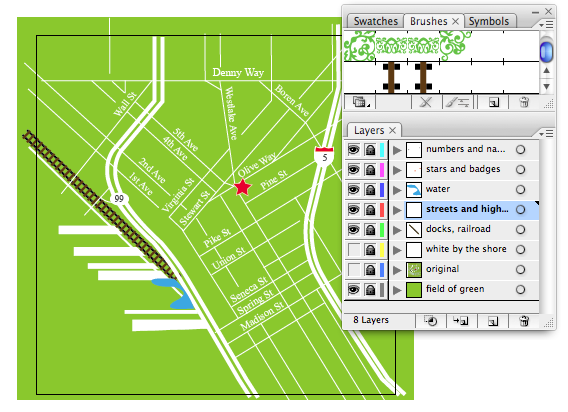
    map of downtown seattle adobe– illustrator screenshot

    As a task for a brochure that my company is making, I created this map in illustrator. When my supervisor told me to make the dark rectangle look more like railroad tracks, I knew it was a job for the brush tool. I made a brush for railroad tracks. It made me think about my first quarter at Seattle Central Creative Academy and Linda Lapping, my Adobe Illustrator teacher who guided our class through the intricacies of Adobe and the wonders of Illustrator. Making this map was a breeze. I named my layers!

    sharing options:

    • Share
    • Share on Tumblr (Opens in new window) Tumblr
    • Print (Opens in new window) Print
    • Share on LinkedIn (Opens in new window) LinkedIn
    • Share on X (Opens in new window) X
    • Share on Reddit (Opens in new window) Reddit
    • Share on Pinterest (Opens in new window) Pinterest
    • Share on Facebook (Opens in new window) Facebook
    • Email a link to a friend (Opens in new window) Email
    Like Loading…
  • Logo Design for L’opera Shmopera

    July 10, 2012
    lopera shmopera logo red text fan
    L’opera Shmopera logo

    I designed this logo for my website in web design bootcamp class. I used Berkshire Swash and added a couple of extra swashes, modified the apostrophe and illustrated a fan. My audience is quirkly and young. I wanted the logo to convey a sense of play and pseudo-elegance, like kitsch and costume jewelry. The L’opera Shmopera brand is accessible and fun.


    (Earlier Post Relating to This Project)

    sharing options:

    • Share
    • Share on Tumblr (Opens in new window) Tumblr
    • Print (Opens in new window) Print
    • Share on LinkedIn (Opens in new window) LinkedIn
    • Share on X (Opens in new window) X
    • Share on Reddit (Opens in new window) Reddit
    • Share on Pinterest (Opens in new window) Pinterest
    • Share on Facebook (Opens in new window) Facebook
    • Email a link to a friend (Opens in new window) Email
    Like Loading…
  • Painting Video: Black and White

    July 10, 2012

    black and white abstract painting

    I made this acrylic painting yesterday after I became frustrated with coding a website. I love art because sometimes there is no “why.” In graphic design, people will ask, “why is it blue” or “why is it three inches tall?” In art, there sometimes is no other reason than “I just was compelled to do it.” I am experimenting with painting. I lost the third installation of this painting video. I need a new camera. My goal is to eventually create an animation effect using paint and video. I have a lot of dreams relating to  visual art. A lot of them look like this. I am trying to solve a design in my sleep. It revolves: I am hoping the solution is as easy as turning it on its side. I wake up feeling like I’ve done nothing.


    Music: Tekno Crazy by  DoKashiteru. I got the music for this video from http://dig.ccmixter.org/ It is licensed under creative commons.

    sharing options:

    • Share
    • Share on Tumblr (Opens in new window) Tumblr
    • Print (Opens in new window) Print
    • Share on LinkedIn (Opens in new window) LinkedIn
    • Share on X (Opens in new window) X
    • Share on Reddit (Opens in new window) Reddit
    • Share on Pinterest (Opens in new window) Pinterest
    • Share on Facebook (Opens in new window) Facebook
    • Email a link to a friend (Opens in new window) Email
    Like Loading…
  • FacebookTimeline: A Review

    July 10, 2012
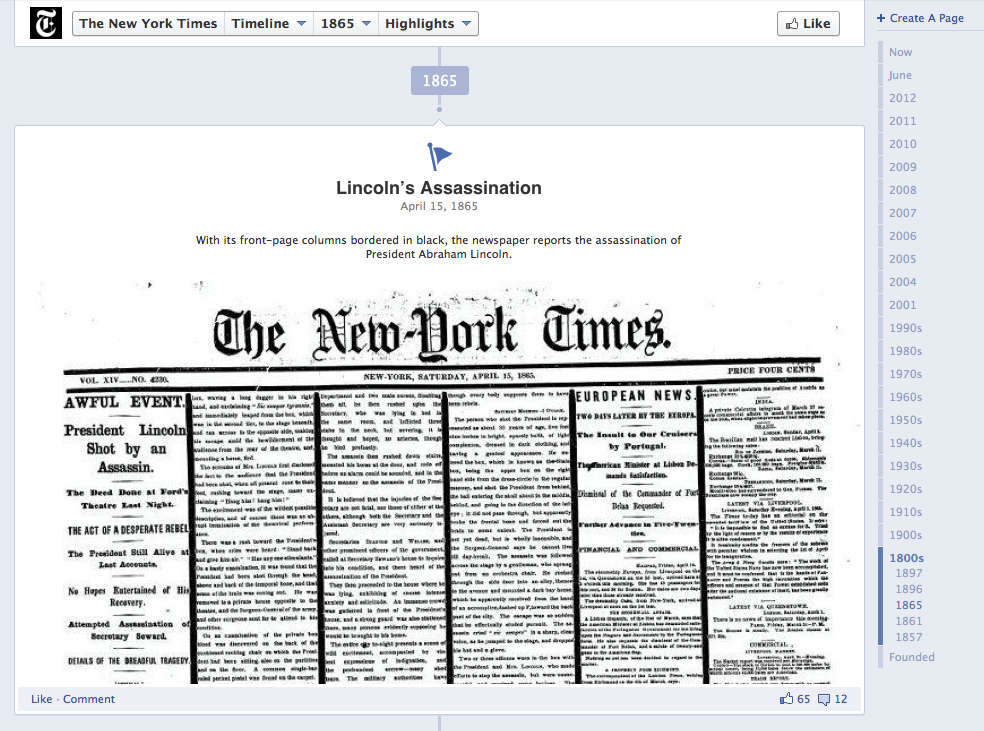
    Screen shot of the New York Times' Facebook Timeline: It goes back to 1857!
    Screen shot of the New York Times’ Facebook Timeline: It goes back to 1857!

    In this morning’s meeting, I’ve been given the task of researching a company’s competitors’ social media efforts. This is a way to go back to the client and tell them where the holes are in their armor and offer to fix them for the company. We had a lively discussion about Facebook. Because Facebook changes so often, their “like” feature also shifts in functionality. By the time companies have figured out what to do with the “like” button, it becomes irrelevant. But, worse, they don’t know it yet. The website they are working on ends up promoting the Facebook brand more than themselves.

    Not to say that all what Facebook does is bad. The link-sharing feature of taking a url and posting it as a status seems to have not changed in the last few years because it is awesome. It posts a thumbnail, the link and a little summary of the linked page. That’s curating, which is Social Media’s primary function.

    That being said. The latest event (that seems to still be rolling in) is Timeline. Facebook Timeline has been called “the worst interface change ever made in the history of human-machine interaction” among other things I wish not to repeat. There are simple graphic design rules not followed. Okay: You’ve indexed posts according to year. Okay: you have a two column layout. Okay: It shifts when new information is added. Not Okay: posts shift from left to right to create a zigzag eyesore.

    Timeline is interesting because you can back-post. This is where you manually put in stuff in the proper year of events, etc. This is crazy because this is not an arbitrary log anymore. It’s not a series of links and statuses that you wrote when you were nineteen. It’s a curated, glamorized facade of yourself. The self that you want to present to the world. And unless you are a meticulous mo’ fo’, you are not going to have a full timeline. To a completist like myself, suddenly I find Facebook full of holes and needing more information. That’s frustrating because what will happen to that hard work and that time spent when Facebook changes again?

    Sorry, Facebook. Though a lot of people feel like they need you to be connected, you are not reliable, not easy to use and not my friend. Dislike!

    sharing options:

    • Share
    • Share on Tumblr (Opens in new window) Tumblr
    • Print (Opens in new window) Print
    • Share on LinkedIn (Opens in new window) LinkedIn
    • Share on X (Opens in new window) X
    • Share on Reddit (Opens in new window) Reddit
    • Share on Pinterest (Opens in new window) Pinterest
    • Share on Facebook (Opens in new window) Facebook
    • Email a link to a friend (Opens in new window) Email
    Like Loading…
  • Web Design Tangent: Where did my background go?

    July 10, 2012

    (My website for this class in its current state.)

    During yesterday’s review session in Web Design Bootcamp, I was recognized for having a website that was more advanced in styling in CSS than the other students. This kind of recognition is unwarranted  in my opinion because I am a terrible coder. I don’t have a system. I don’t pay attention to how I label my files and when something works, I don’t ask why.

    I added :hover states to my nav bar successfully, but when I tried to add hover states to my “read more” buttons, it failed. I couldn’t see my page upload because I had renamed it and I can’t really do that because there’s already a connection between my server and the file name I had before. One could imagine my frustration when I made all these changes and didn’t see them upload to the Internet. I checked my code over and over trying to put things in different divs that were showing up before I realized my error.

    I added pictures by creating new divs for the posts. Erik Fadiman, my instructor, said that blog posts were a lot more complicated to code and this is more of a formatting crutch until  we advance in skill. I learned a lot about the differences between Class and ID and a tags. During the critique of my website, Erik pointed out typographical and stylings that could be massaged. (Designers say to “massage” a design when it is a little horsey and unfinished.) He also noted that I had used an h tag when I should have used an a tag. I should have zigged. It was so easy to zag. Why can’t we use h tags all the way down? Seems simpler than introducing an “a.” P means paragraph. H means heading. What does “a” stand for? A is for ask your teacher. (It actually stands for “anchor” but I have to wonder. Is my site going to float away if I don’t use one?)

    I realized that none of my images were in my image folder, so I put them all there and then I had to relink them all. It wasn’t like using InDesign, where there are cute little warnings and helpful dialog boxes. It was more of a “poof: no more background.” And, I am supposed to figure that out. I might be new at DreamWeaver and not realize where all of the buttons are, but I want my layers panel back. I like seeing my changes  in little boxes that I can click on and off to see the differences. And forget Command+Z. It doesn’t work. No one told me this. Or is it common knowledge?

    Coding in html and CSS is a lot like painting a watercolor. At first, it is the cleanest it will ever be. Slowly as you add more structure, more div tags, your painting will appear faintly. It starts to look really good and then you add more div tags and then forget which a tags go to what. You try rearranging the style sheet and before you know it, a glob of brown has soaked into the page and you cannot salvage it. It’s easier to start over than to rearrange everything to accommodate your new brown smudge.

    I am not the type to know how to ask for help. Partially because I have too much pride. When it finally works, there is an immense satisfaction because it was through my own resourcefulness. Also, when I succeed, especially in DreamWeaver, I only succeed in one way. I learn one thing. When I fail–and that happens often for me– I learn all of the traps one can easily fall in.

    (Earlier Post Relating to This Project)

    sharing options:

    • Share
    • Share on Tumblr (Opens in new window) Tumblr
    • Print (Opens in new window) Print
    • Share on LinkedIn (Opens in new window) LinkedIn
    • Share on X (Opens in new window) X
    • Share on Reddit (Opens in new window) Reddit
    • Share on Pinterest (Opens in new window) Pinterest
    • Share on Facebook (Opens in new window) Facebook
    • Email a link to a friend (Opens in new window) Email
    Like Loading…
  • Go Get Us Social Media

    July 6, 2012

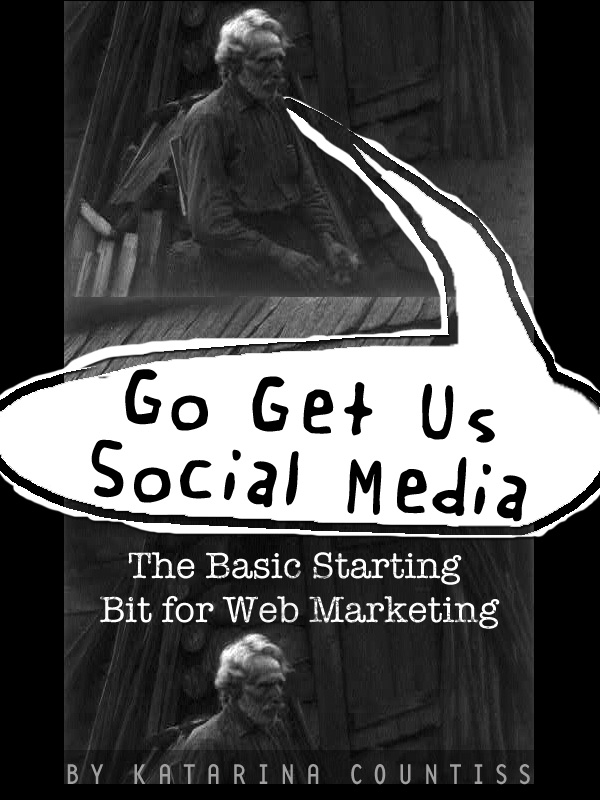
    book cover for Go Get Us Social Media the Basic Starting Bi for Web MarketingThis is for people that don’t really know anything about social media. A lot of books I’ve read about social media don’t start with the the idea of the brand being  the hub of your social media strategy.

    I wanted to explain the initial planning which is in the branding stage. Social media is just a platform for what you want to say. Don’t get intimidated.

    Get people to share your stuff: Here are some tips to make it easy for people to spread word about you.
    http://www.fireflycoaching.com/secrets-to-getting-people-to-spread-the-word/

    Track your mentions: These sites help you keep up with Internet conversations about you.

    • Google Alerts (free)
    • SocialMention email alerts (free)
    • Topsy.com email alerts (free)
    • CoTweet email alerts (free)
    • Facebook Page RSS feed (free)

    Learn More about Internet marketing: Here’s an annotated list of Internet Marketing blogs
     http://www.moosylvania.com/blog/15-internet-marketing-blogs-that-rock/

    Where do blog ideas come from? Stuck for ideas? Get inspired.
    http://www.moosylvania.com/blog/8-ways-to-get-blog-post-ideas/

    http://www.problogger.net/archives/2005/11/29/20-types-of-blog-posts-battling-bloggers-block/

    Improve Long-term blog traffic: Still feeling disconnected? Try these techniques
    http://smashinghub.com/15-tips-to-improve-long-term-blog-traffic-that-you-must-follow.htm

    http://smashinghub.com/extreme-exposure-for-your-blog-posts.htm

    http://smashinghub.com/quick-tips-to-increase-facebook-page-fans.htm

    http://sixrevisions.com/project-management/8-ways-to-promote-your-work-through-internet-collaboration/

    http://www.smashingmagazine.com/2012/06/04/social-media-is-a-part-of-the-user-experience/

    Getting into Twitter: Still feeling disconnected? Try these techniques
    http://smashinghub.com/10-must-have-twitter-tools-and-apps.htm

    http://wp.smashingmagazine.com/2012/01/19/facebook-twitter-google-wordpress/

    Coding: use html to get an edge
    http://designfestival.com/add-rich-snippet-support-in-wordpress-and-dominate-your-personal-brand/

    Specific Marketing Strategy: Look up approaches for your specific niche

    http://designfestival.com/creating-marketing-strategy-for-ux-skills/ specific niche: User Experience

    http://sixrevisions.com/web-applications/10-great-tips-for-using-twitter-as-a-designer/ specific niche: Designer

    http://designfestival.com/best-promotional-tips-for-web-designers-and-developers/ specific niche: web designers and developers

    http://www.logodesignlove.com/self-employed-designer specific niche: freelancing/self-employed designer

    sharing options:

    • Share
    • Share on Tumblr (Opens in new window) Tumblr
    • Print (Opens in new window) Print
    • Share on LinkedIn (Opens in new window) LinkedIn
    • Share on X (Opens in new window) X
    • Share on Reddit (Opens in new window) Reddit
    • Share on Pinterest (Opens in new window) Pinterest
    • Share on Facebook (Opens in new window) Facebook
    • Email a link to a friend (Opens in new window) Email
    Like Loading…
Previous Page Next Page

Blog at WordPress.com.


Loading Comments...
 

    • Subscribe Subscribed
      • Kismet Arts Tangent
      • Join 104 other subscribers
      • Already have a WordPress.com account? Log in now.
      • Kismet Arts Tangent
      • Subscribe Subscribed
      • Sign up
      • Log in
      • Report this content
      • View site in Reader
      • Manage subscriptions
      • Collapse this bar
    %d