Skip to content

Kismet Arts Tangent

Art Collective

    • Fall Program
    • About
    • Blog
    • Contact

recent posts

  • Project Planning
  • Peppermint Products
  • Writing Prep List
  • Automatism
  • Latha’s Prattles

  • Instagram
  • Collaborative Divorce Website Style Tile

    August 21, 2012
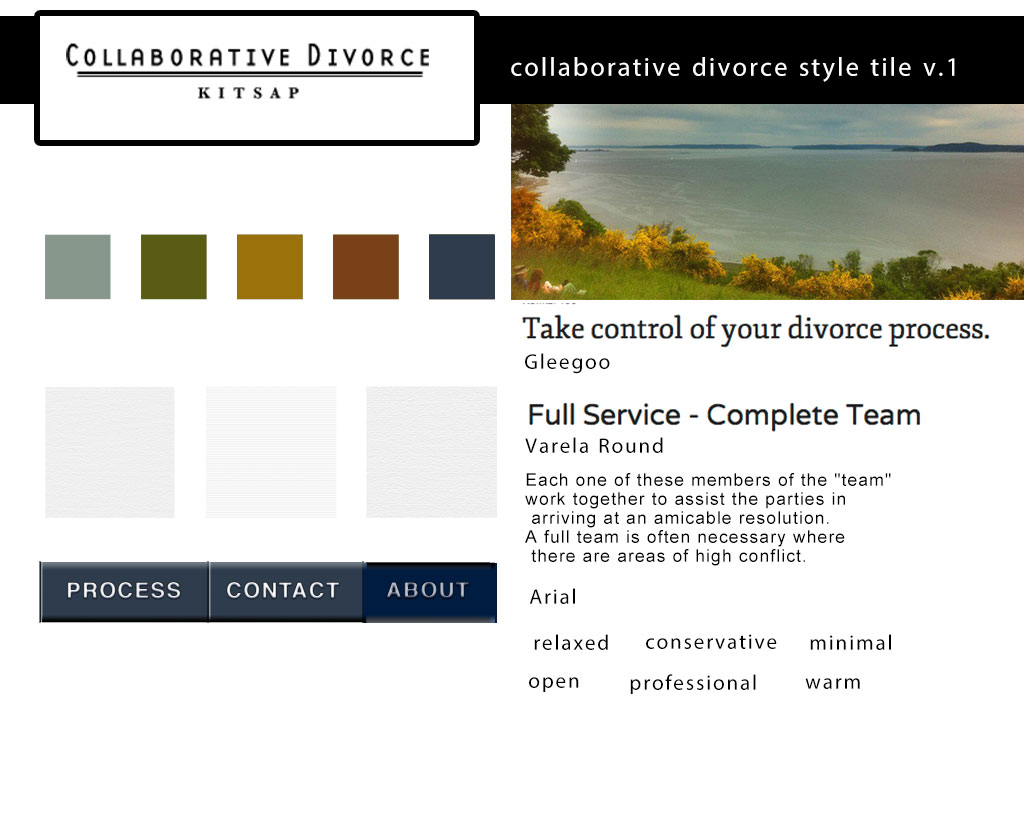
    style tile for collaborative divorce website
    style tile for collaborative divorce website

    FAQ: What is a style tile?

    My newest client is currently using a Template at Yahoo Web Hosting. It’s typographic limitations, stock-photo images and unimaginative swashes makes it look like it hasn’t had enough attention.

    The website is for a Collaborative Divorce service, so I want it to look friendly, warm and professional, a solace for the maritally troubled, hence the warm color palate. I found this great photograph of the Puget Sound in my photographer-friend’s library. He’s allowed me to use it. I created the logo, as well. I used a modern typeface for the main part to convey a sense of “no stuffy-legal-b.s.” that a serif-ed font might convey. I used Baskerville to connote a sense of professionalism and history for the location word “Kitsap” (as in Kitsap County). The textures in the style tiles are really subtle (as they should be considering I got them from Subtle Patterns). They are very conservative– linen, paper and white paperboard.
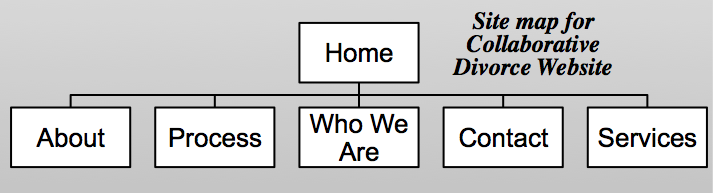

    site map for collaborative divorce website
    site map for collaborative divorce website

    sharing options:

    • Share
    • Share on Tumblr (Opens in new window) Tumblr
    • Print (Opens in new window) Print
    • Share on LinkedIn (Opens in new window) LinkedIn
    • Share on X (Opens in new window) X
    • Share on Reddit (Opens in new window) Reddit
    • Share on Pinterest (Opens in new window) Pinterest
    • Share on Facebook (Opens in new window) Facebook
    • Email a link to a friend (Opens in new window) Email
    Like Loading…
  • Realistic Wrinkled Paper In Photoshop

    August 20, 2012


    Realistic Wrinkled Paper In Photoshop.

    Ignore the corny details about how to make it look like notebook paper, and you’ve got a very simple tutorial about how to make a crinkled texture. Quick and easy! It’s amazing how many interesting affects can be achieved by using different layer modes.

    sharing options:

    • Share
    • Share on Tumblr (Opens in new window) Tumblr
    • Print (Opens in new window) Print
    • Share on LinkedIn (Opens in new window) LinkedIn
    • Share on X (Opens in new window) X
    • Share on Reddit (Opens in new window) Reddit
    • Share on Pinterest (Opens in new window) Pinterest
    • Share on Facebook (Opens in new window) Facebook
    • Email a link to a friend (Opens in new window) Email
    Like Loading…
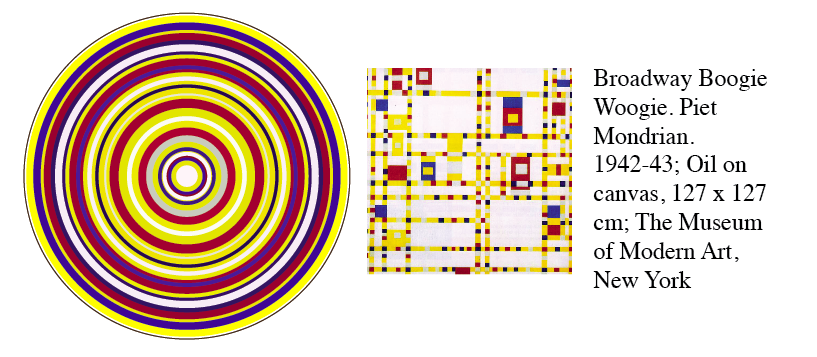
  • Art-rings: I took some paintings and distilled them into circles.

    August 17, 2012

    Boogie Woogie by Piet Mondrian Abstract


    I spent my morning creating “art-rings.” I started out with the idea that I was going to make some circular stickers and I was browsing famous color palates to help with my color choices and then I just got carried away making these concentric circles of my favorite artist’s work.  Creating is like that sometimes. I just have to do it. It doesn’t really make sense or mean much to me. It’s like the work was put there, in the blender of my mind and this came through. Here’s the rest of them. artrings

    sharing options:

    • Share
    • Share on Tumblr (Opens in new window) Tumblr
    • Print (Opens in new window) Print
    • Share on LinkedIn (Opens in new window) LinkedIn
    • Share on X (Opens in new window) X
    • Share on Reddit (Opens in new window) Reddit
    • Share on Pinterest (Opens in new window) Pinterest
    • Share on Facebook (Opens in new window) Facebook
    • Email a link to a friend (Opens in new window) Email
    Like Loading…
  • Poor Man’s Tilt-Shift Photoshop Trick

    August 16, 2012

    chicago tilt-shiftThis is a great tutorial. This is an easy effect to achieve and it’s really fun to look at. It’s really trendy right now, so soak up the fun before it’s overdone!

    I highly recommend you carefully select your photo and add little tweaks to this process. This is a good article about that.

    sharing options:

    • Share
    • Share on Tumblr (Opens in new window) Tumblr
    • Print (Opens in new window) Print
    • Share on LinkedIn (Opens in new window) LinkedIn
    • Share on X (Opens in new window) X
    • Share on Reddit (Opens in new window) Reddit
    • Share on Pinterest (Opens in new window) Pinterest
    • Share on Facebook (Opens in new window) Facebook
    • Email a link to a friend (Opens in new window) Email
    Like Loading…
  • Responsive Design Trends: Research on Education Websites

    August 16, 2012
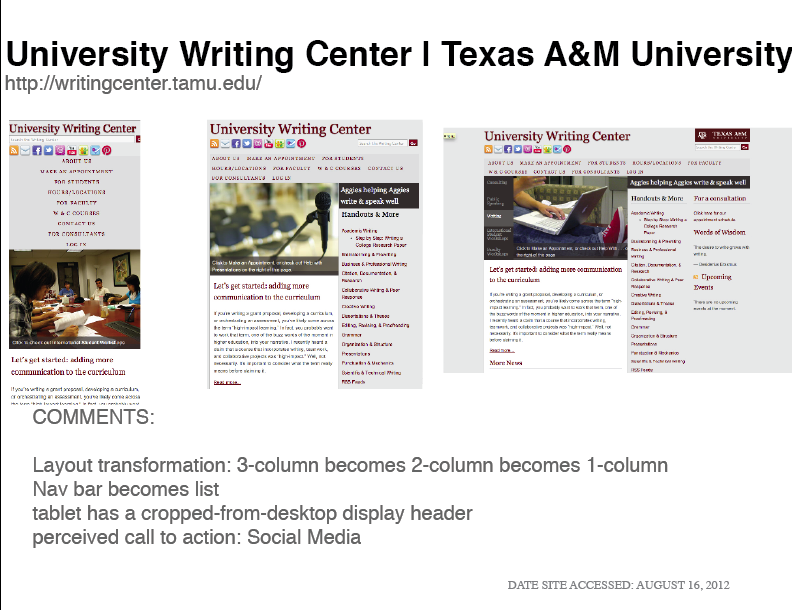
    Screen shots responsive web design research summer 2012 education
    Screen shots of responsive web design. Research summer 2012 education.

    As my last assignment in Web Design Bootcamp, we are to take a snapshot of Responsive Websites in the Summer of 2012. (What is Responsive? I love this article that answers that question.)

    This assignment put forth by Erik Fadiman is one of those tests where it seems the only solution is to call the test unfair and consider it a test of character. No test should be as unfair as this. It’s 2012 and he wants us to find responsive websites and take notes on what their doing. These are precious needles in the haystack of the internet. Things I love and things that I thought would be responsive are not. And many things that are mobile-adapted are separate websites. A good solution, but not the most adaptable. Good design should be imperceptible. One should be able to go to any website on any web-enabled device. End of story. I can’t remember if a site has a separate mobile site or not. And I’m certainly not going to be roaming around on their lame website looking for the link. (Maybe if they’re nice, they’ll put it in the left upper corner or something.)

    Mediaqueri.es is a good place to start looking at responsive websites. The links are all in one place and they are not really organized, so you get a really general visual survey. It seems that to have a responsive website right now, you have to be in the industries of web design or news media or be  just getting on to the “internet” scene. –Or music festivals and conferences. It seems very practical because it is at concerts and such where you need mobile information.– Lucky for people that have held out. They skipped the mandatory renovations that every website will have to go through to stay relevant.

    For my research, I decided to collect screenshots of school/university sites. Karine Joly writes about how difficult it is to update a school website because of funding and staff limitations and the best solution is Responsive Web Design because it anticipates the future and all of the various mobile devices we are destined to be using.

    I noticed that a few websites used a responsive jquery slideshow like the kind I learned how to code in Web Design Bootcamp. It is a great way to add interest and color to a text heavy medium. It was interesting to note the different ways the navigation bar transformed into blocks, lists and menus.

    Here’s my design research_education (a web-view pdf) Can you spot the other trendy tricks the web designers used?


    (Earlier Post Relating to This Project)

    sharing options:

    • Share
    • Share on Tumblr (Opens in new window) Tumblr
    • Print (Opens in new window) Print
    • Share on LinkedIn (Opens in new window) LinkedIn
    • Share on X (Opens in new window) X
    • Share on Reddit (Opens in new window) Reddit
    • Share on Pinterest (Opens in new window) Pinterest
    • Share on Facebook (Opens in new window) Facebook
    • Email a link to a friend (Opens in new window) Email
    Like Loading…
  • Mike’s Tutoring Site–the final stretch

    August 13, 2012
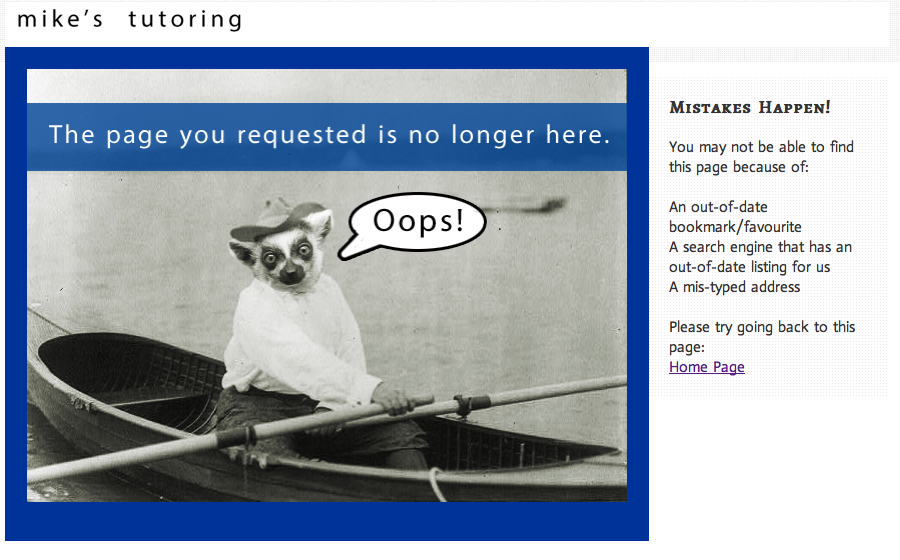
    the 404 error page of mikes tutoring site lemur
    the 404 error page of mikes tutoring site

    Mike’s Tutoring Website. I had a heck of a time with my ErrorDocument (htaccess). A simple linking error caused me so much frustration because I had no idea what to do. The error pages are never helpful. (Below: What came up when I tried to check the link for my custom error page.) Turns out it was a simple addition of a server file name. Mike of Mike’s tutoring was really helpful in pointing out my mistake and telling me the best way to link up my html. (The Internet will offer you an array of choices!)

    I linked my header instead of my logo image. That was a bit troublesome. I’m so tired.


    (Earlier Post Relating to This Project)

    sharing options:

    • Share
    • Share on Tumblr (Opens in new window) Tumblr
    • Print (Opens in new window) Print
    • Share on LinkedIn (Opens in new window) LinkedIn
    • Share on X (Opens in new window) X
    • Share on Reddit (Opens in new window) Reddit
    • Share on Pinterest (Opens in new window) Pinterest
    • Share on Facebook (Opens in new window) Facebook
    • Email a link to a friend (Opens in new window) Email
    Like Loading…
  • Mike’s Tutoring Website Version 4

    August 13, 2012
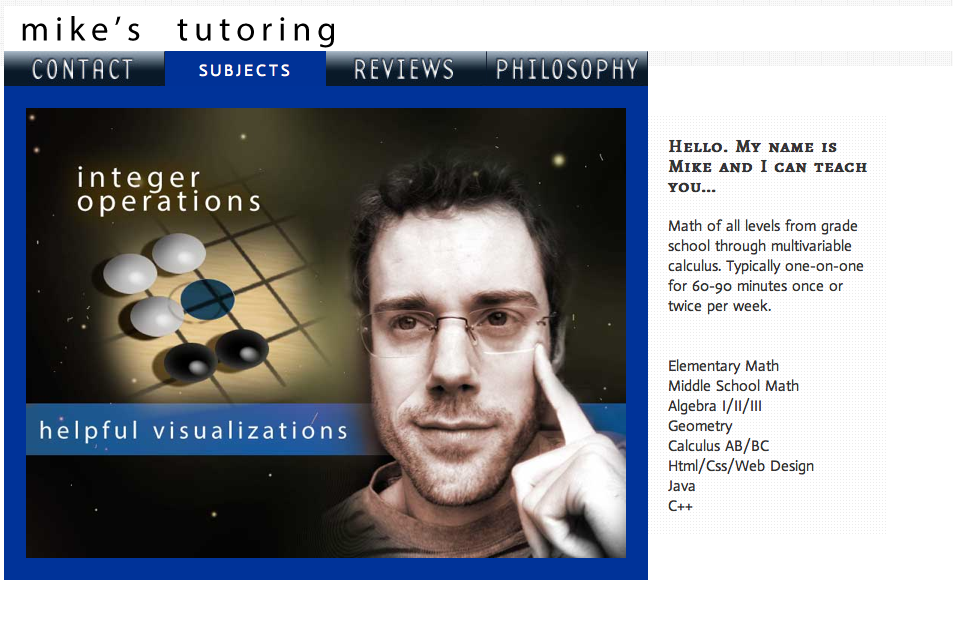
    mikes tutoring website version 4
    mikes tutoring website version 4

    Mike’s Tutoring Website. When I added the pages, I changed the design once again. I realized that since each of the layouts for the pages are almost identical to the home page, I would need a slightly more obvious indication that the user sucessfully clicked through to the next page. This is where the blue frame also makes more sense because when I integrate it when the nav bar, it has a function.

    I realize also that these  kinds of changes can be better avoided by sketching beforehand. But, hey, I’m still learning the order of things. Sometimes, people (like me) want to skip the sketch phase to feel like they are getting something done and up into testing.

    Something that they teach you in design school: every feature should have some kind of function. I’ve seen more than a few students humiliated in front of the class during critique because the instructor asked the most feared question: why?

    I felt a huge sense of accomplishment by added this “tab” styling. The part where the sprite (image) for the navigation bar goes away and html styled text is revealed. Times like that is when I feel like I am truly building something. With design in general, these software programs (InDesign, Illlustrator and Photoshop) offer layers, but in a way, I feel like it’s a crutch for designing things that align. In the case of web design, with the tools of CSS and html, I feel like there are layers that function. When you peel away the CSS, there’s something that still works. It’s kind of like an escalator that breaks down. You still have stairs.*

    *Mitch Hedgeburg joke: “An escalator can never break: it can only become stairs. You should never see an Escalator Temporarily Out Of Order sign, just Escalator Temporarily Stairs. Sorry for the convenience. ”


    (Earlier Post Relating to This Project)

    sharing options:

    • Share
    • Share on Tumblr (Opens in new window) Tumblr
    • Print (Opens in new window) Print
    • Share on LinkedIn (Opens in new window) LinkedIn
    • Share on X (Opens in new window) X
    • Share on Reddit (Opens in new window) Reddit
    • Share on Pinterest (Opens in new window) Pinterest
    • Share on Facebook (Opens in new window) Facebook
    • Email a link to a friend (Opens in new window) Email
    Like Loading…
  • Mike’s Tutoring Website Version 3

    August 10, 2012
    mikes responsive website
    Mike’s Website Version 3

    Mike’s Tutoring Website. I changed the design today. I realized that the footer bar wasn’t doing anything for me and I didn’t really want to put a “copyright notice on this. I also stylized the mobile version today. To decrease loading time and increase readability (and so I didn’t have to design bigger buttons) I ditched the CSS sprites for plain html for my navigation bar. It breaks up into a list-nav. The design turns into a one-column layout.  I’m still working on getting the dimensions perfect on the mobile layout and I haven’t finessed the tablet layout either, so that will be my next step before I apply it to my pages. (I’ll  be making more pages, too.) I’m ready for the weekend!


    (Earlier Post Relating to This Project)

    sharing options:

    • Share
    • Share on Tumblr (Opens in new window) Tumblr
    • Print (Opens in new window) Print
    • Share on LinkedIn (Opens in new window) LinkedIn
    • Share on X (Opens in new window) X
    • Share on Reddit (Opens in new window) Reddit
    • Share on Pinterest (Opens in new window) Pinterest
    • Share on Facebook (Opens in new window) Facebook
    • Email a link to a friend (Opens in new window) Email
    Like Loading…
Previous Page Next Page

Blog at WordPress.com.

Loading Comments...
  • Subscribe Subscribed
    Kismet Arts Tangent
    Join 102 other subscribers

    Have a WordPress.com account? Log in now.

  • Kismet Arts Tangent
    View site in Reader
    Manage subscriptionsSign upLog in
    Report this content
    Collapse this bar
%d