Skip to content

Kismet Arts Tangent

Art Collective

    • Kismet Arts Tangent
    • About
    • Blog
    • Contact
    • Donate

recent posts

  • Photo shoot with Kayleigh Shawn
  • Testimonials
  • Fractures Poem
  • Poetry
  • Pixel art products

  • Instagram
  • Italy Brochure

    June 11, 2012

    Today was the last scheduled gathering of my class of first-years. There was some celebratory crepes involved and a lot of brochures for an Italian bicycle tour. That’s just how we party. It was the final for both the InDesign class and the macro-typography class which focused on using grid structures to create layouts.  It was a bonding experience as we all tried to decode the instructions to convert our files into booklets– there’s a machine that prints and staples your booklet in one go. This machine is not perfect as people who reprinted or had to remove and replace staples will tell you, but still quite a lovely thing I would like to own. I would make booklets for everything.

    Here’s a facing pages spread from my brochure. 
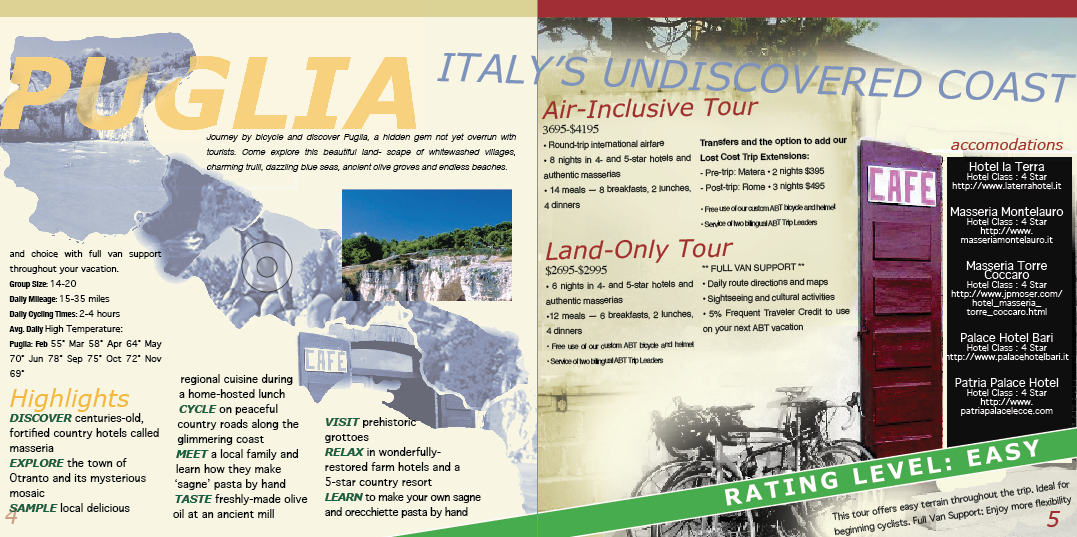
    It was interesting designing this. I ended up doing a lot of the layout in the last week (after Jason taught us everything there is to know) and it went fairly smoothly. Character styles and paragraph styles aren’t the torture devices I thought them to be. They make things go a lot faster and keep everything consistent and organized. (Character styles and paragraph styles is a feature in InDesign where you can store settings for fonts and use them again in the same size and leading etc.)

    Designing a whole book is tricky. Consistency and variation is not easy to achieve. I made a little photo collage map for each region and designed that page around the map.  For the opposing side, I laid out the text then added photographs to fill some gaps and reinforce some groupings,  conscious of keeping the text legible. Long wordy documents like this, I find it easier to tackle after reading it a few times and seeing things that can be put onto snipes, headlines and call outs to give the piece texture and readability.
    (Earlier Post Relating to This Project)

    sharing options:

    • Share
    • Share on Tumblr (Opens in new window) Tumblr
    • Print (Opens in new window) Print
    • Share on LinkedIn (Opens in new window) LinkedIn
    • Share on X (Opens in new window) X
    • Share on Reddit (Opens in new window) Reddit
    • Share on Pinterest (Opens in new window) Pinterest
    • Share on Facebook (Opens in new window) Facebook
    • Email a link to a friend (Opens in new window) Email
    Like Loading…
  • Motor Oil Label (Continued)

    June 8, 2012

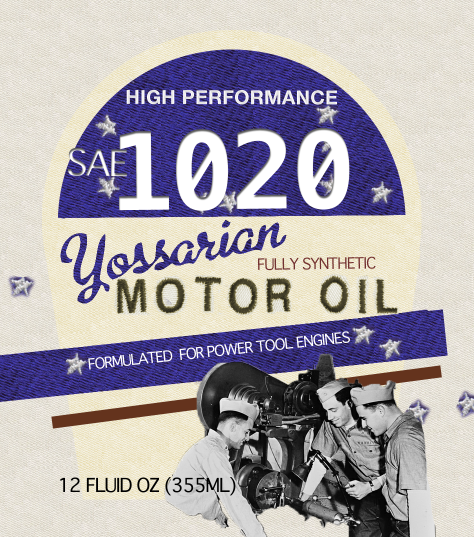
    I lost the original file for this somewhere in my computers. Probably because I haven’t invested in a home for all of my things, I always assume that if my home computer doesn’t have something, my school computer does and that’s not always the case. But, it is a good exercise to redo projects because it’s never the same twice. All the happy accidents and re-considerations make a better product. I addressed the issue of prominence. For practical products, it’s important to have the type, the part that consumers look for, nice and big so that when they are looking, quietly whispering to themselves the numbers of the specific requirements, they’ll see this label and Bam! A purchase is made. This motor oil is especially formulated for hipsters longing for a past where the red, white and blue where symbols of can-do attitude and hard work.

    (Earlier Post Relating to This Project)

    sharing options:

    • Share
    • Share on Tumblr (Opens in new window) Tumblr
    • Print (Opens in new window) Print
    • Share on LinkedIn (Opens in new window) LinkedIn
    • Share on X (Opens in new window) X
    • Share on Reddit (Opens in new window) Reddit
    • Share on Pinterest (Opens in new window) Pinterest
    • Share on Facebook (Opens in new window) Facebook
    • Email a link to a friend (Opens in new window) Email
    Like Loading…
  • Summer and Evening Campaign

    June 8, 2012

    Atk presentation alexs.tedg.katc

    View more presentations from basementcat
    Today my team presented this campaign we’ve been working on for the past month. We got good feedback saying that the idea is good and the interaction between our buttons and tee shirt is cute. It was exhausting trying to match the styles across mediums. In the future, paragraph styles (a magic widget that alters paragraphs to have consistency in font styles) will be a portable device that you can point at any screen, but for now, it requires a lot of talking back and forth with your teammates and double checking which versions need correcting.
    (Earlier Post Relating to This Project)

    sharing options:

    • Share
    • Share on Tumblr (Opens in new window) Tumblr
    • Print (Opens in new window) Print
    • Share on LinkedIn (Opens in new window) LinkedIn
    • Share on X (Opens in new window) X
    • Share on Reddit (Opens in new window) Reddit
    • Share on Pinterest (Opens in new window) Pinterest
    • Share on Facebook (Opens in new window) Facebook
    • Email a link to a friend (Opens in new window) Email
    Like Loading…
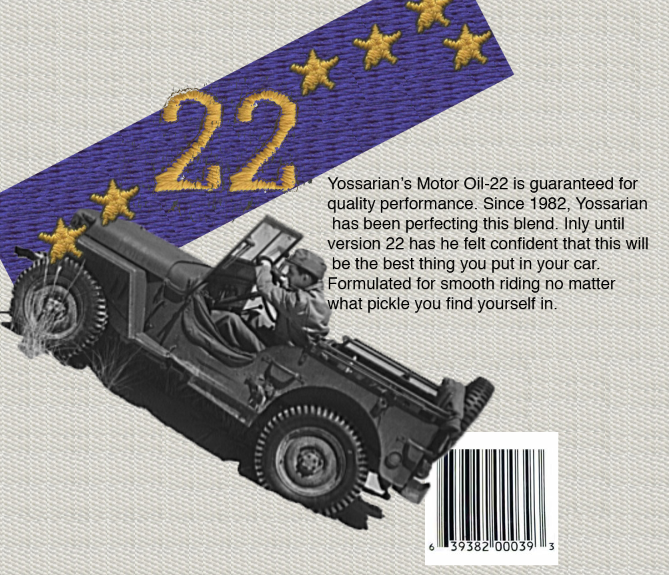
  • Back of Motor Oil Label

    June 6, 2012

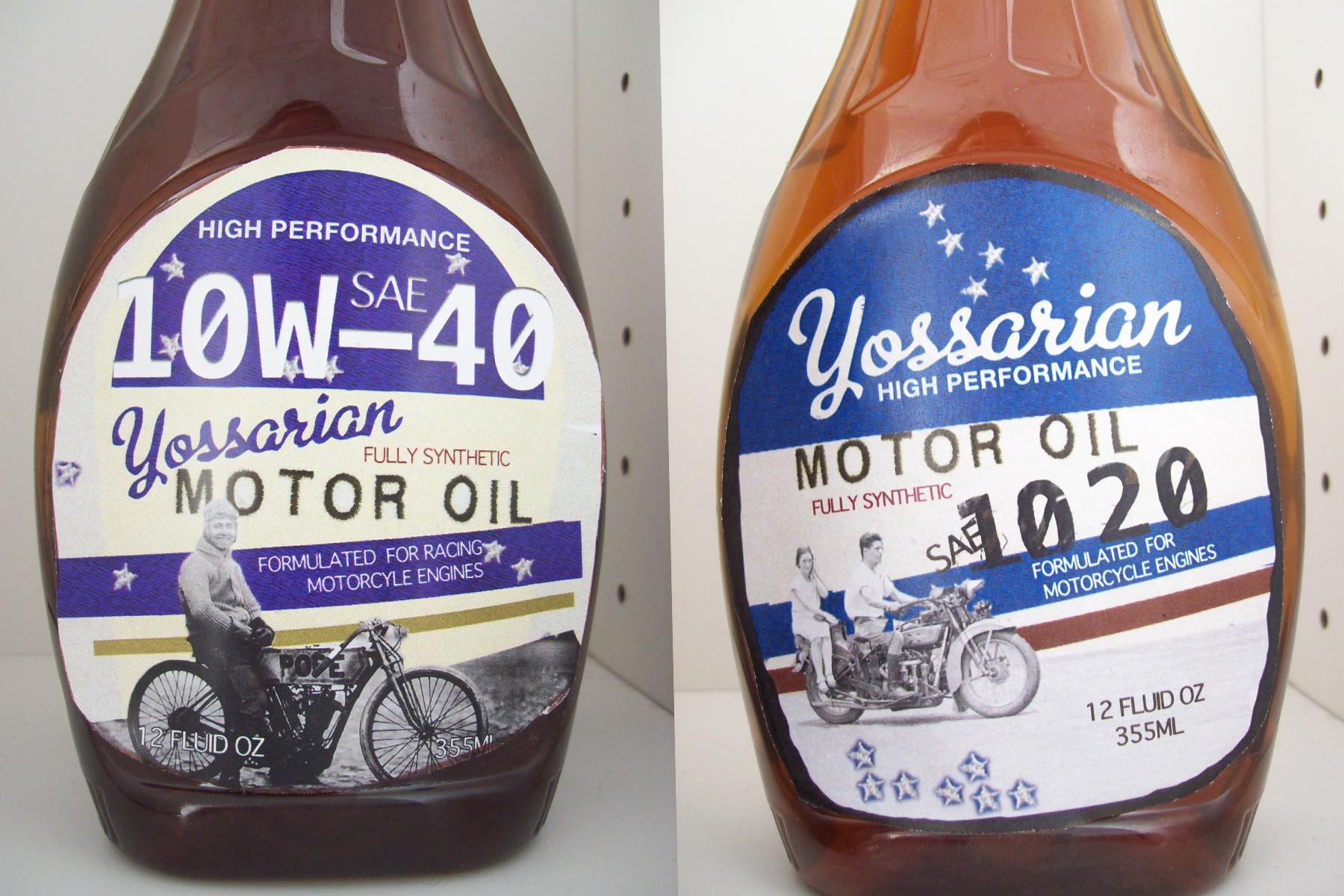
    Today we had another critique for the labels. I’m farther away from success than I thought. I am too much of a romantic to promote motor oil. This was one of the few products where Tom said that it was silly to put a little heart-warming bio on the back. He said that products like these had pragmatic users that wanted to know about the actual differences in the way the product can benefit their lives  and not just make them feel good about themselves. That’s why I now have to come up with labels that say actual oil type information. I envy my classmates that had fun coming up with different flavors that impressed the class. Memorable ones were men’s deodorant flavors Azure Ice and Midnight Party.

    To get my laughs in anyways, I put the labels on a maple syrup bottle. A student pointed out it was a twist because for years now, when they do pancake commercials, it was a trick to use motor oil.

    (Earlier Post Relating to This Project)

    sharing options:

    • Share
    • Share on Tumblr (Opens in new window) Tumblr
    • Print (Opens in new window) Print
    • Share on LinkedIn (Opens in new window) LinkedIn
    • Share on X (Opens in new window) X
    • Share on Reddit (Opens in new window) Reddit
    • Share on Pinterest (Opens in new window) Pinterest
    • Share on Facebook (Opens in new window) Facebook
    • Email a link to a friend (Opens in new window) Email
    Like Loading…
  • SAM app

    June 6, 2012

    Kat.countiss skins2

    View more PowerPoint from basementcat
    (Above: Presentation of screens. Flip through to see the task flow.)

    Post Critique: The theme I could extract from today’s critique was “hierarchy.” Despite my best efforts, it isn’t enough to show people where to click by color alone. All the buttons on this home page are the same size and the art next to them is very busy and obscures the buttons’ importance. One of the biggest faults about designing on a computer is that the sense of scale is warped because small things can always be bigger using the zoom tools. So, I made some huge buttons, not keeping in mind what “actual size” is. So when I go and edit this screen, I have a task list. 1) scale back nav. Buttons. 2) scale back art banner.

    Compliment break: I try to remember all the nice things that people say about my work as well. Tim complimented my use of type. It showed good hierarchy. He accused me of grabbing it from the site (Big complement. Designers for an art website have to work a bazillion times harder because their audience worships art and aesthetic.) When rebranding stuff, what I try to do is start from the beginning. Take all the type that you are working with and transfer them into a new word document, completely undistracted by neighboring images and type. Look at the information you want to present. It helps to have a font that can go Bold, Oblique, etc. to further convey hierarchy. Then color and grey is often helpful. Parse up the information, categorize. It’s exhausting to do it initially because what you’re really doing is building a genre system. Headings should be x, subheads y, dates, j, etc.

    Back to the critique, next screen: The “plan your visit” suffers from ungrid-itus. This common disorder starts when you align ungrouped things. It can lead to serious design illness and it’s best to set your guides early and often. Also considering where you are letting things live. I designed around the “find your visit” button that lead to the onset of ungrid-itus. What I should have done was find a better place to nest that in. Also, the search results column could be more obvious, with headers that say what search factors went into this narrowed result. 3) make “plan art” and “find art” buttons at top left not look like buttons. 4) expand search column 5) label it better 6) add calendar feature button

    Event Profile: How can I include more variety of content? I also did another faux pas here that comes with designing around a task flow. My end goal was a downloadable pdf, and here the button is huge and spans the bottom. Evidence of an app reading a user’s mind? Yup. Task list continued: 7) Invent telepathic widget.


    (Earlier Post Relating to This Project)

    sharing options:

    • Share
    • Share on Tumblr (Opens in new window) Tumblr
    • Print (Opens in new window) Print
    • Share on LinkedIn (Opens in new window) LinkedIn
    • Share on X (Opens in new window) X
    • Share on Reddit (Opens in new window) Reddit
    • Share on Pinterest (Opens in new window) Pinterest
    • Share on Facebook (Opens in new window) Facebook
    • Email a link to a friend (Opens in new window) Email
    Like Loading…
  • Yossarian’s Motor Oil

    June 4, 2012
    comparison of old Yossarian's Motor Oil Design and the new one
    comparison of old Yossarian’s Motor Oil Design and the new one

    (Left: Before Critique, Right: After Critique)

    Tom said I had too many approaches going on here. And furthermore, my brand is called “Yossarian’s”—a very complicated name and even more unreadable when done in a thick font and treated as if there was a shadow coming up from down and under (note the dark lettering on a lighter shadow). So, I went back and found a sportier font to match the sentiment of the mechanic’s name tag that was implied by the embroidery. I got a lot of comments on the embroidery. It takes a patch found at a thrift store and a high quality scanner to a make it look like I had a customer patch label. And don’t forget the few hours in Photoshop.

    sharing options:

    • Share
    • Share on Tumblr (Opens in new window) Tumblr
    • Print (Opens in new window) Print
    • Share on LinkedIn (Opens in new window) LinkedIn
    • Share on X (Opens in new window) X
    • Share on Reddit (Opens in new window) Reddit
    • Share on Pinterest (Opens in new window) Pinterest
    • Share on Facebook (Opens in new window) Facebook
    • Email a link to a friend (Opens in new window) Email
    Like Loading…
  • The Three Versions

    June 4, 2012

    Jason had us design three versions of this gum pad. Each student had to come up with our own headline, but photography, copy and logo provided. First, we thumb nailed many formal versions and many chaotic versions. And then executing the best of both worlds into to respective designs, take the parts that work from each and combine to create a third composition. He wanted us to break everything from how we usually understood it and it generated approaches we wouldn’t have initially thought up. This is a very simple and effective way to make something fresh and fun. (Above: (Left) Final (middle) chaotic (right) formal)

    sharing options:

    • Share
    • Share on Tumblr (Opens in new window) Tumblr
    • Print (Opens in new window) Print
    • Share on LinkedIn (Opens in new window) LinkedIn
    • Share on X (Opens in new window) X
    • Share on Reddit (Opens in new window) Reddit
    • Share on Pinterest (Opens in new window) Pinterest
    • Share on Facebook (Opens in new window) Facebook
    • Email a link to a friend (Opens in new window) Email
    Like Loading…
  • Buttons

    June 3, 2012

    (Above: Pete’s shirt button– I think one day I’m going to make an interface where this is a button you must press. Where it goes, I cannot yet say.)

    Tim showed the class how to do stuff in Photoshop to make our interfaces more professional, but truly this stuff comes with years of practice and exploration.

    Using Photoshop: How to make a depressed icon

    Step one: bring in vector icon from illustrator.

    Step two: make white.

    Step three: outer glow, make a dark one.

    Step four: set glow to normal or multiply.

    Step five inner shadow

    Step six one-two pixels.

    How to make a button bar:

    Create vector bar at the bottom of canvas.

    2. Create subtle gradient (not black to white but black to grey.)

    3. Use line tool- dark line then duplicate it and shift over a pixel to create an indent

    4. Make one of the lines white and then change the opacity to 60%

    5. Group layers so you can move and duplicate them with ease!

    6. Use alignment tools to get organized!

    How to Depress

    Now that you have your button, what’ a depressed button look like?

    1. Rounded rectangle (6 pixel radius)

    And make sure snap to pixels is on to prevent anti-aliasing. (Don’t let your vector straddle pixels that=blurry)

    2. Apply reverse gradient.

    3. If desired add a really strong and crisp highlight (sharper divisions mean shiner button

    4. Add 1 pixel stroke inside box—dark but not black

    5. Inner shadow.

    The key to all this stuff is subtlety. They probably used Photoshop to design Photoshop. Be your own pixel surgeon. Zoom in on a screen grab and see what the pixels are doing. You can make any effect that you can see.

    sharing options:

    • Share
    • Share on Tumblr (Opens in new window) Tumblr
    • Print (Opens in new window) Print
    • Share on LinkedIn (Opens in new window) LinkedIn
    • Share on X (Opens in new window) X
    • Share on Reddit (Opens in new window) Reddit
    • Share on Pinterest (Opens in new window) Pinterest
    • Share on Facebook (Opens in new window) Facebook
    • Email a link to a friend (Opens in new window) Email
    Like Loading…
Previous Page Next Page

Blog at WordPress.com.


Loading Comments...
 

    • Subscribe Subscribed
      • Kismet Arts Tangent
      • Join 104 other subscribers
      • Already have a WordPress.com account? Log in now.
      • Kismet Arts Tangent
      • Subscribe Subscribed
      • Sign up
      • Log in
      • Report this content
      • View site in Reader
      • Manage subscriptions
      • Collapse this bar
    %d