• Note to self: New file naming system in place for the 5th floor– “first name last name_graduation year_abbreviated assignment name”
    (e.g., katarinacountiss_2013_assign.tiff).

    Today is the first day of Self-Directed Project Day. It’s not completely self-directed. Marc Salverda, our jokey yet stern leader, is going to be with the class every Wednesday as a resource, an idea bouncer-offer, a critic and encouraging ear. He’s also going to lead creative exercises  He talked about how this quarter is a way to supplement our learning with things that aren’t in the curriculum like screenprinting and AfterEffects. We could spend the whole quarter watching tutorials if we wanted. (He recommended lynda.com)

    Exercise 1: What is Success?

    The first exercise is a definitions rally. In groups of four, we brainstormed for an hour on the definitions of the words: Success, Failure, Effort, Challenge. After an hour we collectively approved and appended our definitions.

    With excellent brainstorming efforts from my pod, what ended up written for each was something like this (I edited it as I typed it because I was a little rushed during class, so no, it wasn’t quite this elegant in class):

    Success: practical and innovative efforts resulting in appreciated and tangible results

    Failure: The event at which, through the squandering of resources (e.g. time) a problem was not solved. (Marc didn’t think this was a complete definition. So we appropriately failed at grasping this concept.)

    Effort: a force with coordination of energy and knowledge working against something

    Challenge: A commitment of discomfort that through using skills promises results to gain through focused efforts despite opposing forces such as working with other, or a time constraint.

    The exercise also asked the question: Can Failure be Successful  I say no as a linguist, but yes as a motivational speaker.
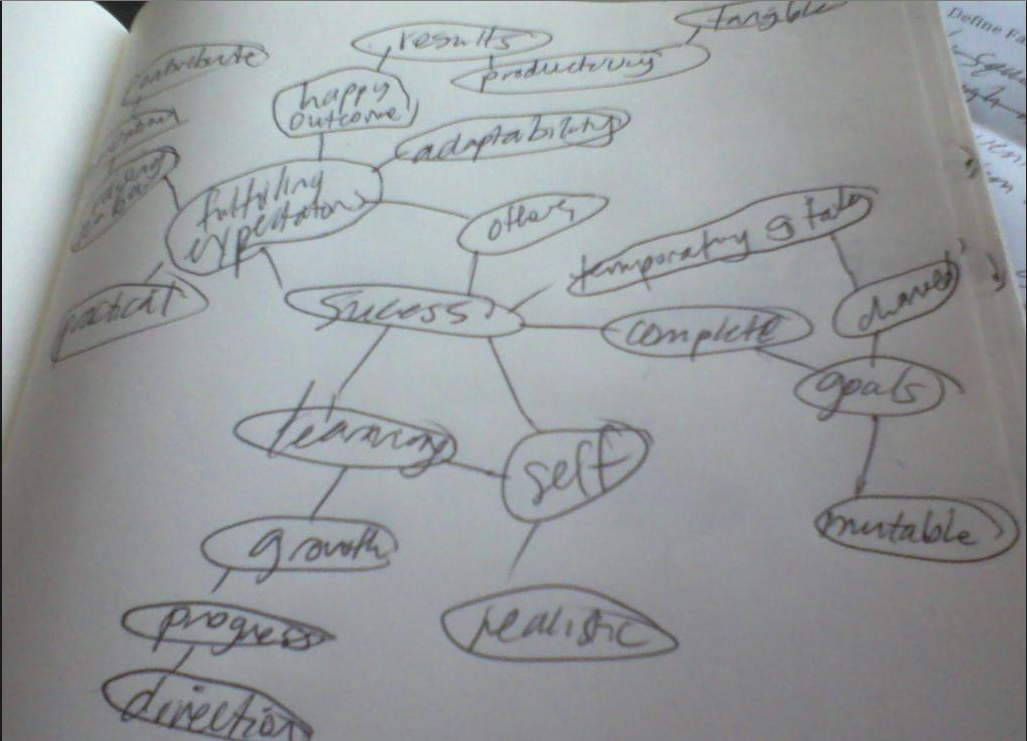
    Success word map
    Success word map

    Exercise 2: Questionnaire for Special Topics Design Project (I think I am just going to look at these questions for now.)

    Question #1

    What do you consider to be your design strengths? Please be specific.

    Question #2

    What do you consider to be your design weaknesses? Please be specific.

    Question #3

    Describe your most successful graphic design project you have done, this can be either a class assignment or an outside project. Including your thoughts on what made the project successful.

    Question #4

    In a short but thorough explanation, please brainstorm a list of any and all ideas you currently have interest in investigating for your project.

    Question #5

    Do you intend for the content of this project to be personally or professionally motivated? Please be specific.

    Question #6

    What techniques, materials and media do you anticipate experimenting with while developing your project?

    Question #7

    What will your final deliverables be?

    Question #8

    Are your intentions for this project to be a self-contained piece (meaning that it will begin and end with the quarter), or do you view this project a starting point to create a larger body of work? Please be specific.

    Question #9

    How many hours per week will you be able to realistically dedicate to this project, not including class time?

    Question #10

    How will you determine the success or failure of this project?

    Question #11

    What are the biggest things you have to both lose and gain from doing this project? Please be specific.

    Question #12

    What would be your dream job and why? Please be specific.

    Question #13

    What would be your dream company?

    Exercise 3: The Next 10 years (due next week, blog post with process to come)

    Assignment description:

    Substrate– On an 11” by 17” (portrait or landscape) paper (collage and other media accepted) mounted on a black board with a 1.5” border

    Theme– reflect The Next 10 Years of your life. It’s a companion piece to the exercise Create a Map of Your Journey to Seattle Central that the class did last year.
  • Katsite Project 1

    Assignment description: “You will need to to do a website audit and analysis, determine what needs improvement, and come up with a comprehensive design solution for desktop computers and smart phones . Requirements: Needs to work in IE8 and above, all modern browsers, and iPhones and Android phones. File size needs to be under 200k for the desktop and under 50k for the mobile version. Additional requirements: Code must be w3c valid html5; needs to incorporate  Google web fonts. There will be no initial design “comp”, you will be designing directly in the browser.”

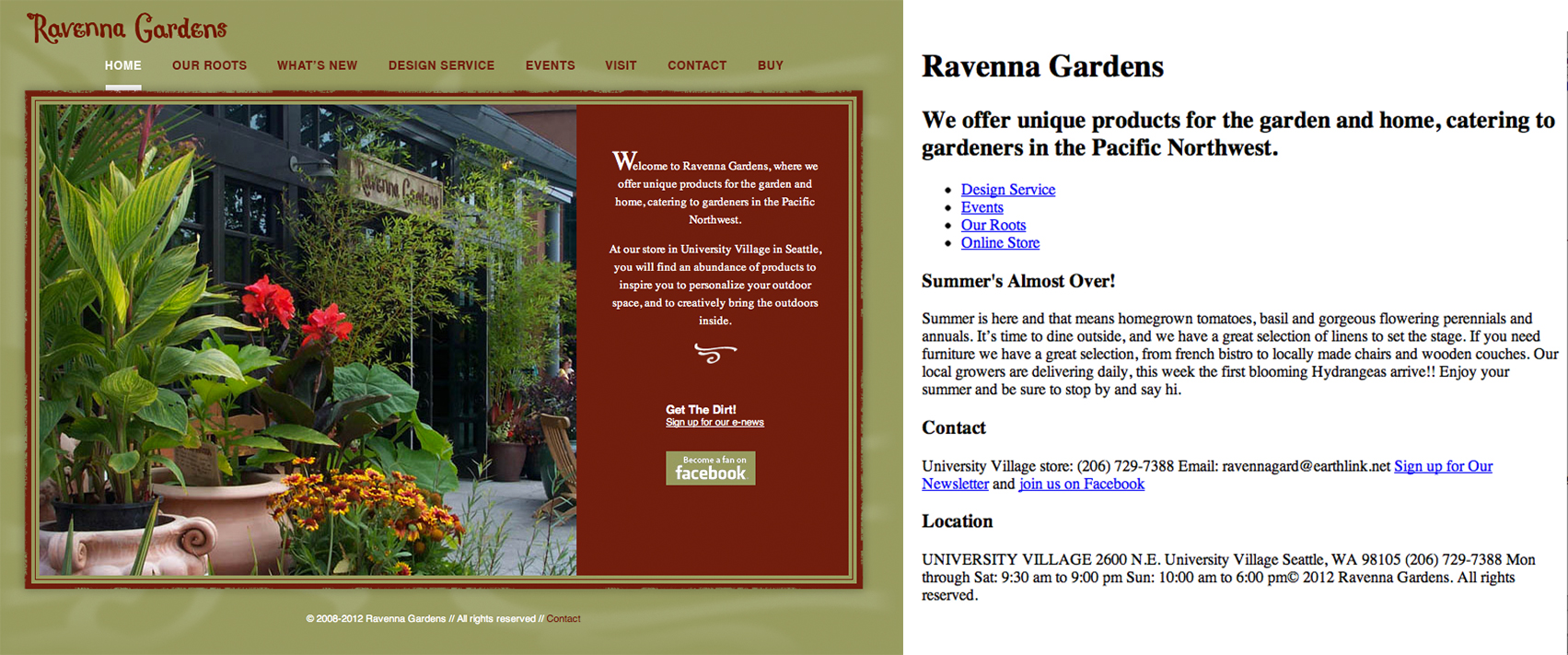
    Employing skills as a designer, information architect and front-end developer, my first assignment is a redesign of Ravenna Gardens. Its online information is few and I think that I can put a lot of it on the home page and eliminate 3 of its 8 navigation bar elements. (I also think that its users are smart enough to click on the logo instead of clicking a “home” button.)

    As part of the process style we’ll be using in this class (agile development) Phase 1 is also the stage where the designer works on the wire-framing and style tiles (I will be working on this in the following days.)

    Phase 1

    • restructure information with user-centered considerations (e.g. if the user is using their mobile device to find the store or look up the store’s hours, I don’t want them to look any further than the homepage.)
    • create style tile this is a great way to contain the brand’s essence (colors, fonts, logos) but feel free to explore different layouts
    • wire-framing explore more efficient (and mobile friendly) layouts
    • understand mobile strategy this is important to know what your client wants/willing to pay for. More site options will cost more money. (e.g. this “client” Ravenna Gardens just wants two options: mobile and desktop)
    screen shot of old web site and modified html
    Step one: restructure information by changing the html.


  • bookmarklet apps for browser toolbarSchool is back in session which means a lot of resetting up shop. Each time I arrive at a new workspace, I should have a “home” day, where I change the preferences on everything so it feels like home.

    Here’s a quick list of what to trick out your browser with if you’re going to be into Web Design/Developing. (Firstly use Chrome. All the cool kids do.)

    1. Web Dev toolbar
    2. What Font
    3. YSlow
    4. Code Cola
    5. Tools – Delicious.(you need to make an account)
    6. Chrome Web Store – Pinterest Keyboard Shortcut | Ctrl+Alt+P.
    7. Chrome Web Store – Chrome Time Track.
    8. Chrome Web Store – Session Buddy.

    Katsite. This is my school account for my web design endeavors. Here I will be putting the quarter’s projects. (As you can see, we’ll be having three projects.) With naming everything, it’s not about being creative. It’s about being consistent.

    I was thinking “what’s missing?” as I was eating lunch. I realized I didn’t have a book to read. So, here’s a good list I’ll start from. It’s a great looking interaction design list. I think that’s a thing I want to focus on because I really love things when they work. It really gets me when I encounter a website or some product that does exactly a nice thing. On my vacation to Michigan, I went on a boat tour. The boat driver wore a a tee shirt with the map of the islands he was touring. Considering I was staring at his back half the time anyway, someone thought to make that time more useful by adding this useful map. Stuff like that, really thoughtful.

    During Erik Fadiman’s first session of his Fall 2012 “Intractive Design IV” (I’m not sure if there’s a typo on his online syllabus or if the course is a very profound introspection) he covered the differences between agile development and waterfall methodology. He told the class about how content comes first and that’s why html is the boss.”No one comes to your website because it looks amazing.” He also gave an updated presentation of the things he talked about in Web Design Bootcamp. I don’t think anything was left out, so I will just link to those notes and that will be that. People Structure and Design Structure. Questions that you want to ask your client when going into the discovery meeting, or the set-up or whatever stage you’re at. “What is your content strategy?” and “What is your mobile strategy?”

    It’s our goals as good designers to deal with the changes in information technology and center our designs around the user. It’s a great consideration to (as Fadiman says) “future-proof” our sites because there are so many different devices out on the market and we need to be delivering excellent experiences on all of them. Yay, Responsive Web Design.

  • Today is the first day of the school year at Seattle Central Creative Academy. I wanted to take this moment to give a “shout-out” (type-out?) to my classmates that approached me saying how they kept up with my blog over the summer. Awkward, but wonderful moments in a blogger’s life. (Awk-wonderful?)

    Note to self: Review– Fonts. Font Combinations. (Check this link out.)

    Jill’s website/syllabus for this class. It is the first day of the first class, Long Documents. This quarter we’ll be designing a book and magazine. Jill explained the evolving world of “books,” if you can even call them that anymore. The difference between e-books and epub is the difference that an electronic book simply refers to the digital reincarnation of the book whereas epub is a format. It is a zipped set of elements that contain among other things, html. Jill said that she considered it as a mini-website. Due to the nature of the industry and time constraints, we will not be making physical books as in past years in the program.

    One column/manuscript grid

    I wish we had a few minutes before diving into today’s tutorial to reacquaint with the new InDesign (CS6!). I wanted to set up my preferences as per Jason Hoppe’s advice from the InDesign class last school year.


    Here’s a visual of the process to starting designing a book in InDesign. Setting up the document size of 8” x 5.375”. If books were the human race, Eve is the Manuscript Grid. Book designers of old utilized the golden-ratio to create their manuscript page with heavenly gutters. (The height of the text box matches the width of the page. How cool!) As a rule, book design stems from this proportions. This is a guide to make a guide. From this guide, you can deviate from it slightly to get a more modern variant. This is a good way to get started on book design. Sometimes, it’s intimidating to create because you start with a blank page. After using this process, creating some masterpages with page numbers (folios), running headers, and margins, it’s no longer a blank page but an excellent start to a beautiful book.

    how to make a manuscript grid guideline in InDesign

  • Today is the 4th. September 7th is my last day at the Internship. My supervisor asked me to make a list of my tasks I have performed as their intern. I have listed them below.

    This has been a fruitful experience for me. Other than being in an air conditioned office through the hotter months of the year, this position has given me many interesting work experiences. One of my favorite aspects is working with a project manager. He has been very clear about expectations and deadlines. He’s been in a good mood and very communicative, answering my concerns and questions in a timely manner through email.

    In a lot of ways, Interning is easier than being in school because I don’t have to go through the process of inventing my product or brand that I am designing. Having real clients allows me to focus my creativity on the design aspects and being able to create a system using existing elements.

    However, a plus to school is unlike the real world, none of your stuff ends up being used for anything outside the school. Whereas, in my experience, there is a weird sense of accomplishment after creating something with the assumption that I’ve just created a piece of an existing, living brand, but then later the client decides not to use it and then I have to deflate my ego.

    Working at a company with a small staff and a slow intake of work during summer allowed me to pursue my side projects with more dedication than I ever have before. As well as exploring “discovery” engines (used by people who want to find content on the internet, but don’t know exactly what), I had more time to devote to my Web Design Bootcamp assignments, as well as continue practicing my coding with the design of Mike’s Tutoring Website.

    In many ways, I wish I could have directed this energy towards the company I was interning for. I gathered that a down side to being an intern is that they hired me with the knowledge that I would be leaving after a short while and that to integrate my skills into any long term project would not be advisable. They said that one of the reasons that they hired me was that I had a good deal of experience with WordPress. But, since I got here, I haven’t received one assignment that used WordPress. Unlike their previous intern, who didn’t know any WordPress and it seems like that’s the assignments she got. It was a simple luck of the draw. Timing of workflow.

    Advice I would give to the next intern at this company and interns in general: Find ways to learn. Come to work with projects in mind, to-do lists and organizational tools. I certainly had slow days, but I’ve always had some book to read or some idea floating in my head on what I could do with my resources at hand. They give you a computer, make computer-ade.

    Internship tasks

    Logo

    brainstorming, research, sketching, font choices, presenting logo versions to Terry, several rounds of refining designs, color options

    Stationery Update Pitch—created 3 versions of new layout for business card, envelope and letterhead

    layout, creating a brand system using existing logo, presenting versions to Matt, refining design, a second presentation to Matt

    Business Card information update

    Used InDesign to create a template of business card, created 10 business cards with unique information

    Map for Brochure

    Used existing map as a guide to create a vector file of street map of a part of downtown Seattle

    Building Artwork

    Using photograph (lo-res) provided, created a 300 dpi image using Photoshop filters and adjustments to match original artwork

    Test Print

    Looking at the printed comp of the brochure and adjusting colors and filters to better match original, created a document with three different versions of building to see which one prints closest to original

    Organization of Receipts

    Attached receipts to corresponding invoices

    Social Media Research (PowerPoint Presentation)

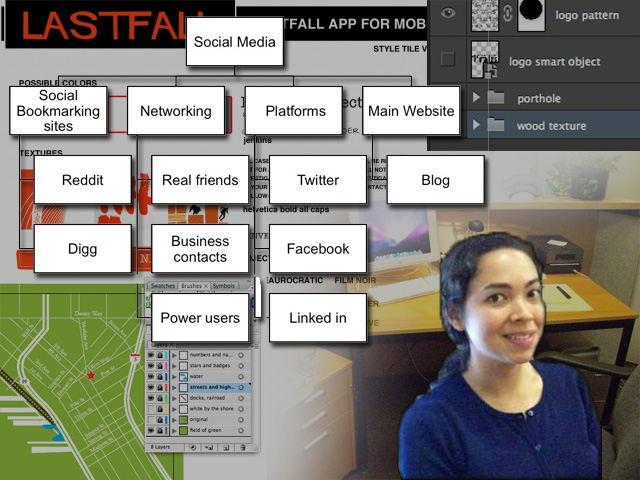
    Research of Social Media, including Facebook pages, Twitter and LinkedIn, created a PowerPoint document with diagrams (Ultimately redundant information with Matt and Kevin’s current working knowledge.) This lead to the consolidation of my knowledge into a small “e-book.”

    Facebook Pages Research (Screenshots and links)

    Research of specifically Facebook pages, gathering screenshots of advertising peers in Seattle, finding internet articles reporting on creative uses of Facebook pages.

    Training Completion Certificate Design

    Design research, layout, created an InDesign document with 4 versions, designed with Style Guide considerations, refined designs with Matt’s suggestions

    Interior Design Suggestions for improving the Character of the Atrium in the form of Mood Boards

    Color palate, picking styles of chairs, art direction, materials, 2 versions

    Modified Image of Light Fixture

    Rotated image and created new shadows for object using Photoshop

    Post sticker

    Created a vector version of a faded antique decal using Illustrator

    Report on Visit to Square Tomato

    Attended a book talk at a local advertising agency, wrote a report of the information shared there regarding the affect of social media on internet advertising business models and possible solutions

    Phone Answering

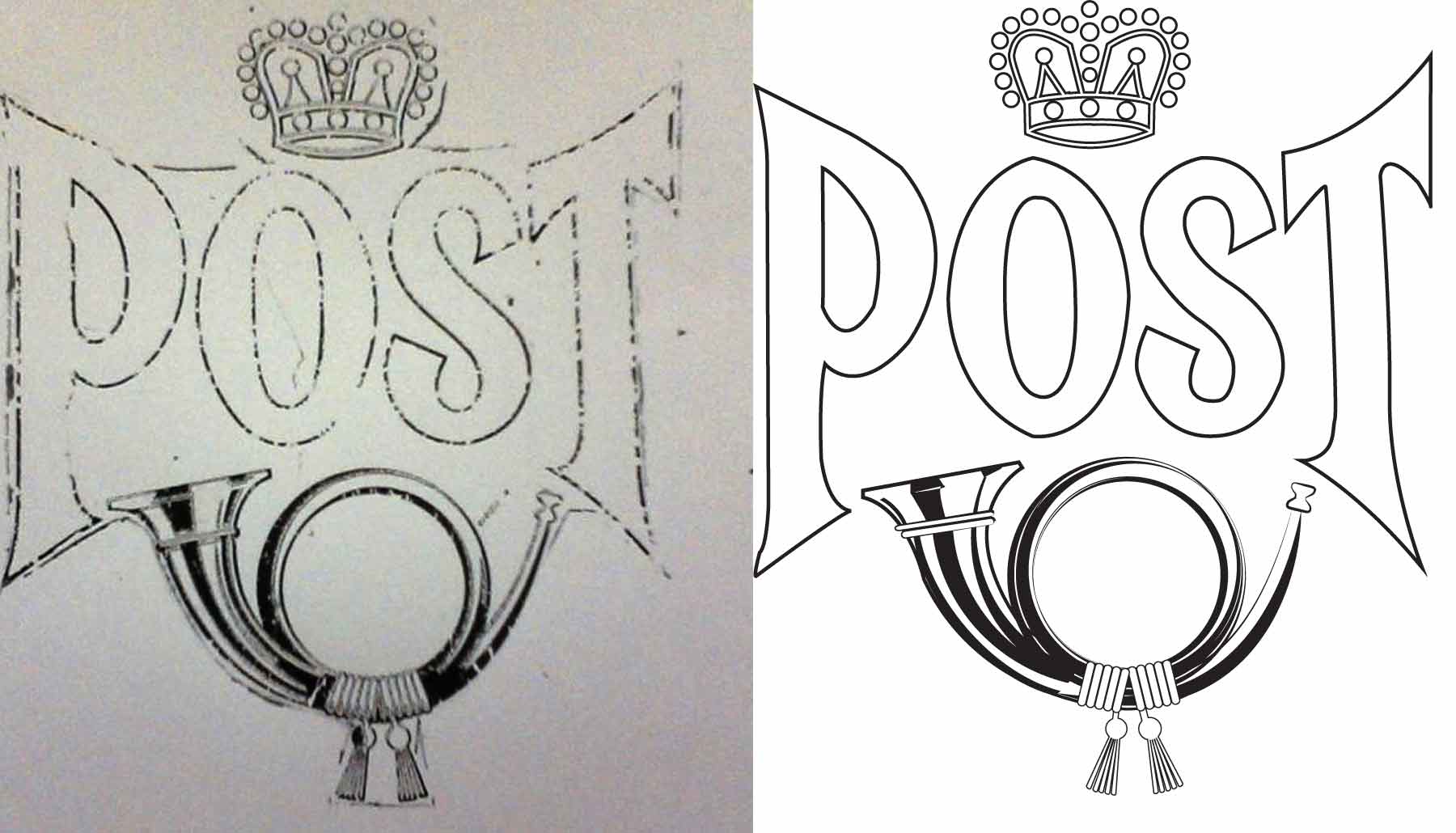
  • mailbox post sticker restoration An internship assignment: Recreate an antique mailbox decal.

    This was a fun assignment. I had a flashback to first quarter where the assignment was to make a picture using shapes and the pathfinder tool. I pen-tooled a few things in this design, but I was surprised at how effective it was to make the shine on the bugle using an uneven stroke on an oval, expanding the appearance and then erasing the part I didn’t need.


  • the process of illustrating a boat
    the process of illustrating a boat

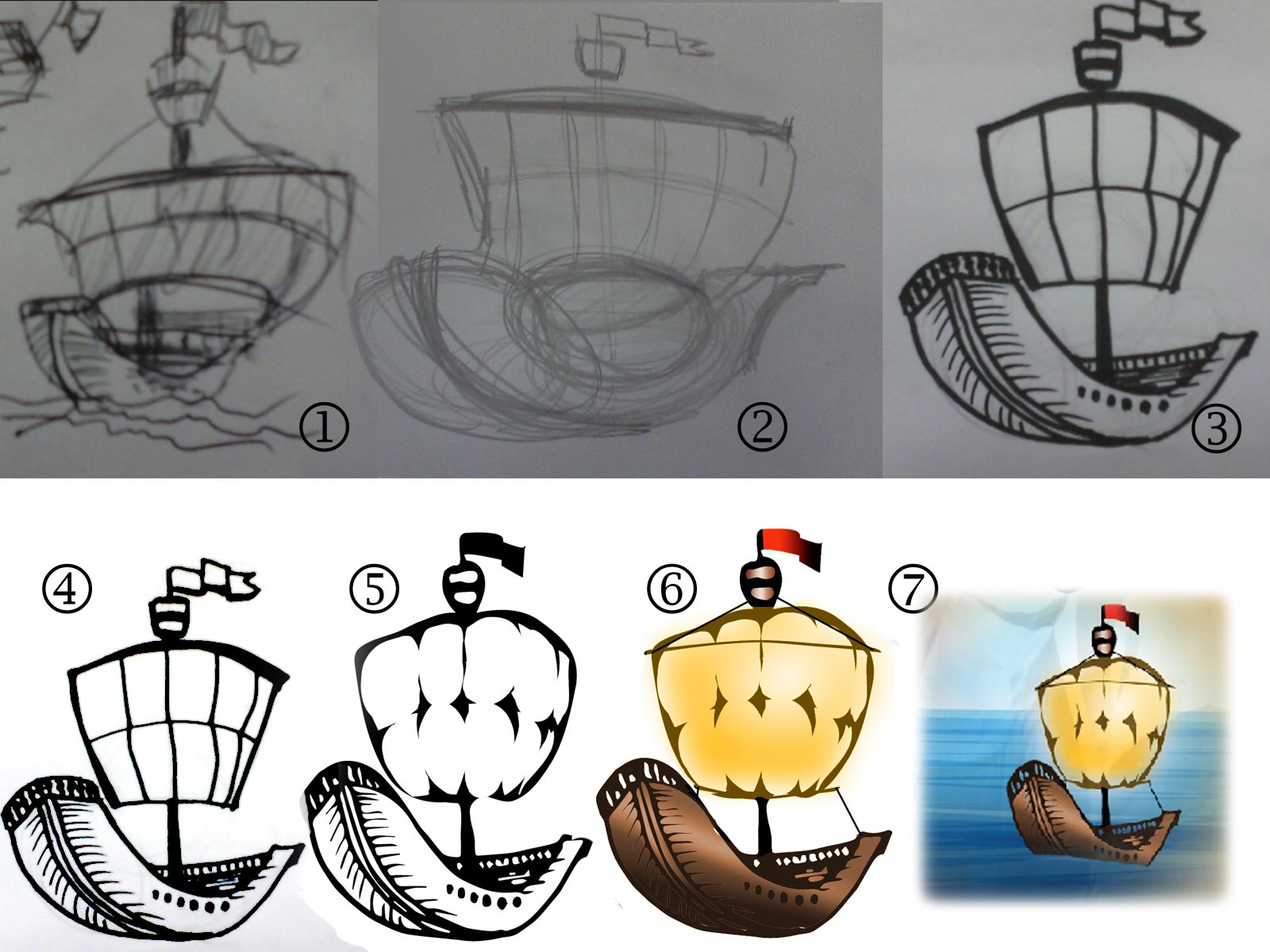
    Today, I illustrated a boat. I was going for a cartoony look, but my style doesn’t lend itself to exaggerated proportions, varying outline and flat color, so I turned to software for help.

    1) I sketched a boat in an angle I thought was dynamic. I used a ball point pen.
    2) I sketched the boat from the sketch using a pencil and broke it down into shapes and exaggerated those shapes.
    3) I sketched the boat again using pencil, modifying the proportions, and then outlined the boat with a Sharpie.
    4) I used Photoshop (Levels) to clean up the sketch, so that it is a black and white outline.
    5) I did what most Designers and Illustrators say not to do, I used the live-trace/image trace feature. Then distorted what I had.
    6) I used gradients, clipping masks, and hue/saturation masks to color the outline and the fill separately.
    7) I put the boat against a background.

    And there you have it. Now go be the cartoonist Adobe knows you to be.

  • still of yoks animation
    still of yoks animation

    Mr.Yoks Project. I made this animation without using a story board. I had the inspiration of Photoshop shortcuts and I let them take me as long as I felt I could go. It was really interesting. Because the frame-by-frame animation is so slow, it gave me a lot of time to think of the next thing. I think that’s why cartoons are so zany. Because it takes so much time, you literally go crazy. If I were to do this more often, I would by one of those Hand Tally Counters because I kept losing track of the frame I was on.

    I saw this set of jokey book covers like “If You Give a Browser a Cookie” (a parody of “If You Give a Mouse a Cookie”) and I thought to myself, where are the children’s stories that reflect the times. They don’t have to be parodies. I’ve seen youtube videos of toddlers playing with iPads (and even, the funnier, toddlers trying to engage magazines in the same way). Let’s give them virtual crayons. Is there a photoshop for children? What wonders their minds would wrought! Or is it too soon? Is there a fundamental stage where children need to be creating with their own hands and minds before technological intervention?


    (Earlier Post Relating to This Project)